Wizstar

Wizstar - AI video creation platform powered by Seedance multi-model technology

Launched today

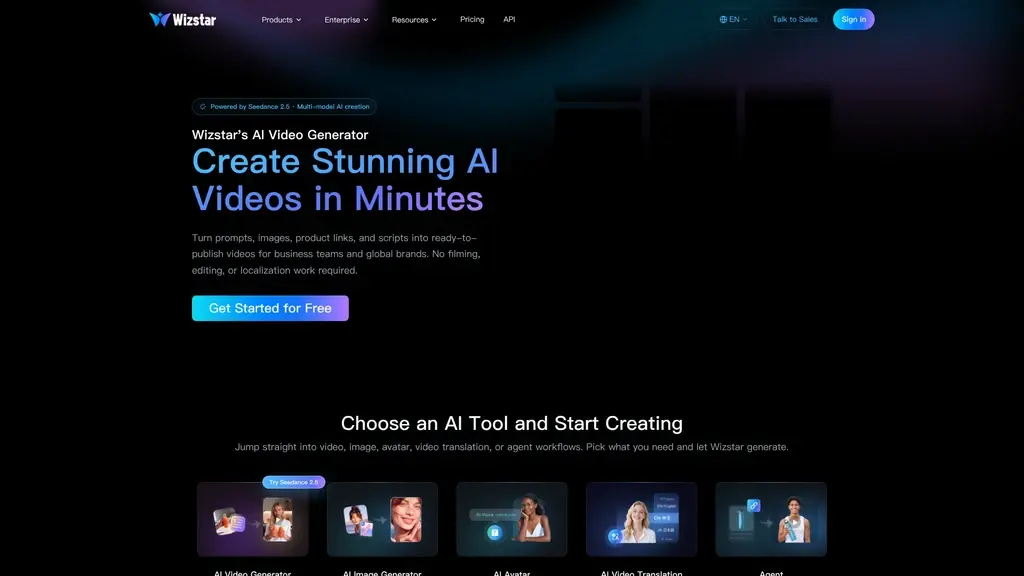
Creating polished videos used to require a studio, crew, and hours of editing. Wizstar turns prompts, images, product links, and scripts into ready-to-publish videos automatically. Powered by Seedance 2.5 and multi-model AI, it handles scripting, visuals, captions, lip sync, and localization for you. Built for creators, e-commerce sellers, and marketing teams who need video faster.
0ViewsAI VideoFreemiumAI Agent FrameworkE-commerceContent CreationVideo GenerationMulti-language

What is Wizstar

Let's be honest: traditional video creation is a heavy lift. You need a studio, a crew, cameras, lighting, actors, and then hours—sometimes days—of editing before anything is ready to publish. For most businesses, that's a bottleneck. By the time a video finally goes live, the campaign window has often already closed.

That's exactly the problem Wizstar was built to solve. Wizstar is an AI video creation platform powered by Seedance 2.5 with multi-model AI creation, designed to turn your ideas into ready-to-publish videos in minutes—no filming, no editing, and no localization headaches.

The core promise is simple: you bring the concept, Wizstar handles the execution. You can start from a text prompt, an image, a product photo, a product link, a script, audio, or even a reference video. The platform takes your input and generates visuals, adds captions, syncs lips, translates content, and assembles everything into a finished video you can publish immediately.

Here's what makes Wizstar genuinely useful across teams and industries:

  • AI-generated videos from prompts or images

  • Product videos that make e-commerce listings come alive

  • Product images for stores, ads, and marketplace listings

  • Lip sync videos where any photo or video speaks naturally

  • Translated videos for global audiences

  • Avatar-based videos for training, marketing, and social content

  • Short-form marketing content built for TikTok, Reels, and Shorts

Wizstar is designed for a wide range of users: creators looking to scale content, e-commerce sellers who need product videos fast, marketers juggling multiple campaigns, and educators who want to produce training material without a production budget. If you need high-quality video faster than your current workflow allows, this platform is worth your attention.

TL;DR
  • End-to-end AI video creation — describe an idea once, get a ready-to-publish video with script, scenes, voiceover, captions, and edits planned for you

  • Multi-model AI support — powered by Seedance 2.5, Kling Omni 3.0, Nano Banana 2, and other advanced models for cinematic quality

  • Free credits for new users — get started without spending a dime on the AI video generator and eligible tools

  • Built-in localization — translate videos and localize scripts to ship the same campaign across multiple markets


Wizstar's Core Features

Wizstar isn't just another single-purpose AI tool. It's a full video production suite that covers the entire content lifecycle—from first idea to publish-ready output. Let's walk through the features that matter most, framed around what you can actually do with them.

AI Video Agents: Your All-in-One Video Pipeline

You can use it to describe an idea, product, or creative brief once, and Wizstar plans the entire production for you—script, scenes, voiceover, captions, and edits—delivering a video that's ready to publish.

There are two specialized agents to choose from:

  • Agent (Creative) — turns any idea or brief into a polished video. It expands short prompts into a full storyline, keeps characters consistent across scenes, and generates synced visuals and audio. If you've ever struggled to stretch a one-line concept into a complete video narrative, this agent does the heavy lifting for you.

  • Agent (E-commerce) — specifically built for product marketing. Paste a product link or upload photos, and it generates scripts, captions, voiceovers, and formats tailored for e-commerce stores and social ads.

AI Video and Image Generation

You can use it to turn a simple prompt or image into a cinematic video with realistic motion, natural lighting, and smooth camera movement. This isn't generic clip art—Wizstar leverages advanced models including Seedance 2.5, Kling Omni 3.0, and Nano Banana 2 to produce footage that looks professionally shot. The same engine also generates high-quality product and marketing images when you need static visuals.

AI Avatar and Lip Sync

You can use it to make any photo or video speak naturally. Upload a portrait, and Wizstar syncs the lips, expressions, and voice to create a talking avatar that feels authentic. Prefer to work at scale? The AI Avatar feature generates talking avatar videos in bulk from multiple scripts—perfect for social content, training series, or global campaigns. The Turbo variant lets you make any avatar or photo speak instantly with synced audio.

AI Drama Tools

You can use it to turn novels, scripts, or story ideas into localized short drama content. The Novel to Script tool converts stories into episode-ready scripts with adapted scenes, pacing, and audience fit, while Localize Script adapts your script for different markets. If you're creating serialized content or testing new formats, this is a fast way to prototype short drama at scale.

AI Video Translation

You can use it to take a finished video in one language and translate it into others. Combined with the script localization tools, this means one campaign can ship across multiple markets without re-shooting or re-editing. Just upload your video, choose your target language, and let Wizstar handle the dubbing and translation.

  • No filming needed — skip studios, crews, cameras, and the entire pre-production headache

  • Multi-model quality — access to Seedance 2.5, Kling Omni 3.0, and Nano Banana 2 means cinematic output without the cinema budget

  • Fast turnaround — go from idea to publish-ready video in minutes, not days

  • Advanced avatar generation and voice synthesis require a paid subscription, so fully exploring avatar features isn't possible on the free tier

  • Free tier has credit limits — you'll need to upgrade for heavier production volume and faster generation speeds


Who Uses Wizstar

Wizstar isn't a niche tool. It's built to serve different roles across the organization, and understanding which scenario fits you best makes it easier to see where it delivers the most value.

E-commerce teams use Wizstar to turn product photos or links into shoppable videos and product images for their stores, TikTok-style ads, and Amazon content—all while keeping product details consistent across every asset. If you're selling online, you've felt the pain of constantly refreshing product creatives. This eliminates that grind.

Marketing teams turn campaign ideas into videos, images, avatars, and localized content for every channel in their mix. One campaign concept becomes a YouTube video, a set of social images, an avatar-led explainer, and a localized version for an international market—all generated from the same starting point.

Social ads teams generate short-form ad creatives with hooks, captions, voiceovers, and product-focused storytelling. When you need to test 20 different ad variants quickly, Wizstar lets you produce them at a pace that manual production simply can't match.

Training and L&D teams create avatar-led training videos from scripts without cameras, studios, or repeated recording. Instead of booking talent and scheduling studio time for every training module, you can generate consistent, professional training content on demand.

Sales teams produce product demos, explainers, and sales videos that help them pitch faster and scale outreach. A sales enablement library that once took months to build can now be assembled in days—and updated just as quickly.

Digital content creators use Wizstar for viral video recreations, avatar videos, and translated content that reaches global audiences. When your livelihood depends on consistent output, having a tool that speeds up production while maintaining quality is a game-changer.

💡 Where to start

If you're not sure which feature to try first, start with your most frequent content need. Sell online? Try the AI Product Video tool first. Train teams or employees? Start with avatar-based videos. Running paid campaigns? Test the short-form ad generation. The platform rewards starting where your daily workflow actually lives—not where the features look most impressive on paper.


Quick Start Guide

Getting your first video out of Wizstar is faster than you might expect. Here's the fastest path from sign-up to published content.

Step 1: Sign up and claim your free credits. New users receive free credits to try Wizstar's AI video generator and other eligible creation tools. No credit card required to get started—just create an account and the credits are yours.

Step 2: Choose your starting input. Wizstar accepts a wide range of starting points: a text prompt, an image, a product photo, a product link, a script, audio, or even a reference video. Whatever you have on hand is likely enough to begin.

Step 3: Run the AI Video Agent. Describe your idea once—whether it's a product, a marketing concept, or a creative brief. The platform then plans the script, scenes, voiceover, captions, and edits, delivering a polished video without you touching a single frame.

Alternative fast path: AI Product Video. If you're in e-commerce, this is your shortcut. Paste a product link, and Wizstar generates a shoppable video in minutes—no photoshoot, no editing timeline, just a finished product video ready for your store or social channels.

One thing worth noting: some advanced features—specifically AI avatar generation and voice synthesis—require a paid subscription. The free tier gives you a solid taste of what the platform can do, but those premium capabilities are where the full production power lives.

Before you dive deeper, the Wizstar Blog is a great companion resource. It offers practical tutorials on product marketing videos, image-to-video workflows, and scaling UGC ads with AI—all written with real workflows in mind.

💡 Pro tip

Use your free credits to test two things first: the AI Video Generator (to gauge video quality and style) and the E-commerce Agent (to see how fast product ideas become shoppable content). These two tools give you the clearest sense of whether Wizstar fits your workflow—before you commit to any paid plan.


Wizstar for Enterprise

For larger organizations, Wizstar scales well beyond individual content creation. It's positioned as an end-to-end video production hub that can support entire teams, multiple departments, and global operations.

Industry-Specific Solutions

Wizstar offers dedicated enterprise solutions for a broad set of industries, including Sales, E-Commerce, Marketing, Real Estate & Property, Social Ads, Financial Services, Learning & Development, Local Services, Localization, and Off-market Services. This isn't a one-size-fits-all platform—each industry solution is tailored to the content formats, compliance needs, and production workflows that matter most in that sector.

Enterprise Key Functions

Three core functions anchor the enterprise offering:

  • AI Video — the full creation suite at scale, allowing teams to produce consistent, on-brand video content across departments

  • AI Livestream — for businesses that need live, interactive video content without the logistics of a broadcast setup

  • Interactive AI Avatar — engaging, avatar-led experiences for customer-facing or internal applications

API-First Integration

For teams with existing workflows, the API access at wizstar.com/official/api is where enterprise value really compounds. Instead of forcing your team to switch tools, you can integrate Wizstar's video generation directly into your existing systems—product catalogs, CMS platforms, marketing automation, or custom dashboards. This API-first approach means AI video becomes part of your infrastructure rather than a separate stop.

Getting Started with Enterprise

The path forward is straightforward. For a live walkthrough of how Wizstar fits your organization, you can talk to the sales team directly via Calendly to schedule a demo. Enterprise teams can also explore the Content Partner Program at wizstar.ai/activitypages/cpp—a program designed for creators and agencies looking to build around the platform at scale.

The combination of industry-specific solutions and API-first integration is what sets Wizstar apart for enterprise buyers. You're not adopting a generic video tool; you're plugging in a production engine designed around how your industry actually creates and distributes content.


Pricing & Free Credits

Wizstar operates on a freemium model designed to let you experience the platform's value before spending anything. Here's what you need to know about getting started and scaling up.

Free credits for new users. When you sign up, you receive free credits to try the AI video generator and other eligible creation tools. This is a genuine trial period—you can evaluate quality, speed, and workflow fit without a financial commitment.

What requires a paid subscription. Some advanced features—notably AI avatar generation and voice synthesis—are reserved for paid plans. If your work revolves around avatar content or voice-over production, you'll want to account for that in your budget.

What paid plans include. Upgrading unlocks three key benefits: more credits for higher production volume, faster generation speeds, and access to advanced workflows that the free tier doesn't offer.

Feature

Free Credits Tier

Paid Subscription

Credits

Limited free credits for new users

More credits for higher production volume

Generation Speed

Standard processing speed

Faster generation for quicker turnaround

Advanced Workflows

Basic creation tools only

Full access to advanced workflows and tools

Avatar/Voice Features

Not included (avatar generation and voice synthesis unavailable)

Included with subscription

Suitable Audience

Individuals testing the platform

Teams, creators, and businesses scaling content production

Our recommendation: Start with the free credits to test the AI Video Generator and E-commerce Agent. Once you've confirmed the quality meets your standards and your content volume grows beyond what the free tier supports, that's the signal to upgrade. For detailed pricing tiers and custom enterprise quotes, the best move is to contact the sales team directly—they can tailor a plan to your specific production needs.


Frequently Asked Questions

What is Wizstar?

Wizstar is an AI video creation platform that turns ideas, images, scripts, product links, and audio into ready-to-publish videos. You don't need filming equipment, editing skills, or a production team—describe your idea, and Wizstar handles the script, scenes, voiceover, captions, and edits to deliver a polished, publish-ready video.

Is there a free trial?

Yes. New users receive free credits to try the AI video generator and other eligible creation tools—no credit card required to start. That said, some advanced features like AI avatar generation and voice synthesis require a paid subscription. The free tier is a solid way to test quality and fit before committing.

Can it create e-commerce videos?

Absolutely. Wizstar can turn product links or photos into shoppable videos for e-commerce stores, TikTok-style ads, Amazon content, and social campaigns—while keeping product details consistent across every asset. The E-commerce Agent handles scripts, captions, voiceovers, and platform-specific formats automatically.

Does it support avatars and lip sync?

Yes. Wizstar supports AI avatar creation and lip sync. You can make photos or videos speak with synced lips and natural expressions, and generate avatar videos in bulk from multiple scripts. Advanced avatar generation and voice synthesis are available with a paid subscription, so keep that in mind if avatar work is central to your content plan.

What AI models power the video generation?

Wizstar uses a multi-model approach, drawing on some of the most advanced video generation models available: Seedance 2.5, Kling Omni 3.0, and Nano Banana 2, among others. This multi-model orchestration is what allows the platform to produce cinematic videos with realistic motion, lighting, and camera movement across different content types.

Can I translate videos into other languages?

Yes. Wizstar includes an AI Video Translation tool plus script localization capabilities (including the Localize Script tool for drama content). You can translate finished videos into other languages and localize scripts for different markets, making it practical to ship the same campaign across multiple countries without starting from scratch.

Comments

Comments

No comments yet. Be the first to share your thoughts!