

- Monthly visits
- 960
- 2026-10
- Monthly growth -77.1%
Theona - AI agents that run team workflows in existing tools
Theona maps how a team works and turns those processes into AI agents that operate in tools such as Slack, Teams, a CRM, and email. Agents can respond to events or run on a schedule, and begin in draft mode for review. The service includes process discovery, agent deployment, run history, and ongoing changes as processes evolve.
- AI Agents
- General AI Agents
- Workflow Automation
- Agent Governance
- AI workflow agents
- Slack automation
- business process automation
Capabilities
Process discovery
The Architect maps how work gets done and outputs a workflow map. It reads conversations, meeting recordings, and a task tracker during a two-to-three-week discovery phase.
Custom AI agents
Custom AI agents carry out team workflows in connected tools and report their runs. Describe an outcome, connect the required tools, and use event triggers or scheduled runs; agent limits vary by plan.
Draft review and approvals
Agents show proposed actions in draft mode and request confirmation before sensitive or irreversible actions. Teams can review drafts and approve or edit messages before sending.
Tool integrations
Theona connects agents to tools such as Slack, Teams, CRMs, trackers, and inboxes. Plans include different integration access, and Enterprise offers custom integrations upon request.
Run history and monitoring
Run history records what agents ran and did, while the workspace shows what is currently running. Teams can inspect activity and drafts awaiting review.
Pricing
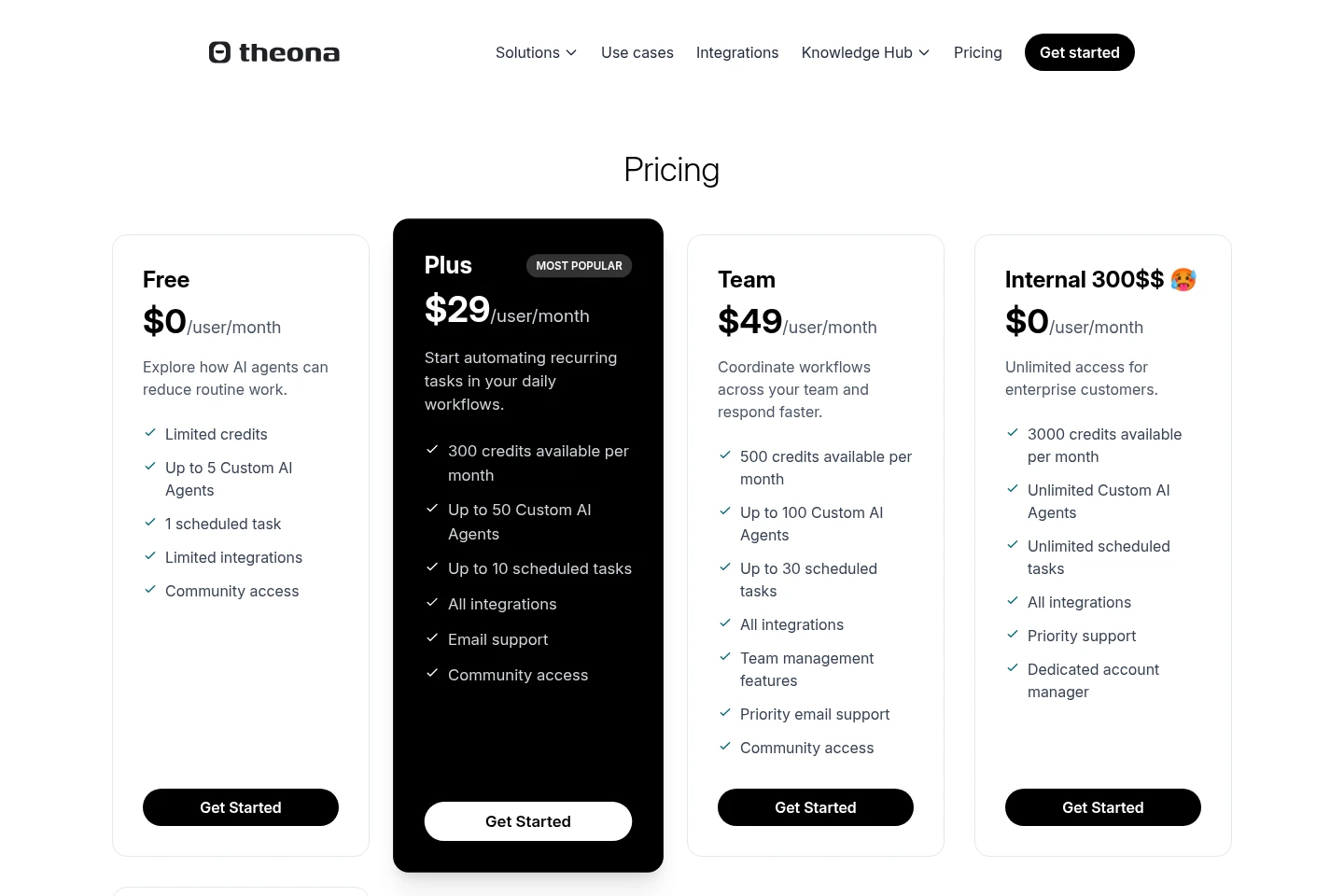
Theona offers a free plan and paid per-user monthly plans, with Enterprise pricing customized. Compare credits, agent and scheduled-task limits, integrations, support, and enterprise features when choosing a plan.
| Plan | Price | Included features and limits |
|---|---|---|
| Free | $0/user/month |
|
| Plus | $29/user/month |
|
| Team | $49/user/month |
|
| Internal 300$$ 🥵 | Price not stated |
|
| Enterprise | Custom pricing |
|
Use cases
Map how team work actually gets done
When a company has an established process that is not fully documented, The Architect uses conversations, meeting recordings, and a task tracker to map the work. The map provides a basis for building agents around the actual workflow.
Automate recurring work across connected tools
When teams repeat operational tasks across systems, they can describe the desired outcome and configure custom agents to act in connected tools. Agents can run after events or on a schedule, with drafts and confirmations for review.
Review agent actions before they take effect
When teams need oversight of automated actions, agents start in draft mode and ask before sensitive or irreversible actions. Run history and reviewable drafts let process owners inspect activity and approve or edit messages.
Limitations
The Free plan includes limited credits, limited integrations, one scheduled task, and up to five Custom AI Agents.
The Plus plan provides 300 credits per month, up to 50 Custom AI Agents, and up to 10 scheduled tasks.
The Team plan provides 500 credits per month, up to 100 Custom AI Agents, and up to 30 scheduled tasks.
The Internal 300$$ 🥵 plan lists 3,000 credits per month, unlimited agents and scheduled tasks, but no price is shown.
Enterprise credits are custom allocated; custom integrations are available upon request.
Who it is for
Operations-heavy teams at companies with established processes
Enterprise process owners who need to automate workflows across existing tools
Recruitment operations teams handling application and interview workflows
FAQ
Do we need to document our processes before starting?
No. The Architect builds a map from conversations, meeting recordings, and a task tracker, reflecting how work actually happens rather than relying on written process documents.
How much time does the team need to contribute?
The team takes part in one or two sessions during discovery and a weekly 30-to-45-minute demo call. Other work runs asynchronously.
What happens if an agent is about to do something wrong?
Agents start in draft mode so the team can review proposed actions before anything is sent. The agent asks for confirmation before sensitive or irreversible actions, and every run is logged.
What access does Theona need?
Theona uses conversations, meeting recordings, and a task tracker to build the process map. Each agent receives only the access it needs and never more than the person who connected it.
Do we need engineers to maintain agents after the pilot?
No. Process owners can change agent logic, connect another tool, or extend an agent to a new workflow after the pilot.
Comments