What is Plask.ai
If you've ever tried creating professional 3D animation, you know the frustration: traditional motion capture requires expensive equipment, specialized studios, and technical expertise that puts it out of reach for most creators. That's exactly the problem Plask.ai was built to solve.
Plask.ai is an AI-powered web-based motion capture platform that transforms any video into professional-grade 3D animation—right in your browser. No downloads, no installations, no expensive hardware. Just upload your video, and Plask's AI algorithms analyze the movement and generate accurate 3D skeletal animations that you can export directly to your preferred 3D software.
What makes Plask.ai stand out is its accessibility without compromising quality. The platform supports full body and hand capture, multi-person tracking, and exports to industry-standard formats including FBX, GLB, BVH, and VMD. Whether you're working with Unreal Engine, Blender, Unity, After Effects, Metahuman, VRoid, or Ready Player Me, Plask.ai integrates seamlessly with your existing workflow.
The platform has earned trust from major industry players. Companies like Nexon (one of Korea's largest game publishers), Square Enix (creators of the Final Fantasy series), Activision (Call of Duty), and Warner Bros have used Plask.ai for their projects. Academic institutions including the University of Tokyo have also adopted the technology for motion analysis research.
:::card{type="summary" title="Key Takeaways"}
- AI-powered video-to-animation conversion in your browser
- No software installation required—fully web-based
- Exports to FBX, GLB, BVH, VMD formats
- Integrates with Unreal Engine, Blender, Unity, After Effects, and more
- Trusted by Nexon, Square Enix, Activision, Warner Bros, and University of Tokyo
:::
---
Core Features of Plask.ai
Plask.ai offers a comprehensive suite of tools designed to make professional motion capture accessible to everyone. Here's what you can accomplish with the platform:
AI Motion Capture is the heart of Plask.ai. Upload any video—cell phone footage, screen recordings, or professional shots—and the AI analyzes human poses frame by frame, converting 2D movement into precise 3D skeletal animations. This opens up possibilities that were previously reserved for studios with massive budgets.
Full Body & Hand Capture goes beyond basic body tracking. Plask.ai separately models body and hand movements, giving you accurate finger animations that are essential for gestures, sign language, musical performances, and other detailed work. Many motion capture solutions skip hand tracking entirely, but Plask delivers the nuance you need.
Multi-person Capture handles complex scenes with multiple actors. Whether you're capturing a dance routine, martial arts sequence, or game cutscene with several characters, Plask.ai tracks and separates each individual, assigning the correct skeletal animation to each character.
When it's time to bring your animations into your production pipeline, Multi-format Export has you covered. Export to FBX for Unreal Engine and Unity, GLB for web and AR applications, BVH for legacy software and motion analysis, or VMD for MikuMikuDance and Japanese animation workflows.
Real-time Collaboration lets team members work on the same scene simultaneously. Powered by WebSocket technology, changes sync instantly across all connected clients—essential for distributed teams and agency workflows.
Video Rendering & Scene Sharing provides built-in rendering tools and shareable scene URLs. Quickly preview your animations or send a link to clients for approval without them needing to install any software.
Auto Camera & Lighting uses AI-assisted scene setup to automatically configure camera angles and lighting. This gets you to a usable 3D environment faster, though you can always fine-tune manually.
Customizable Effects allows you to add visual overlays and adjust post-processing parameters to match your project's branding or artistic direction.
::::grid :::card{type="advantages"}
- No expensive equipment needed: Use any video footage—no motion capture studio required
- Web-based convenience: Access from any browser, work anywhere without software installation
- Broad format compatibility: Works with Unreal Engine, Blender, Unity, After Effects, Metahuman, VRoid, and more
- Flexible capture options: Full body, hands, and multi-person tracking in one platform
- Team collaboration: Real-time editing for distributed teams
:::
:::card{type="disadvantages"}
- Free tier limitations: Daily 15-second limit may constrain larger projects
- Video quality dependent: Results depend heavily on input video clarity, lighting, and camera angle
- No offline capability: Requires internet connection to process videos
:::
::::
---
Who Is Using Plask.ai
Plask.ai serves a diverse range of creators, from solo indie developers to major studios. Here's how different users leverage the platform:
Game Developers traditionally face a significant bottleneck: professional motion capture costs thousands of dollars per minute and requires booking studio time. With Plask.ai, developers upload their reference videos and generate character animations in minutes. This dramatically reduces both cost and production time, enabling smaller studios to compete with larger teams on animation quality.
Indie Developers and Hobbyists often lack both the budget for professional motion capture and the expertise to animate manually. Plask.ai democratizes 3D animation—anyone can create professional-quality movements without years of training or expensive equipment. This is transformative for solo game developers, modders, and creators just starting their 3D journey.
3D Artists and Animation Studios use Plask.ai to streamline specific workflows. Japanese creators particularly appreciate the VMD export for MikuMikuDance (MMD) productions—a traditionally complex process now simplified to just uploading a dance video. Studios report that Plask.ai accelerates pre-visualization and helps them iterate on animation concepts faster.
Short Video and TikTok Creators have discovered a unique advantage: Plask offers 24-hour custom animation services, enabling content creators to produce viral 3D content at scale. The speed-to-market advantage is significant in fast-paced social media environments.
Academic Researchers benefit from accessible motion analysis. The University of Tokyo and other research institutions use Plask.ai to analyze human movement from video footage—no specialized motion capture hardware required. This opens up motion study possibilities for researchers without access to lab-grade equipment.
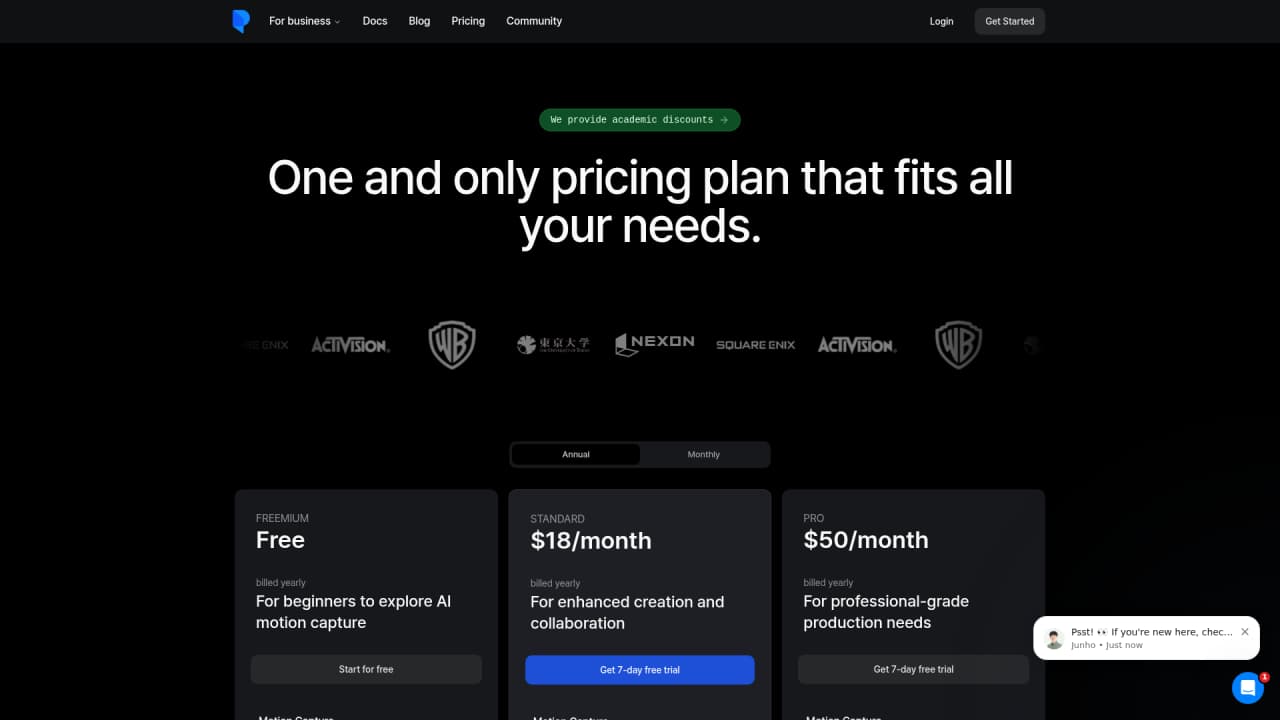
:::card{type="tip" title="💡 Choosing the Right Plan"} New to motion capture? Start with the Free plan to explore the platform and understand its capabilities. Independent developers will likely find the Standard plan ($18/month) offers the best balance of affordability and functionality. Game studios and professional teams should consider the Pro plan ($50/month) for higher processing limits, priority support, and early access to new features. :::
---
Pricing Plans
Plask.ai offers three tiers designed to match different user needs—from casual experimentation to professional production workflows.
Free Plan — $0/month
Perfect for exploring the platform and trying out basic motion capture projects. Includes 15 seconds of capture per day, 1GB of storage, and access to all core features: full body and hand capture, multi-person tracking, FBX/GLB/BVH export, video rendering, scene sharing, and real-time collaboration.
Standard Plan — $18/month
Ideal for regular users and indie developers with consistent motion capture needs. Provides 10 minutes of capture per month (compared to the free tier's ~7.5 minutes weekly), 3GB of storage, and faster processing speeds. The increased storage means you can keep more projects organized without cleanup.
Pro Plan — $50/month
Designed for studios and professional teams with high-volume requirements. Offers 1 hour of capture per month, 10GB of storage, the fastest processing speeds, early access to new features, and team organization tools. This plan also includes priority support for faster issue resolution.
| Plan | Price | Capture Limit | Storage | Best For | |------|-------|---------------|---------|----------| | Free | $0 | 15 sec/day | 1 GB | Learning & exploration | | Standard | $18/mo | 10 min/month | 3 GB | Indie developers & regular users | | Pro | $50/mo | 1 hour/month | 10 GB | Studios & professional teams |
All paid plans include faster processing than the free tier—a meaningful advantage when you're iterating on animations and need quick turnaround times.
---
Getting Started
One of Plask.ai's biggest advantages is how quickly you can begin using it. There's nothing to download or install—everything happens in your browser.
Step 1: Access the Platform
Visit https://plask.ai in your web browser. Plask.ai works best in Chrome for the optimal experience, though it also supports Edge, Firefox, and Safari.
Step 2: Create Your Account
Sign up using your email address or connect through your social media accounts. The registration process takes less than a minute.
Step 3: Upload Your Video
Click the upload button and select your video file. For the best results, use footage where the subject is clearly visible, the background is uncluttered, and lighting is adequate. The subject should be fully in frame with no major obstructions.
Step 4: AI Processing
Once uploaded, Plask.ai's algorithms analyze the video and generate the 3D animation automatically. Processing time depends on video length and complexity—typically a few minutes for short clips.
Step 5: Review and Export
Preview the generated animation. If needed, you can adjust parameters or review specific frames. When satisfied, export to your preferred format and integrate it into your project.
:::card{type="tip" title="💡 Pro Tips for Best Results"} For optimal motion capture quality, use videos where the subject is fully visible (full body in frame), the movement is clear and not too fast, lighting is even across the subject, and there are no obstructions blocking the body. Videos with complex backgrounds or multiple people require the multi-person feature to be enabled. :::
---
Frequently Asked Questions
:::card{type="faq" title="What exactly is Plask.ai?"} Plask.ai is an AI-powered motion capture tool that converts any video into professional-grade 3D animation. It analyzes human movement in video footage and generates skeletal animations that can be exported to major 3D software platforms. :::
:::card{type="faq" title="What export formats are supported?"} Plask.ai supports FBX, GLB, BVH, and VMD formats. FBX works best with Unreal Engine and Unity. GLB is ideal for web and AR applications. BVH is useful for motion analysis and legacy software. VMD is specifically designed for MikuMikuDance and Japanese animation workflows. :::
:::card{type="faq" title="What are the limitations of the free plan?"} The free plan provides 15 seconds of motion capture per day, with 1GB of cloud storage. All core features are available, including full body and hand capture, multi-person tracking, and all export formats. Processing may take longer than paid tiers. :::
:::card{type="faq" title="Do I need to install any software?"} No. Plask.ai is a fully web-based platform. You access it through your browser at https://plask.ai—no downloads, installations, or client software required. :::
:::card{type="faq" title="What platforms and tools does Plask integrate with?"} Plask.ai integrates with major 3D and animation platforms including Unreal Engine 4 and 5, Unity (via FBX import), Blender, After Effects, Metahuman, VRoid, Iclone, and Ready Player Me. :::
:::card{type="faq" title="Does Plask support hand capture?"} Yes. Plask.ai provides full body capture combined with detailed hand tracking. This is particularly valuable for animations requiring precise finger movements, such as sign language, musical performances, or natural gesticulation. :::
:::card{type="faq" title="Can Plask handle multiple people in one video?"} Yes. The multi-person motion capture feature can track and separate multiple individuals in a single video, making it suitable for group dance sequences, multiplayer game animations, and scenes with several characters. :::






Comments