

- Monthly visits
- 0
- 2026-09
ImgVid - Turn any image into a stunning AI-generated video
Creating video content from static images used to be time-consuming and expensive. ImgVid changes that by letting you transform any photo into a dynamic video with just a text prompt. Powered by a multi-engine system that aggregates top AI models like Wan, Runway, Kling, and Veo 3, it delivers watermark-free output up to 4K resolution. Whether you're a content creator, e-commerce seller, or digital artist, you can generate professional videos in minutes without any software installation.
- AI Video
- Video Generation
- Social Media
- Image Generation
- Content Creation
524Views
What Is ImgVid?
Picture this: you need a video for your brand's social media post — a product showcase, a quick explainer, or maybe just something eye-catching. A few years ago, your options were pretty limited. You'd either book a studio, hire a videographer, spend hours editing, or settle for static images that don't stop the scroll.
That gap — between the demand for video content and the time it takes to create it — is exactly where ImgVid sits.
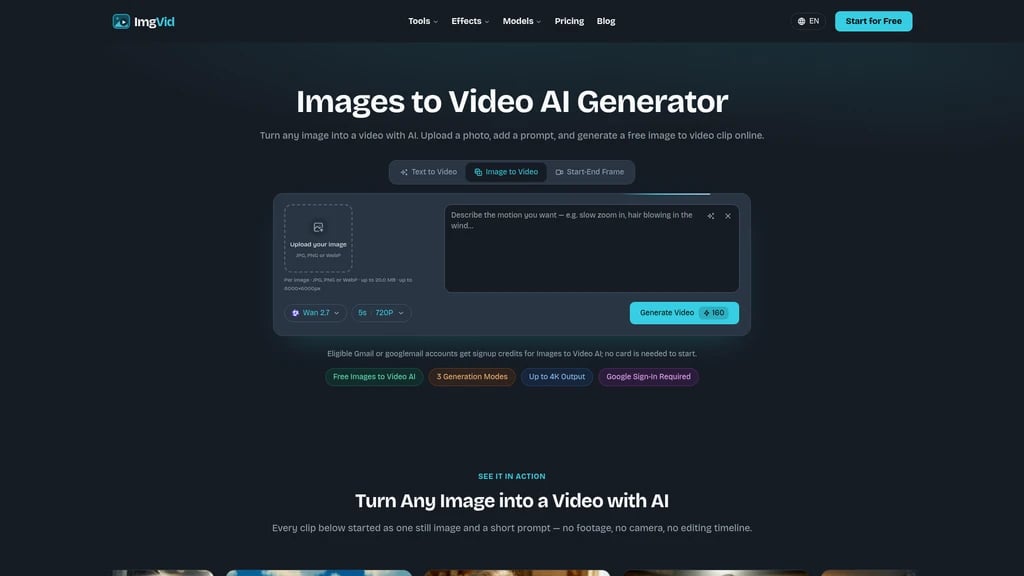
ImgVid is an online AI image-to-video platform that aggregates top-tier AI video models (Wan 2.7, Runway, Kling, Hailuo, Veo 3, Flux, and more) under one simple interface. Instead of learning complex animation software or juggling multiple AI tools, you just upload an image, type what you want to see happen, and let the AI do the rest.
Here's how it works in practice:
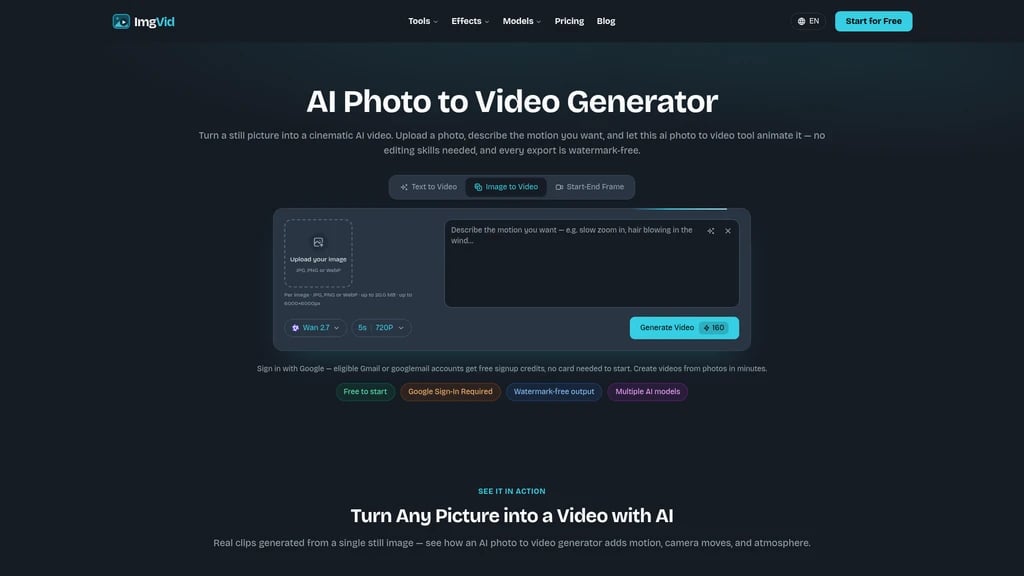
Upload a photo → Describe the motion → Pick a model → Download your MP4
That's it. Within minutes, you get a watermarked-free video — at up to 4K resolution — ready to publish on TikTok, Reels, YouTube Shorts, or your e-commerce store. No software installs, no rendering queues, no technical skills required.
ImgVid has been featured across 40+ AI tool directories and is used by everyone from e-commerce sellers and digital artists to marketing teams, independent filmmakers, and students. It's not trying to be a full video production suite — it's a focused tool that solves one specific problem well: turning static images into dynamic video content with text control.
Prompt-Driven Motion — Describe movement in plain English, and the AI follows your instructions
Multi-Model Engine — Choose from Wan, Runway, Kling, Hailuo, Veo 3, Flux, and more
Watermark-Free 4K Output — Professional-grade video, ready for publishing
No Installation Needed — Runs entirely in your browser, on desktop or mobile
Free Trial Credits — Start without entering a credit card (eligible Gmail accounts)
The Features Your Team Actually Needs
Let's walk through what ImgVid can actually do — not as a spec sheet, but in terms of what it means for your workflow.
Prompt-Driven Motion: You're the Director
Most AI video tools generate random motion and hope it looks good. ImgVid takes a different approach: you describe the movement, and the AI follows your lead.
If you upload a portrait photo and type "slow zoom in, hair blowing gently in the wind", that's exactly what you'll get. Want a product to spin slowly? Type "slow 360 rotation on a clean background". The text-to-motion pipeline combines a text encoder with video diffusion models (like Wan, Runway, and Kling) to map your words to actual movement vectors.
This means you're not leaving results to chance. You're directing — and the AI executes.
Three Generation Modes for Different Needs
Not every video starts the same way, so ImgVid gives you three input methods:
Single image to video — Turn a static photo into a living scene. Best for portraits, products, and landscapes.
Multiple images to video — Upload several photos and let the AI blend them into one continuous sequence. Great for storytelling or combining product shots.
Start + end frame to video — Define the first and last frame; the AI fills in everything in between. Perfect for smooth transitions and animations.
Each mode consumes credits differently depending on the model you choose, and the exact cost is shown before you hit generate.
Watermark-Free 4K Output, Ready to Publish
This one matters more than you might think. Many free or trial-tier AI video tools slap a watermark on your output. ImgVid doesn't — at any plan level. Your generated videos are clean, professional, and ready to go straight to your social channels.
Support goes from 720p (the default) all the way up to 4K, and you can choose between portrait (9 for TikTok/Reels/Shorts) and landscape (16 for YouTube) aspect ratios. No post-processing, no cropping, no secondary edits.
Multi-Model Engine: Pick the Right AI for the Job
ImgVid isn't a single AI model — it's a gateway to multiple leading models. Before generating, you can select from:
Model | Best For |
|---|---|
Wan 2.7 | Balanced, versatile motion generation |
Runway | Cinematic, film-like quality |
Hailuo | Anime and stylized animation |
Veo 3 | High realism, lifelike motion |
Kling | Fast generation, creative flexibility |
Flux | Artistic and experimental output |
Plus Grok, Raphael, Seedance, and more. The unified API gateway routes your request to the model you choose, so you can experiment across different engines without leaving the same interface.
Fun Effects Library for Viral Content
Sometimes you're not making a commercial — you're making something fun. ImgVid includes a collection of preset effects:
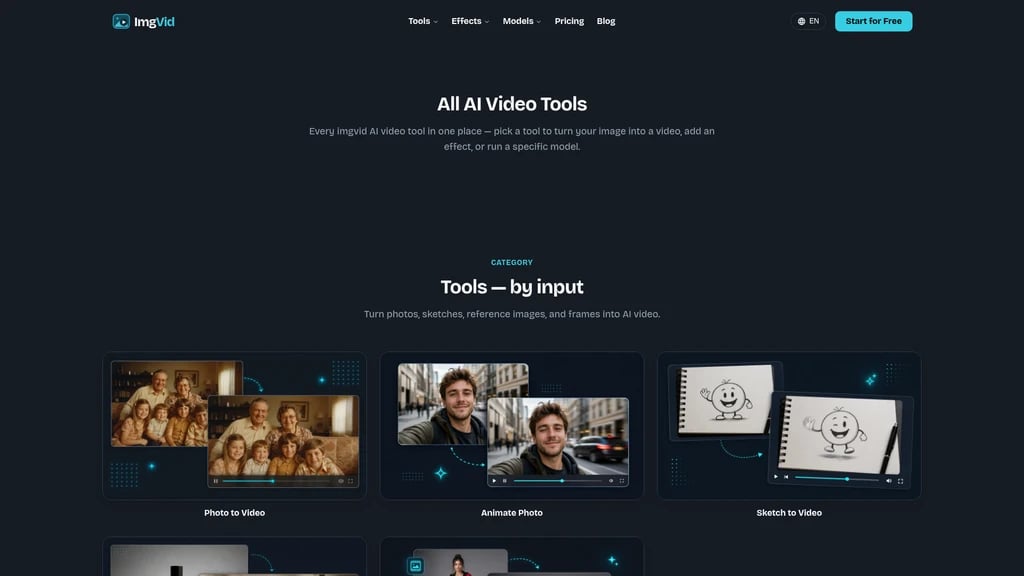
Talking Pet — Upload a pet photo and make it "speak"
AI Hugging / AI Kissing — Animate interactions between characters
Old Photo Animation — Bring vintage photographs to life with subtle movement
VHS Effect — Add retro video grain and color shifts
Each effect comes with optimized prompt templates, so you don't need to write anything from scratch.
Reference Image Matching
Need your generated video to match a specific visual style? Upload a reference image alongside your main photo, and the AI will attempt to replicate the look, lighting, or motion pattern. This is especially useful for brands maintaining visual consistency across a campaign.
Multi-model aggregation: One subscription gives you access to multiple premium AI video models
Controllable output: Prompt-driven motion lets you direct results, not just hope for the best
Watermark-free quality: Clean 4K output you can publish immediately
No lock-in: Switch between models freely based on your creative needs
Generation takes minutes: Not real-time; complex settings (higher resolution, longer duration) take longer
Creative variance: AI may not always interpret your prompt perfectly — you might need a few tries
Who Actually Uses ImgVid?
The best way to know if a tool is right for you is to see who's already using it and why. Here are the six most common user profiles — you might recognize yourself in one of them.
E-Commerce Sellers
The challenge: Shooting product videos requires a studio setup, lighting equipment, and significant time. For small sellers or solo entrepreneurs, it's often just not feasible.
The ImgVid solution: Upload a product photo, enter a prompt like "slow 360 spin on white background", and let AI generate a professional-looking product showcase video.
Real result: Sofia R., an e-commerce seller, says the tool "replaced a whole afternoon of production work."
Social Media Content Creators
The challenge: Posting daily or multiple times per week on TikTok, Reels, and Shorts demands a constant stream of video content. Filming and editing at that cadence is exhausting.
The ImgVid solution: Turn a single photo + a short text prompt into a ready-to-post video in minutes. No filming, no editing timeline.
Real result: Marco T., a content creator, reports "my posting cadence doubled" after integrating ImgVid into his workflow.
Digital Artists and Animators
The challenge: Traditional animation requires rigging, frame-by-frame drawing, and specialized software. Turning a static illustration into motion is a massive time investment.
The ImgVid solution: Upload a hand-drawn illustration, describe the motion you want, and let AI generate the animation directly — no rigging needed.
Real result: Aisha K., a digital artist, sums it up: "no rigging, just images to video AI."
Marketing Teams
The challenge: Multiple ad creatives, social posts, and campaign assets need to be combined into cohesive video content — often on tight deadlines.
The ImgVid solution: Upload multiple images and let AI blend them into a single cinematic sequence. One pass, from multiple assets to a finished video.
Real result: Lena P., a marketing lead, notes that "generating a video from multiple images now looks cinematic in one pass."
Casual Users: Old Photos and Fun Pet Videos
The challenge: You have a cherished family photo or a funny pet picture, but no idea how to animate it.
The ImgVid solution: Use the Old Photo Animation effect for subtle movement (a smile, a blink, wind in the background), or the Talking Pet effect for a shareable social video.
Real result: Romain L. says, "watching a decades-old picture come alive got the whole room emotional."
Independent Filmmakers
The challenge: Pre-visualization and concept art need to become moving images quickly for pitch decks or creative exploration.
The ImgVid solution: Upload a scene concept or landscape painting, describe the motion ("drifting clouds, slow pan across the horizon"), and get a realistic dynamic preview.
Real result: Devraj S., an independent filmmaker, "animated a landscape with drifting clouds and it looked like real footage."
Not sure which scenario fits you best? Upload a single photo and try the free starter credits. You'll get a feel for how different prompts and models change the output — no commitment needed.
Pricing: Find the Plan That Fits Your Volume
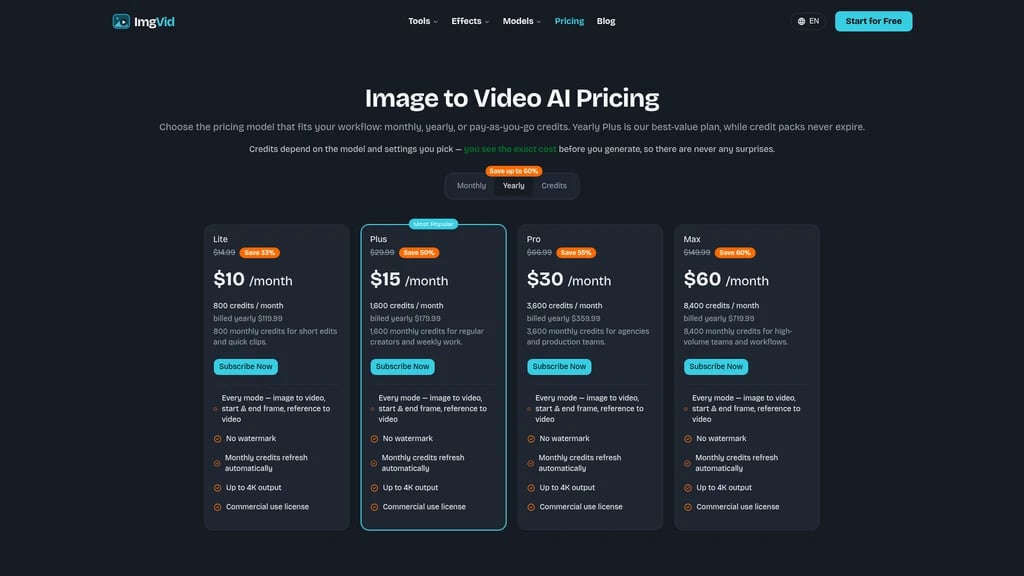
ImgVid operates on a credit-based system. Each generation consumes a certain number of credits based on the model, resolution, and duration you choose. The exact cost is displayed before you generate — no surprises.
All paid plans include:
All generation modes (single image, multi-image, start-end frame, reference)
Watermark-free output
Up to 4K resolution
Commercial usage rights (you own what you create)
If you're new to AI video generation, start with the free trial credits or the monthly Lite plan. You can always upgrade as your volume grows. For teams posting daily, the Plus or Pro plan offers the best value per credit.
Subscription Plans
Plan | Monthly | Yearly (per month) | Yearly Total | Monthly Credits |
|---|---|---|---|---|
Lite | $14.99 | $10 | $119.99 | 800 |
Plus (Most Popular) | $29.99 | $15 | $179.99 | 1,600 |
Pro | $66.99 | $30 | $359.99 | 3,600 |
Max | $149.99 | $60 | $719.99 | 8,400 |
Yearly plans save you 33% to 60% over monthly billing, paid as a single annual charge.
Free trial: Eligible Gmail/googlemail accounts receive starter credits upon sign-up — no credit card required. This gives you a genuine risk-free way to test the platform before committing.
One-time credit packs are also available and never expire, so you can top up without committing to a subscription.
All subscriptions auto-renew monthly or annually, and you can cancel at any time.
What Users Are Saying
Here's honest feedback from people who use ImgVid in their daily work and creative projects.
"ImgVid replaced a whole afternoon of production work."
— Sofia R., E-commerce Seller
"My posting cadence doubled."
— Marco T., Content Creator
"No rigging, just images to video AI."
— Aisha K., Digital Artist
"Generating a video from multiple images now looks cinematic in one pass."
— Lena P., Marketing Lead
"Watching a decades-old picture come alive got the whole room emotional."
— Romain L., User
"Animated a landscape with drifting clouds and it looked like real footage."
— Devraj S., Independent Filmmaker
These aren't curated marketing quotes — they're real outcomes from real users across different industries. The common thread? ImgVid saved them time, unlocked new creative possibilities, or both.
Frequently Asked Questions
Is Images to Video AI free?
Eligible Gmail/googlemail accounts receive starter credits upon registration, allowing you to try the platform for free. All generated videos are watermark-free, even on the free tier. No credit card is required for eligible accounts.
Do I need to create an account?
Yes, you'll need to sign in with your Google account. This connects your credits, upload history, and generated videos to your profile. Eligible Gmail accounts can sign up without adding a payment method.
How do I turn an image into a video with AI?
Upload your image → type a text prompt describing the motion you want → select your preferred AI model → click generate. Within a few minutes, your MP4 video will be ready to download.
Can I use multiple images to create a video?
Absolutely. You can upload multiple photos, and the AI will blend them into a single continuous video sequence based on your prompt. This is especially useful for combining product shots or building a visual narrative.
Does the prompt actually change the result?
Yes. Your text prompt directly influences the direction, speed, camera movement, and mood of the generated video. The AI models are designed to follow your instructions — not produce random motion. If you're not satisfied, you can tweak the prompt and regenerate.
How long does it take to generate a video?
Most videos complete within a few minutes. The exact time depends on the chosen model, video length, resolution, and current queue. A standard 720p 5-second clip on a fast model is typically the quickest option.
Is my uploaded image safe and private?
All uploads are transmitted over encrypted connections. Your images and generated videos are bound to your account and are never publicly shared. They are automatically deleted when no longer needed. ImgVid operates under UK GDPR and the Data Protection Act 2018, and does not sell user data to advertisers or data brokers.


Comments