

- Monthly visits
- 91,848
- 2026-09
- Monthly growth +137.6%
Post Formatter - Format social posts with Unicode styles, previews, drafts, and AI proofreading
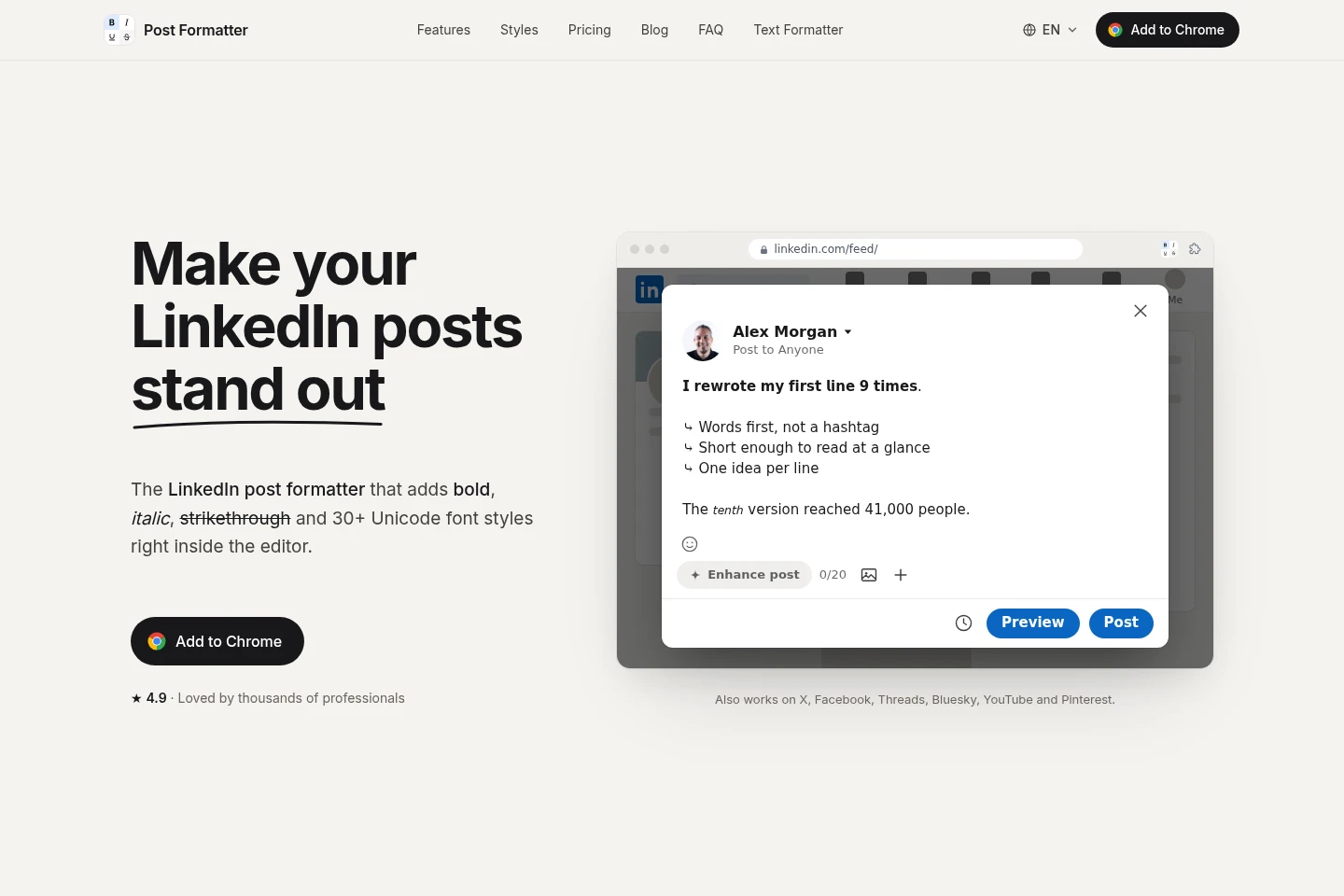
Post Formatter is a Chrome extension for formatting LinkedIn posts with bold, italic, underline, strikethrough, and more than 30 Unicode styles. It also provides post previews, hook checks, insights, drafts, saved posts, Smart Paste, and optional AI proofreading and auto-styling through your own OpenRouter API key. The extension also works with X, Facebook, Threads, Bluesky, YouTube, and Pinterest.
- AI Marketing
- Social Media Management
- Paraphrasing Tools
- Grammar Checkers
- LinkedIn post formatter
- Unicode text styles
- AI proofreading extension
Capabilities
Unicode text formatting
Apply bold, italic, underline, strikethrough, and more than 30 Unicode styles to selected text or posts. Choose a style from the extension and insert it into the editor; basic styles are free, while premium styles have limited free trial uses.
Post preview and hook check
Preview post layouts and check opening text before publishing. Live LinkedIn preview updates as you type, while platform mockups and hook checks identify text shown before the “more” cutoff.
Draft and saved-post management
Save drafts and posts, then organize and retrieve them. Pro adds folders, tags, search, ready-to-post status, and insertion from the toolbar or right-click menu.
Smart Paste conversion
Convert supported formatting into Unicode when pasting from Google Docs, Word, Notion, or Markdown. Bold, italic, strikethrough, underline, and lists are converted automatically.
AI proofreading and auto-styling
Proofread text and apply bold or italic emphasis with AI inside the post editor. This Pro feature requires the user's own OpenRouter API key; model requests go directly from the browser to OpenRouter.
Post insights
Review impressions, engagement, and posting-time information from LinkedIn posts while browsing. Insights are available in Pro, and the page says this data is stored only in the browser.
Pricing
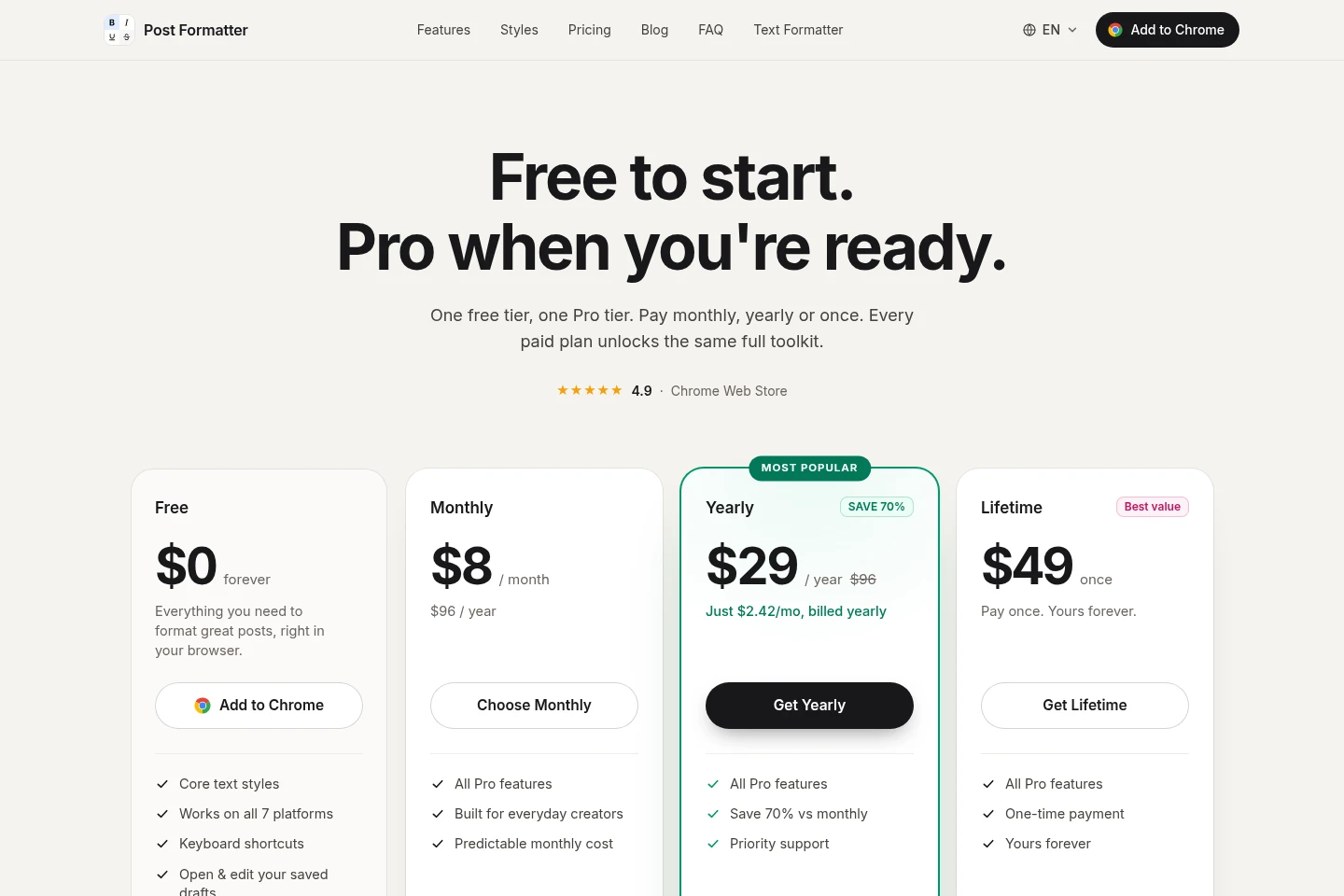
Post Formatter offers a free plan and paid Pro access billed monthly, yearly, or once. Compare payment frequency and whether you need the Pro toolkit; every paid option unlocks the same listed Pro features.
| Plan | Price | Included features and limits |
|---|---|---|
| Free | $0 forever |
|
| Monthly | $8 per month |
|
| Yearly | $29 per year |
|
| Lifetime | $49 once |
|
Choose the paid plan inside the extension after installing. The yearly plan is billed yearly; its advertised $2.42 per month is an equivalent, not monthly billing. Secure checkout is provided by Stripe.
Use cases
Format text for a social post
When preparing a post for LinkedIn or another supported platform, select text and apply Unicode styles, lists, symbols, or emoji. The formatted text can be inserted into the editor and is intended to display without special rendering.
Preview a post before publishing
When drafting a post, inspect its platform preview and how its opening appears before the “more” cutoff. The live LinkedIn preview follows typing, and the hook check presents opening-line checks.
Save and reuse drafts and posts
When a post is unfinished or worth keeping, save it as a draft or save it from the feed. Pro provides organization and search tools, and saved items can be inserted while writing.
Proofread and emphasize post copy
When revising a post, use AI proofreading for grammar, spelling, and style, or let AI emphasize key phrases. This Pro feature uses the user's OpenRouter API key and incurs OpenRouter token charges.
Limitations
AI proofreading and auto-styling require a Pro plan and the user's own OpenRouter API key; OpenRouter charges the key directly for tokens.
Free users have three trial uses for listed Pro features; LinkedIn document carousel preview, draft organization, toolbar insertion, and post insights are marked Pro-only.
The browser extension is offered for Chrome, Edge, and Brave; the supplied pages do not identify native desktop or mobile apps.
Who it is for
People who write and format LinkedIn posts and want in-editor styling and previews
Creators preparing posts for LinkedIn and other supported social platforms
Writers who save, organize, revisit, and reuse social post drafts
Post writers who want optional AI proofreading using their own OpenRouter API key
FAQ
Is Post Formatter free to use?
Yes. Core formatting, including bold, italic, bold italic, strikethrough, underline, and case, is free forever without sign-up. Pro is an optional upgrade for additional tools.
What does the Free plan include?
Free includes core styles, keyboard shortcuts, supported-platform access, and opening and editing saved drafts. Listed Pro features have three free trial uses, except features marked Pro-only.
How is AI proofreading billed?
AI proofreading uses your own OpenRouter API key, and OpenRouter bills that key directly for tokens used. It is a Pro feature; Post Formatter says it does not add a markup.
Which platforms does Post Formatter work with?
The pages identify LinkedIn, X, Facebook, Threads, Bluesky, YouTube, and Pinterest. The browser extension is stated to work on Chrome, Edge, and Brave.
Can I cancel or change my paid plan?
Yes. The pricing page says you can switch or cancel anytime. Choose a plan inside the extension after installing.
Comments