

Plimo - Generate AI videos and images from text, photos, or uploaded clips
Plimo is a browser-based creative platform that integrates multiple leading AI image and video generation models in a single account. It supports text-to-video, image-to-video, video-to-video, AI dance generation, motion control, and a full suite of AI image editing tools with built-in synchronized audio generation. The platform is designed for content creators, social media users, and personal creators who want to produce short videos, product demos, and creative projects without complex editing software.
- AI Video
- Video Generators
- Image Generators
- Short Video Generators
- AI video generator
- text to video
- image to video
0Views
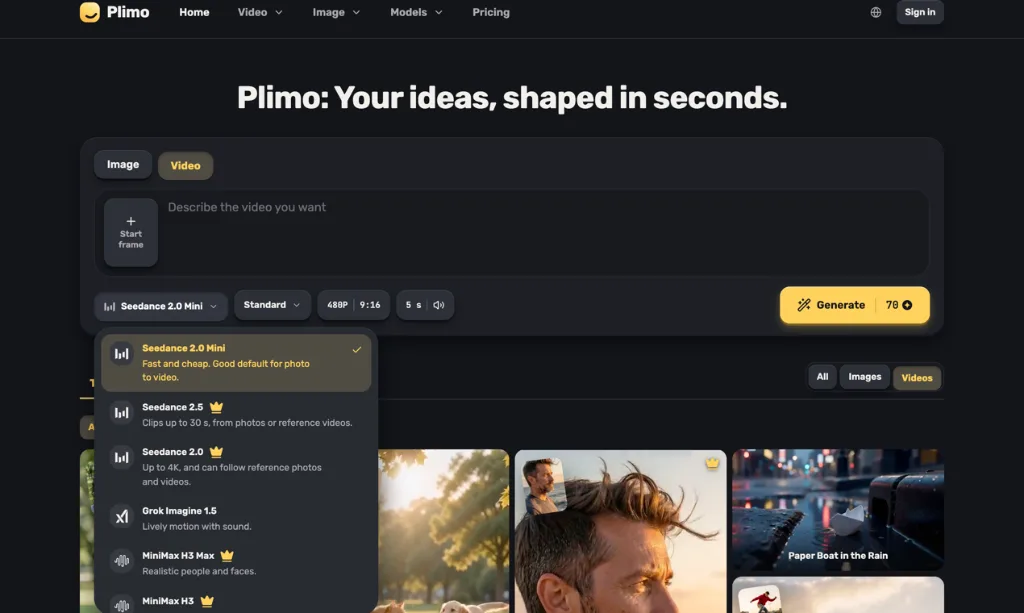
Capabilities
Text to video generation
Generates short AI videos with synchronized sound from user-written text prompts. Users input a scene description, camera movement details, and desired audio, then select a supported model to produce the final clip.
Image to video animation
Animates a static uploaded photo to turn it into a video, using the original photo as the first frame of the output clip. Users add a description of desired motion, select a model, and generate the animated sequence.
Video to video editing
Modifies existing uploaded video footage based on user-provided text descriptions of desired changes. Users upload their source clip, specify adjustments like weather or lighting, and generate the altered version of the footage.
Motion transfer for videos
Applies motion captured from a reference video clip to a separate photo of a person. Users upload a reference motion clip and a target photo, then generate a new video where the person in the photo performs the movements from the reference.
AI image and GIF generation
Produces AI-generated images, edits existing photos, and creates animated GIFs using a suite of integrated AI image tools. Users can generate art, anime portraits, headshots, or edit clothing and hairstyles on uploaded photos.
Template-based video creation
Generates pre-structured videos without requiring users to write custom prompts. Users select a pre-made template, optionally upload a relevant photo, and generate a ready-to-use short video clip.
Pricing
Plimo uses a freemium model with free, subscription, and one-time credit top-up options. New users get 100 one-time free credits, and paid plans are available with monthly or yearly billing, where yearly billing offers a 50% discount. Users can select plans based on their required generation volume, concurrent generation limits, and commercial use access.
| Plan | Price | Included features and limits |
|---|---|---|
| Free | 100 one-time free credits, no recurring charge |
|
| Plus | $7.50 per month, billed $90 yearly |
|
| Pro | $14.50 per month, billed $174 yearly |
|
| Ultra | $64.50 per month, billed $774 yearly |
|
Unused monthly plan credits do not roll over to the next billing period. One-time credit packs are available as top-ups for subscribed members, and credits from these packs never expire. The first subscription can be refunded within 3 days if 100 credits or fewer have been used.
Use cases
Animate old family photos
Users have static old family photographs they want to bring to life. They upload the photo, write a short prompt describing subtle natural movements for the subjects, and generate a short animated video to share with family members.
Create social media short videos
Content creators need regular short vertical videos for platforms like TikTok, Reels, or Shorts. They write a short scene prompt or use a pre-made template, select the 9:16 aspect ratio, and generate a ready-to-post clip without filming or complex editing.
Generate product demo clips
Online shop owners need short product demonstration videos for their listings without a professional video shoot. They upload an existing product photo, describe a slow camera movement across the item, and generate a polished product video to add to their store page.
Produce event promo videos
Users need a short promotional clip for an upcoming event a few days before the event date. They write a text prompt describing the desired event scene, generate the full video with synchronized sound, and share it to promote the event.
Limitations
Adult content and prompts or uploads that violate the content policy are rejected by the platform
Free tier generated content is restricted to personal non-commercial use only
Maximum generated video clip length is capped at 30 seconds, depending on the selected AI model
Hands, small text, and very fast action in generated videos may produce imperfect, non-ideal results
Google model clips including Veo and Gemini Omni include an invisible SynthID watermark
Uploaded photos are limited to JPG, PNG, or WebP formats up to 30 MB, reference video clips to MP4 or MOV up to 50 MB
Who it is for
Personal users creating non-commercial videos and images
Social media content creators making regular short-form video posts
E-commerce shop owners creating product demonstration content for their listings
Independent creators working on short films, event promos, and personal creative projects
FAQ
Do I need an account to generate content on Plimo?
Yes, a user account is required to generate content. You can sign in with Google or use a one-time email code, no payment card is required to create a free account.
How long does it take to generate a typical AI video?
Most AI video clips take around 2 minutes to generate. The Grok Imagine 1.5 model often completes generation in roughly 45 seconds, while longer high-resolution clips take slightly more time.
Can I generate videos without writing a custom prompt?
Yes, you can. Pre-built templates come with pre-written prompts, so you only need to upload a relevant photo to generate a video. Some models can also animate a photo with an empty prompt.
Are generated videos overlaid with a visible watermark?
Plimo does not add any visible watermark to exported videos. Clips generated using Google's Veo and Gemini Omni models include an invisible SynthID watermark to mark them as AI-generated.
Can I use generated content for commercial business purposes?
Commercial use is only allowed for paid plan subscribers. Content generated on the free tier is restricted to personal, non-commercial use only.
Comments