

- Monthly visits
- 0
- 2026-09
- Monthly growth -100%
EasyAIBridge - Ask spreadsheet questions and get data-backed answers
EasyAIBridge lets users upload Excel or CSV files, connect Google Sheets, and ask questions in plain language. It returns chat-based analyses with charts, tables, and narratives, supports follow-up questions, and offers PDF or Word exports. Its Excel workflow can create or edit workbooks with multiple sheets, tables, formulas, and dashboards.
- AI Data Tools
- Data Analysis
- Excel Assistants
- Data Visualization
- AI spreadsheet analysis
- Google Sheets data chat
- Excel dashboard generator

Capabilities
Spreadsheet chat analysis
Analyzes attached spreadsheet data and returns answers, charts, tables, and narratives. Users upload Excel or CSV files or connect Google Sheets, ask questions in plain language, and continue with follow-up questions.
Excel workbook creation and editing
Creates or edits Excel workbooks and returns an .xlsx file with multiple sheets, Excel Tables, live formulas, and a dashboard. Users describe the requested work in plain language or provide data for a new workbook.
Analysis and workbook exports
Exports analysis results and spreadsheet work for sharing or continued use. Available outputs include PDF or Word reports for chat answers and CSV saving; the Excel workflow produces .xlsx workbooks.
Pricing
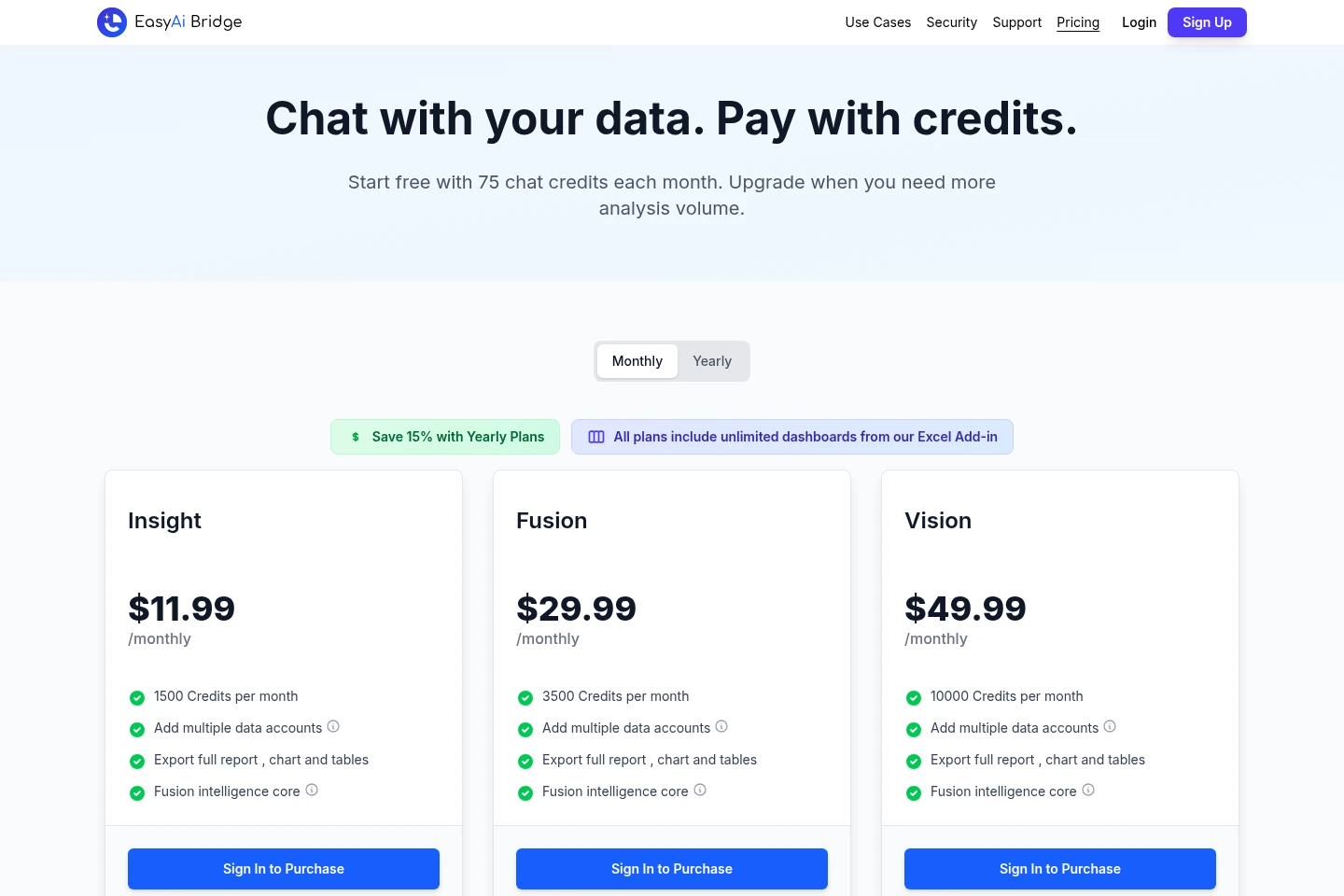
A free account includes 75 chat credits per month; paid plans are subscriptions shown with monthly prices and a yearly option. Compare monthly credit allowances and included analysis features when choosing a plan.
| Plan | Price | Included features and limits |
|---|---|---|
| Insight | $11.99/monthly |
|
| Fusion | $29.99/monthly |
|
| Vision | $49.99/monthly |
|
Yearly plans are offered with a stated 15% saving. The free account includes 75 chat credits per month and requires no credit card.
Use cases
Ask questions about spreadsheet data
When spreadsheet data needs analysis, users upload an Excel or CSV file or connect Google Sheets, then ask questions in plain language. EasyAIBridge provides answers with charts and tables and allows follow-up questions about the attached data.
Create or edit Excel workbooks
When a user needs a working Excel workbook, they can describe the requested workbook or upload an existing file to edit. The tool creates an .xlsx with multiple sheets, tables, formulas, and a dashboard that can continue working as rows are added.
Export analysis for sharing
When analysis needs to be shared or reused, users export chat results as PDF or Word, or save results as CSV. The Excel workflow can also produce an .xlsx workbook containing the requested sheets, formulas, and dashboard.
Limitations
The free account provides 75 chat credits per month; paid plans provide specified monthly credit quotas rather than unlimited chat credits.
Who it is for
People who need to explore spreadsheet data without writing analysis code
Excel users who need to build or edit formula-based workbooks and dashboards
Google Sheets users who want to ask questions about connected sheet data
FAQ
Which data sources can I analyze?
You can upload Excel or CSV files and connect Google Sheets. Ask questions in plain language about the data you attach.
What does the free account include?
The free account includes 75 chat credits per month and does not require a credit card. Paid plans offer larger monthly credit allowances.
Can I ask follow-up questions?
Yes. You can continue the conversation about the attached data with follow-up questions, without starting over.
Which formats can I export?
Chat answers can be exported as PDF or Word, and results can be saved as CSV. The Excel workflow creates an .xlsx workbook.
What is included with every paid plan?
All listed paid plans include unlimited dashboards from the Excel Add-in. The plans differ in monthly credits and each lists access to multiple data accounts, report exports, and Fusion intelligence.
Comments