What Is Create a Caricature of Me: Your Photos, Reimagined as Fun Cartoons
Ever looked at your regular photo and thought, "This could be way more fun"? Maybe you want something unique for your social media profile, or you're hunting for a gift that's actually personal and memorable. Here's the thing—traditional photo editing takes forever, and hiring a professional illustrator? That gets expensive fast.
Create a Caricature of Me is exactly what it sounds like: an AI-powered tool that transforms your ordinary photos into unique cartoon caricatures in just seconds. Upload a photo, pick your style, and boom—you've got a one-of-a-kind image that's unmistakably you, just with a playful twist.
What makes this different from your standard filters? It's not just slapping a preset effect on your face. The AI actually understands your features—the shape of your eyes, your smile, that distinctive nose—and reimagine them in a cartoon style while keeping you recognizable. Your friends will still say "that's totally you," but they'll laugh at how cool or funny you look.
The platform taps into multiple cutting-edge AI models (Google Veo, OpenAI's GPT-4o Image, Flux Kontext, and several others), so you get different artistic interpretations depending on which model you choose. Whether you want something that looks like a classic newspaper cartoon, a modern anime vibe, or a quirky sketch, the choice is yours.
It's been featured on Product Hunt and listed across 100+ AI tool directories, so it's not some fly-by-night operation. People are actually using it for profile pictures, party invitations, team photos, and those "remember when" gifts that end up on refrigerators everywhere.
TL;DR
Transforms photos into cartoon caricatures in seconds using AI
Multiple AI models to choose from, each with unique styles
Keeps you recognizable while adding creative flair
Great for social media, gifts, team avatars, and personal projects
Free trial: 6 credits when you sign up
What Can You Actually Do With It? More Than Just Funny Avatars
Let's get specific about what you're actually getting here, because "turn your photo into a cartoon" only scratches the surface.
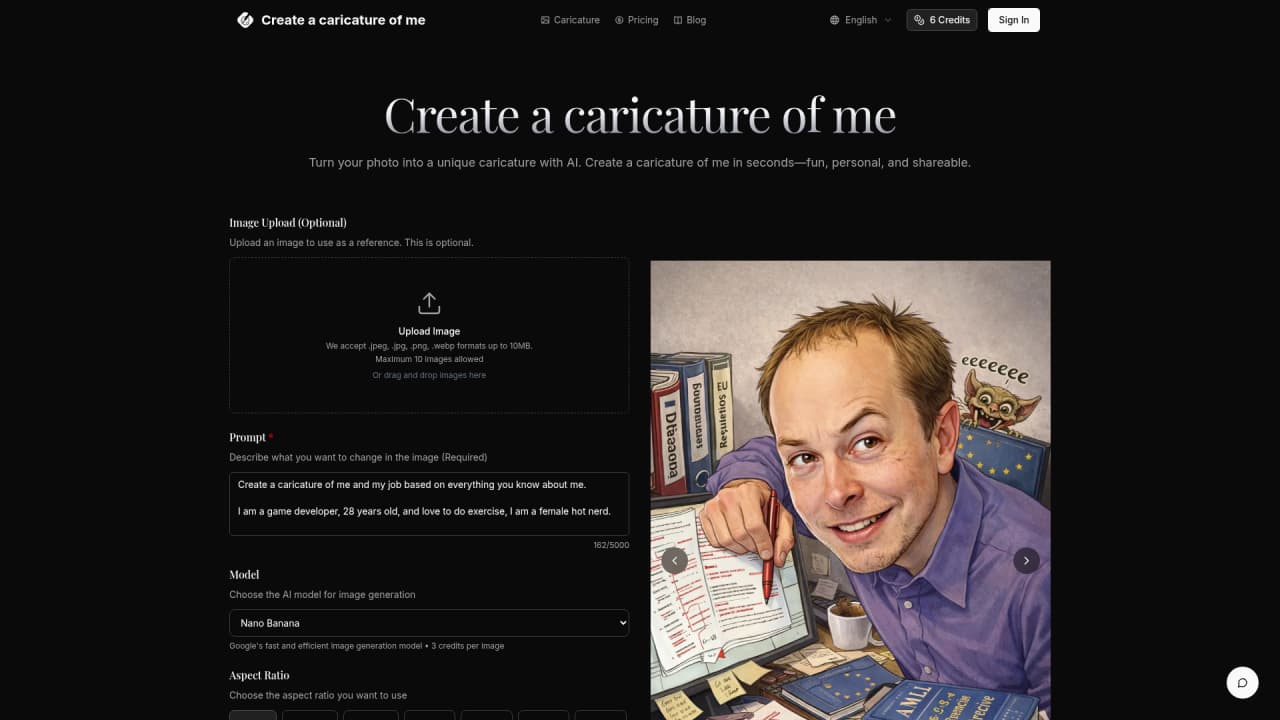
Turn any photo into a caricature — This is the main event. Upload a selfie, a family photo, or even your pet (because why not?), and the AI converts it into a cartoon version. We're talking seconds, not minutes. You don't need any design skills or editing experience. Just upload, click, and download.
Control the style with text prompts — Got a specific vision? You can describe what you want in plain language. Say something like "make me look like a 1950s comic book character" or "give me an anime style with big eyes." The prompt box accepts up to 5,000 characters, so you can get pretty detailed. The AI takes your description and incorporates it into the generation.
Pick from multiple AI models — Here's where it gets interesting. Different models produce different results:
Nano Banana: Quick and efficient, great for speed (3 credits per image)
Flux Kontext: Solid all-around option (4 credits per image)
GPT-4o Image: Higher quality, more detailed results (6 credits per image)
Each model has its own personality, so you can experiment to find what works best for your photo and style preferences.
Choose your output format and size — One of the things people often overlook is the flexibility here. You can output in multiple aspect ratios: 1 for Instagram posts, 9 for Stories, 16 for YouTube thumbnails, and plenty more. It's not just square or landscape—you've got options like 3, 4, even 21 for those cinematic vibes.
Get commercial rights with paid plans — This is a big one. If you're a freelancer, business owner, or just someone who wants to use their cartoon for marketing materials, you can. All paid plans include commercial usage rights. That means you can use your generated images on your website, in ads, on products—pretty much whatever.
Super fast: Generate caricatures in seconds, not hours
Multiple models: Different AI engines = different artistic styles to explore
Flexible output: 10+ aspect ratios for any platform
Maintains similarity: Recognizable but stylized—best of both worlds
Commercial rights included: Use your creations for business
No design skills needed: If you can upload a photo, you can use this
Credit system takes getting used to: New users need to figure out which model fits their needs
Results vary by photo quality: Better input photos generally mean better outputs
Limited free usage: Only 6 free credits to start (though that's enough to test it out)
Who Is This For? Pretty Much Anyone Who Wants Cool Cartoons
Here's the thing about this tool—it appeals to a really wide range of people because the use cases are so flexible. Let me walk through who gets the most value out of it.
Social media enthusiasts — Look, everyone and their dog has a profile picture on Instagram, LinkedIn, Twitter. Want to stand out? A cartoon version of yourself is infinitely more memorable than a regular photo. It takes maybe 30 seconds to create, and suddenly your profile is the most interesting one in the feed. People actually message me asking about mine.
Gift givers — This is where it gets really fun. You know those gifts that feel impersonal—the Amazon gift card, the generic mug? Turn your grandma's photo into a cartoon and put it on a canvas. Make a comic strip of your partner using photos from your relationship. These become keepsakes, not clutter. The "aww" factor is off the charts.
Teams and workplaces — More companies are getting creative with how they present themselves. Instead of boring corporate headshots, why not a unified cartoon style for the whole team? It's professional enough for LinkedIn but shows personality. Remote teams especially love this for making things feel more personal.
Event planners and party hosts — Making a birthday party invitation? Creating a poster for a charity event? Using your cartoon face as the "host" of the event adds instant character. People pay attention to unique visuals, and this is way more engaging than stock photos.
Content creators and bloggers — If you create content online, visual distinction matters. A cartoon avatar that looks the same across all your platforms builds recognition. Plus, it's way less creepy than using your real photo everywhere.
Anyone who just wants to laugh — Honestly, sometimes you just want to see yourself as a goofy cartoon. It's entertainment. It's harmless. It's kind of addictive once you start trying different styles.
💡 Pro tip
Start with your best selfie—a well-lit photo where your face is clearly visible. The AI works best when it can "see" your features clearly. Once you get a feel for how different models interpret your photo, you can experiment with more creative shots.
What Do Real Users Say? The Honest Feedback
Since this is a newer tool, I won't bore you with fake testimonials. But here's what makes sense about the product: it's straightforward, it works, and people are using it for exactly what you'd expect.
The tool has been listed across 100+ AI directories and featured on Product Hunt, which tells you it's getting traction in the AI community. That kind of visibility doesn't happen unless people are actually using and sharing it.
What users consistently mention:
The speed is genuinely impressive (seconds, not minutes)
The similarity preservation is better than expected—people still look like themselves
Having multiple models to choose from adds real value, especially as you learn which produces your favorite style
The commercial rights matter for anyone using this professionally
The main friction point? Figuring out the credit system and which model to start with. But honestly, that's a minor learning curve that resolves after your first few generations.
Pricing Breakdown: What's It Going to Cost You?
Let's talk money. Here's the thing—you can actually try this before you buy, which I always appreciate.
Free trial: New users get 6 credits when they sign up, valid for one year. That's enough to generate a few different caricatures and see what you think. No credit card required.
Monthly plans:
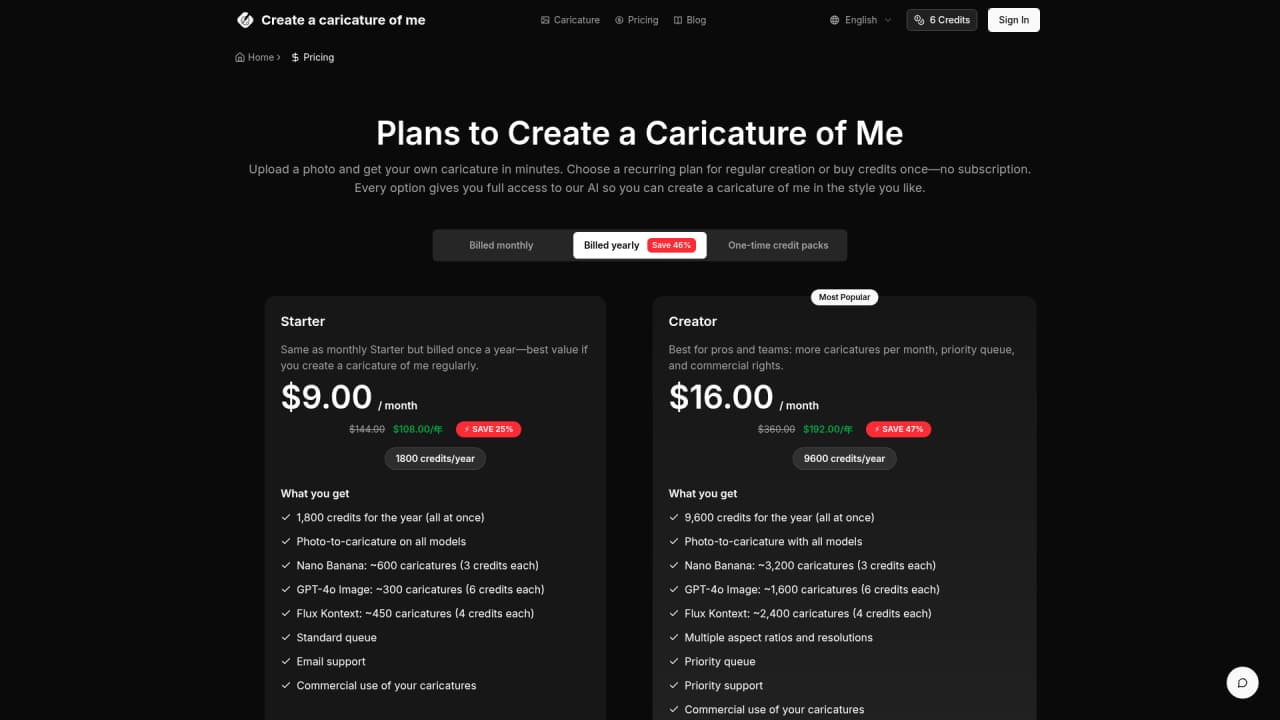
Annual plans (better value if you're a regular user):
Starter: $108/year (1,800 credits)
Pro: $192/year (9,600 credits)—this works out to just $16/month for way more credits
One-time credit packs: Also available if you don't want a subscription. These credits never expire.
Credit costs by model:
Nano Banana: 3 credits/image
Flux Kontext: 4 credits/image
GPT-4o Image: 6 credits/image
All paid plans include commercial usage rights, which is a big deal if you're using these for business.
Plan | Price | Credits | Cost per Credit | Best For |
|---|
Free Trial | $0 | 6 credits | Free | Testing it out |
Starter Monthly | $9/mo | 150/mo | $0.06 | Light users |
Pro Monthly | $16/mo | 800/mo | $0.02 | Regular users |
Starter Annual | $108/yr | 1,800/yr | $0.06 | Saving vs monthly |
Pro Annual | $192/yr | 9,600/yr | $0.02 | Heavy users |
My take? If you just want to play around, the free credits are enough to see if you like it. If you want actual ongoing use—regular social media content, gifts for family, team avatars—the Pro annual plan is the clear winner. You're essentially getting 5x the credits for slightly more than the monthly price.
Frequently Asked Questions
What's the difference between Image to Image and Text to Image generation?
Image to Image takes your existing photo and transforms it into a caricature style—the AI keeps your face recognizable but applies the cartoon effect. Text to Image lets you describe a character from scratch, though you'll typically get better results starting from an actual photo since the AI has your features to work with.
What photos work best?
Clear, well-lit photos where your face is visible work best. High resolution is good but not required—the tool handles up to 10MB per file. Avoid heavily filtered photos or those where your face is partially obscured, as the AI needs to "see" you to create an accurate caricature.
How much control do I have over the result?
You have two main controls: which AI model you choose (each produces different styles) and the text prompt where you can describe specific styles or modifications. The AI does the heavy lifting, but these give you directional control. It's not Photoshop-level precision, but for a few seconds of work, the results are surprisingly customizable.
How long does generation take?
The website says "seconds" and that's accurate for most generations. Depending on server load and which model you use, it typically takes 3-10 seconds. The fastest is Nano Banana; the higher-quality models like GPT-4o Image might take slightly longer.
What file formats and sizes are supported?
Supported input formats: JPEG, JPG, PNG, WebP. Maximum file size: 10MB. You can upload up to 10 images at once. Output is available in PNG or JPG.
Can I use the generated images for commercial purposes?
Yes! All paid plans include full commercial usage rights. That means you can use your caricatures on your website, in marketing materials, on products, in ads—whatever commercial application you need. The free trial credits are for personal use only.
Is there a limit on how many images I can convert?
There's no hard limit on conversions, but each image costs credits. Subscribers get monthly or annual credits depending on their plan. One-time credit packs don't expire, so you can stock up and use them whenever.
Ready to See Yourself as a Cartoon?
If you've ever wanted a fun, unique version of yourself without hiring an illustrator or spending hours in complex software, this is exactly what you've been looking for. The AI does the creative heavy lifting—you just need a photo and a few seconds.
The free trial gives you enough to test it out and see if the results make you smile. From there, the pricing is pretty accessible whether you're an occasional user or someone who wants to generate cartoons regularly.
Go ahead—upload that selfie and see what the AI does with your face. It's kind of addictive.
Try Create a Caricature of Me



Comments