
Pixa - The New Operating System for Creative Work
Launched on Feb 23, 2025Pixa (formerly Pixelcut) is an AI-powered creative work platform trusted by 50 million+ users. It offers all-in-one tools including background removal, image upscaling (up to 16x), AI video generation, and product showcase creation. With support for 30+ AI models including Sora 2, Flux, and Kling, Pixa serves creators, e-commerce sellers, and businesses needing professional marketing content. Pricing starts free, with Pro at $10/month and Business at $30/month.
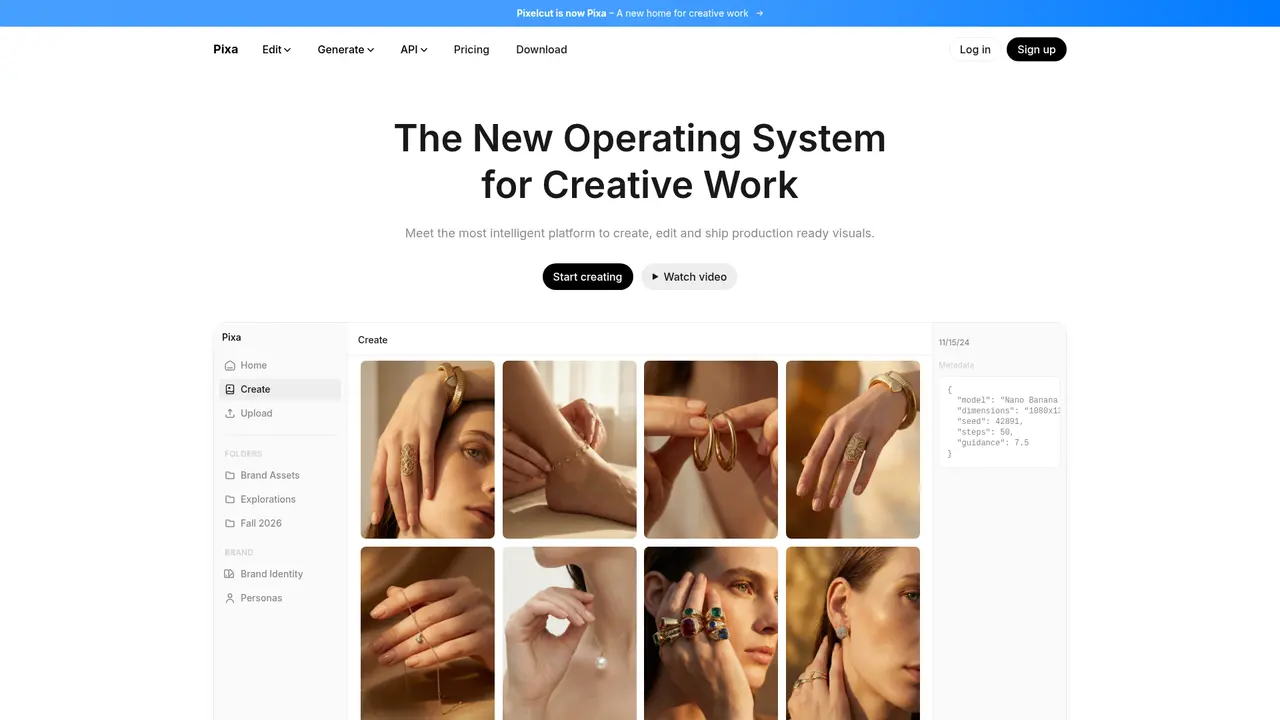
What Is Pixa: The New Operating System for Creative Work
Imagine spending hours trying to remove a background from product photos, only to get jagged edges that scream "amateur." Or imagine your small business needing professional marketing materials, but hiring a designer is simply beyond your budget. Perhaps you've experienced the frustration of watching a competitors social media feed and wondering how they manage to post high-quality content every single day while you're struggling to keep up.
These are the exact challenges that Pixa was built to solve.
Pixa (formerly Pixelcut) is an AI-powered creative work platform that brings together every tool you need to create professional-quality visual content in one place. Whether you're an e-commerce seller needing clean product images, a social media manager churning out daily content, or a small business owner who just wants marketing materials that don't look homemade, Pixa handles it all—from creation to publication.
What makes Pixa stand out is its comprehensive approach. Instead of juggling multiple apps for different tasks, you get background removal, image enhancement, AI video generation, and more all within a single platform. With over 50 million creators, brands, and businesses already using Pixa, it's clear that this isn't just another AI tool—it's becoming the new standard for how creative work gets done.
:::card{type="summary" title="TL;DR"}
- AI creative platform trusted by 50M+ users worldwide
- All-in-one solution: background removal, image enhancement, AI video, and more
- Supports 30+ top-tier AI models including Sora 2, Flux, Kling, and Veo
- Available on iOS, Android, Web, and via API
- Used by 200,000+ brands and small businesses :::
Pixa's Core Capabilities: Your Complete Creative Toolkit
What truly sets Pixa apart is how it combines powerful AI technology with remarkable ease of use. You don't need to be a technical expert or have design experience to create professional results. Let's explore what you can do with Pixa.
You can use background removal to instantly isolate any subject with precision that rivals professional editing. Pixa's proprietary AI algorithm handles both images and videos, recognizing edges with remarkable accuracy. Whether you're processing e-commerce product shots, preparing headshots, or creating transparent logos, the results speak for themselves—and unlike many tools, Pro and Business plans give you unlimited background removal.
You can upscale images up to 16x resolution without losing quality. That old product photo from years ago? The blurry image from a supplier? Pixa integrates industry-leading models including Topaz to transform low-resolution images into crisp, print-ready assets. This is game-changing for businesses working with legacy imagery or anyone needing to repurpose content for larger formats.
You can use Uncrop to intelligently extend your images and reframe them for different platforms. Found the perfect photo but it doesn't fit your Instagram square? Need to add space for text overlay? Pixa's AI analyzes your image and intelligently generates new content that seamlessly extends the original, giving you perfectly resized assets without cropping essential elements.
You can retouch and remove unwanted elements with generative fill technology. The magic eraser isn't just about removing photobombers—it's about complete creative control. Fix imperfections, remove distracting background elements, or completely transform a scene using text prompts. Your imagination sets the limits.
You can maintain brand consistency with Pixa's Identity feature. This is particularly valuable for brands and marketers. Define your brand's visual persona once, and Pixa ensures every piece of content maintains consistent character features and styling. Create a series of ads, social posts, or product images that unmistakably carry your brand identity.
You can generate AI videos from text prompts, integrating models like Sora 2, Kling, and Veo. Create product demonstrations, UGC-style ads, or social media videos without ever touching a camera. These models represent the cutting edge of AI video generation, enabling you to produce engaging video content at scale.
You can generate studio-quality product images from simple text descriptions. Upload your product, describe the environment you want, and Pixa creates professional lifestyle shots that would traditionally require expensive photography equipment and studio time.
You can create speaking avatar videos for ads using AI lip-sync technology. Transform static images into dynamic talking avatars perfect for TikTok, Instagram ads, or influencer marketing campaigns. This capability opens up possibilities that previously required video production teams.
::::grid :::card{type="advantages"}
- All-in-one platform: No more switching between apps—everything you need in one place
- 30+ AI models: Access to the latest and best AI image and video generation technology
- Unlimited usage on paid plans: Background removal and upscaling without worrying about quotas
- Team collaboration: Built-in features for small teams to work together
- API access: Integrate Pixa's capabilities into your own workflows and products
- Commercial license included: Use your creations for business purposes with peace of mind ::: :::card{type="disadvantages"}
- Free tier limitations: Limited daily uses for some features may not suit heavy users
- Learning curve: With so many features, new users may need time to explore everything available
- Credit-based system: Advanced AI features consume credits, requiring plan management ::: ::::
Who Is Pixa For: From Solo Creators to Enterprise Teams
Pixa is designed to serve a remarkably broad spectrum of users, from individual creators just starting out to established enterprises with demanding creative workflows.
If you're an e-commerce seller, Pixa transforms your product photography workflow. Traditional product shoots require studios, equipment, models, and extensive post-processing—costs that add up quickly. With Pixa, you upload your product photo, and the AI handles background removal, generates professional environments, and even creates virtual try-on images. You get studio-quality results in minutes instead of weeks, at a fraction of the traditional cost.
If you're a social media manager or content creator, maintaining a consistent posting schedule with high-quality visuals is challenging. Pixa's AI tools let you batch-create content efficiently. Generate variations, resize for different platforms, maintain brand identity across posts, and produce video content—all without a design team. The 1,200 daily credits for AI backgrounds and Pro Eraser on paid plans ensure you never have to pause your creative momentum.
If you run a small business, professional marketing materials shouldn't require a dedicated design department. Pixa democratizes professional creative work, giving you capabilities that were previously accessible only to large companies with big budgets. Create ads, social posts, flyers, and website imagery that compete with larger competitors—all from your laptop or phone.
If you're a marketing agency, Pixa becomes your secret weapon for client deliverable speed. The team features (3 seats on Pro, 10 on Business) enable collaboration, while API access lets you integrate Pixa's capabilities into your own production pipelines. Process high volumes of client assets efficiently, and use Identity features to maintain consistent styling across all client work.
If you're a developer or tech company, the API opens up entirely new possibilities. Integrate background removal, image upscaling, background generation, or try-on capabilities directly into your products. At just $0.01 per credit (with bulk pricing available), it's accessible for startups and scalable for enterprises.
:::card{type="tip" title="💡 Getting Started Tip"} Start with the free plan to explore Pixa's core features. Once you understand which tools you use most (likely background removal and upscaling if you're in e-commerce), upgrade to Pro for unlimited access. The $10/month plan pays for itself after avoiding just one professional editing session. :::
What Users Are Saying About Pixa
The best way to understand Pixa's impact is to hear from the people who use it every day.
"Pixa has become our go-to tool for all product imagery. We've eliminated the need for external photographers for most of our catalog, saving thousands of dollars every month. The background removal quality rivals what we'd get from a professional retoucher." — E-commerce business owner
"As a solo entrepreneur, I couldn't afford a designer. Pixa gives me professional-quality marketing materials in minutes. I look like I have a full creative team behind me." — Small business founder
"The AI video generation is incredible. We created a month's worth of social media content in a single afternoon. Our engagement has increased significantly since we started using Pixa." — Social media manager
"We use the API to process thousands of product images daily. The reliability and speed have been outstanding, and the pricing scales beautifully with our needs." — Tech company developer
These aren't just testimonials—they represent the real-world impact Pixa has on businesses of all sizes. The platform powers millions of image creations daily, and with a loved-by-2-million-user seal of approval, the results speak for themselves.
Pixa Pricing: Finding the Right Plan for Your Needs
Pixa offers transparent, straightforward pricing designed to match different usage levels and team sizes. Whether you're a solo creator or managing a growing business, there's a plan that fits.
Web & App Subscriptions
| Plan | Price | Key Features | Best For | |------|-------|--------------|----------| | Free | $0 | Limited background removal & upscaling, watermark-free export | Casual users, trying the platform | | Pro | $10/month (billed annually) | 600 AI credits/month, unlimited background removal & upscaling, 300/day Magic Eraser & Expand, 1,200/day AI Backgrounds, 3 team seats, batch editing, commercial license | Individual creators, small teams | | Business | $30/month | 3,600 AI credits/month, unlimited background removal & upscaling, 1,200/day Magic Eraser & Expand, 1,200/day AI Backgrounds, 10 team seats, batch editing, commercial license | Growing teams, agencies |
The Pro plan at $10/month (or $8/month with annual billing) offers exceptional value, especially considering unlimited background removal alone would cost significantly more from specialized tools. The 20% annual discount makes it even more accessible.
API Pricing
For developers and businesses needing programmatic access:
| Credits | Price | Cost per Credit | |---------|-------|-----------------| | 1,000 | $10 | $0.01 | | 5,000 | $50 | $0.01 | | 10,000 | $100 | $0.01 | | 25,000 | $250 | $0.01 | | 50,000 | $500 | $0.01 | | 100,000 | $1,000 | $0.01 | | 1,000,000 | $10,000 | $0.01 |
API credit consumption is straightforward: Background Removal costs 5 credits per request, while Image Upscaler, Generate Background, and Try-On each cost 10 credits. At $0.01 per credit regardless of volume, pricing remains predictable and scalable.
Credit Usage Examples
Understanding how credits translate to actual usage helps you plan effectively:
Image Generation (credits per image):
- Nano Banana 2 / Pro: 20 credits
- ChatGPT Image: 15 credits
- Flux 2 Max: 42 credits
- Ideogram v3: 33 credits
Video Generation (credits per 5-second video):
- Sora 2: 6 credits
- Sora 2 Pro: 1 credit
- Kling v3.0 Pro: 7 credits
- Veo 3.1: 1 credit
This means your 600 monthly Pro credits could generate approximately 40 images using ChatGPT Image, or about 100 videos using Sora 2 Pro—substantial capacity for content creation.
Frequently Asked Questions
:::card{type="faq" title="Do I need design experience to use Pixa?"} Not at all. Pixa is designed specifically to make professional creative work accessible to everyone. The AI handles the complex editing tasks, and the interface is intuitive enough that anyone can produce quality results within minutes of starting. :::
:::card{type="faq" title="Can I use Pixa for commercial purposes?"} Yes. Both Pro and Business plans include a commercial license, meaning you can use your creations for business marketing, advertising, e-commerce, and client work without attribution or restrictions. :::
:::card{type="faq" title="What's the difference between Pixelcut and Pixa?"} Pixa is the new brand name for what was formerly Pixelcut. The platform has evolved to offer more comprehensive creative tools beyond just image editing. You'll find the same powerful features, now under the Pixa name. :::
:::card{type="faq" title="Is there a free trial for Pro or Business plans?"} The free plan gives you limited access to explore the platform. To unlock unlimited usage and access all AI models, you'll need to upgrade to Pro or Business. However, the free plan is sufficient to evaluate the quality of results before committing. :::
:::card{type="faq" title="How does Pixa compare to hiring a professional designer or photographer?"} For many use cases, Pixa eliminates the need entirely. Product photography that would require studio time, equipment, and post-processing can be accomplished in minutes. For complex creative projects requiring art direction and conceptual work, a professional designer still has a role—but Pixa dramatically reduces the volume of work that needs to be outsourced. :::
:::card{type="faq" title="Can I integrate Pixa into my own applications?"} Yes. Pixa offers a comprehensive API for developers. You can integrate background removal, image upscaling, background generation, and try-on capabilities directly into your products or workflows. Visit the API documentation at pixa.com/docs for technical details. :::
:::card{type="faq" title="What happens if I exceed my monthly credit limit?"} On free plans, you'll need to wait until the next day for credit resets. On Pro and Business plans, additional credits can be purchased at the standard $0.01 per credit rate, or you can upgrade to a higher plan for more monthly credits. :::
:::card{type="faq" title="Is my data secure?"} Pixa provides complete privacy policies and terms of service. Your creations remain yours, and the platform uses industry-standard security practices. For API users, data processing follows the API terms of service. :::
---
Ready to transform your creative workflow? Whether you're a solo creator, growing business, or enterprise team, Pixa offers the tools you need to produce professional-quality visual content at scale.
Start with the free plan to explore, upgrade to Pro when you're ready to unlock unlimited potential, or contact the team for Business pricing if you're managing a larger organization. With 50 million users already on board, you're joining one of the largest creative communities in the world.
Related Content

Copy.ai Review 2026: AI Copywriting Made Easy
Our honest Copy.ai review for 2026. We test Content Agents, AI Workflows, pricing ($29-$249/mo), and compare it to Jasper and Writesonic. Find out if it's worth it for your marketing team.

Rytr Review 2026: Is This Budget AI Writer Worth It?
Our hands-on Rytr review for 2026. We test features, pricing, content quality, and compare it to Jasper & ChatGPT. Find out if Rytr is the best budget AI writing tool.

Word Changer - Free AI tool to rewrite and improve your writing instantly
Writing always using repetitive words or need to avoid plagiarism? Word Changer is a free AI writing assistant that instantly rewrites any text with richer vocabulary and appropriate tone. Get multiple versions with one click, adjust formality level, check readability - all for free!

Unite - AI-powered platform for romantic fantasies and dream couple moments
Explore romantic fantasies and create special moments for your dream couple. This AI-powered platform lets you generate personalized romantic content and experience exclusive AI-created romantic experiences.
Comments