Logo
ProductsBlogs
Submit

Categories

  • AI Coding
  • AI Writing
  • AI Image
  • AI Video
  • AI Audio
  • AI Chatbot
  • AI Design
  • AI Productivity
  • AI Data
  • AI Marketing
  • AI DevTools
  • AI Agents

Featured Tools

  • Coachful
  • Wix
  • TruShot
  • AIToolFame
  • ProductFame
  • Google Gemini
  • Jan
  • Zapier
  • LangChain
  • ChatGPT

Featured Articles

  • The Complete Guide to AI Content Creation in 2026
  • 5 Best AI Agent Frameworks for Developers in 2026
  • 12 Best AI Coding Tools in 2026: Tested & Ranked
  • Cursor vs Windsurf vs GitHub Copilot: The Ultimate Comparison (2026)
  • 5 Best AI Blog Writing Tools for SEO in 2026
  • 8 Best Free AI Code Assistants in 2026: Tested & Compared
  • View All →

Subscribe to our newsletter

Receive weekly updates with the newest insights, trends, and tools, straight to your email

Browse by Alphabet

ABCDEFGHIJKLMNOPQRSTUVWXYZOther
Logo
English中文PortuguêsEspañolDeutschFrançais|Terms of ServicePrivacy PolicyTicketsSitemapllms.txt

© 2025 All rights reserved

  • Home
  • /
  • Products
  • /
  • AI Image
  • /
  • Swapface - Transform your face in real-time
Swapface

Swapface - Transform your face in real-time

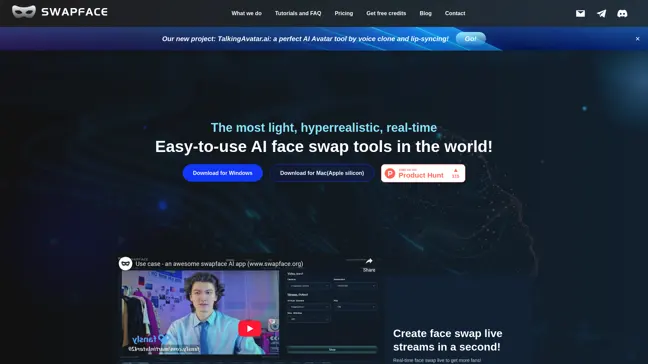
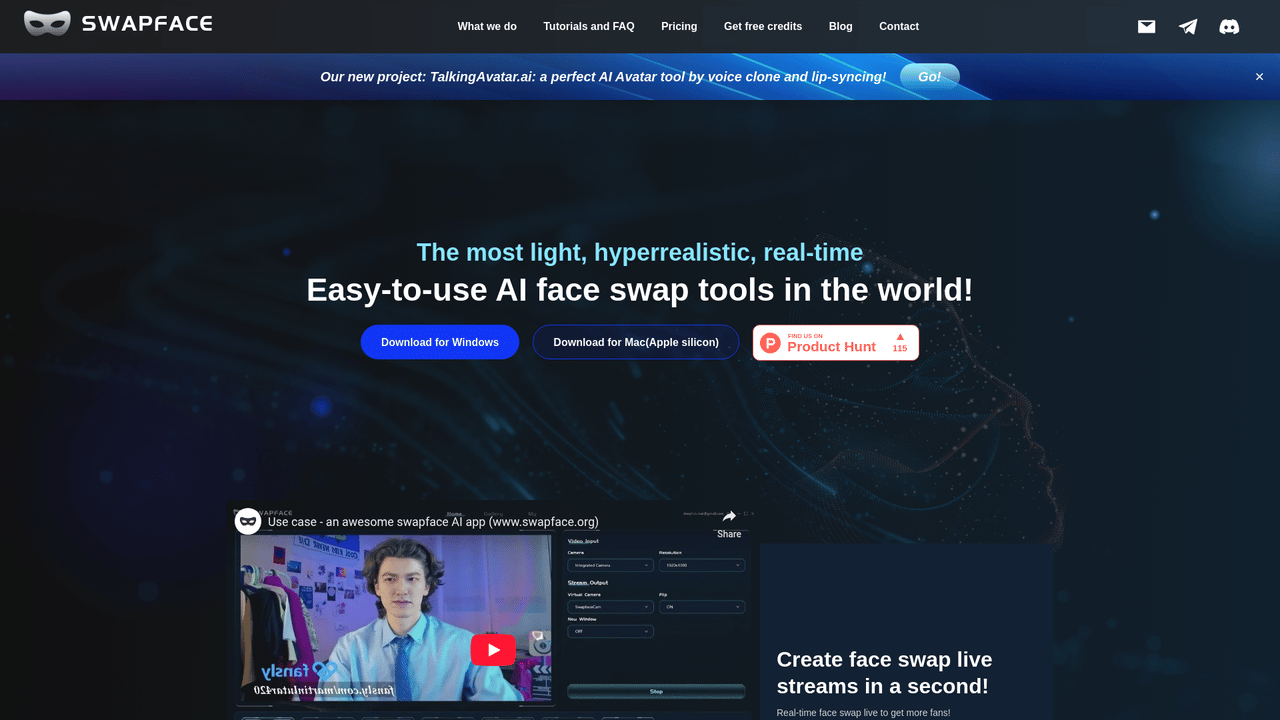
Swapface offers a revolutionary face swap technology that allows you to create stunning real-time face swaps effortlessly. With our user-friendly interface, you can connect your camera and start swapping faces in seconds. Experience hyperrealistic results powered by advanced AI models, suitable for live streams, videos, and gifs.

AI ImageFreeVideo EditingImage GenerationVideo Generation
Visit Website
Product Details
Swapface - Main Image
Swapface - Screenshot 1
Swapface - Screenshot 2

Unlock the power of real-time face swapping with Swapface. Whether you're a content creator, gamer, or just looking to have fun, our technology allows you to swap faces live with ease. Join the growing community and captivate your audience!

How It Works

Swapface utilizes cutting-edge AI algorithms to analyze and swap faces in real-time. This process involves several key steps:

  • Real-time Detection: The software identifies and tracks faces in the video feed using advanced facial recognition technology.
  • Face Mapping: It maps facial features and expressions onto the target face to ensure a natural and realistic swap.
  • Rendering: With powerful GPU acceleration, the swapped face is rendered in HD quality, providing a smooth experience without lag.
  • Output: Users can seamlessly broadcast their face-swapped video to various platforms, enhancing their live streams or recorded content.

Usage

To get started with Swapface, follow these simple steps:

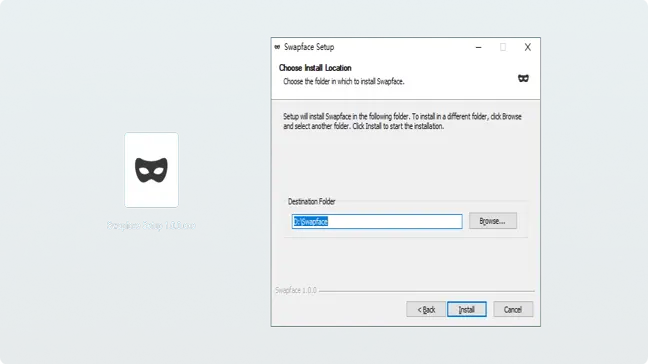
  1. Download and install the Swapface app on your device.
  2. Connect your camera and launch the app.
  3. Choose the face you want to swap with from the gallery or upload your own.
  4. Click the 'Start' button to begin live face swapping.
  5. Adjust settings as needed for optimal performance.
  6. Share your live stream or video with friends or on social media!

Live Streaming

Enhance your live streams by swapping faces with popular characters, engaging your audience like never before.

Video Editing

Incorporate face swapping into your video projects for a unique and entertaining viewing experience.

Social Media Posts

Create fun and interactive posts by swapping faces, increasing engagement and shares.

Virtual Meetings

Add a fun twist to your virtual meetings by swapping faces with colleagues or avatars.

Gaming Videos

Make your gaming videos stand out by incorporating real-time face swaps with your character.

Party Entertainment

Use Swapface at parties to entertain guests with hilarious face swaps in real-time.

Features

  • Real-time Face Swap: Experience seamless and instant face swapping during live streams or recordings.
  • User-friendly Interface: Easily connect your camera and start swapping faces with just a click.
  • High Definition Quality: Enjoy HD quality images and videos thanks to our advanced rendering technology.
  • Privacy Protection: All processing occurs on your local machine, ensuring your data remains private.
  • Cost Efficiency: Utilize a mid-range graphics card for optimal performance without breaking the bank.
  • AI-Powered Technology: Benefit from hyperrealistic face representation through our sophisticated AI models.

Free Plan (Daily): Free

  • 10 image faces upload per day
  • 10 video faces upload per day
  • 10 stream faces upload per day
  • 10 image faceswap per day
  • 10 video faceswap per day
  • 10 stream faceswap per day

Pay as you go (On-demand): $19.0 for 100 Credits

  • Only for Image and video faceswap
  • 1 image faceswap = 1 credit
  • 1 video faceswap = 4 credits
  • Nvidia GPU acceleration (Over 2x)

Pro Plan (Monthly): $39.0 Monthly

  • 50 image faceswap per day
  • 50 video faceswap per day
  • Unlimited image faces upload
  • Unlimited video faces upload
  • Unlimited stream faceswap
  • HD MP4 for video faceswap

Advance Plan (Monthly): $69.0 Monthly

  • 100 image faceswap per day
  • 100 video faceswap per day
  • Unlimited faces upload
  • Fast mode for stream faceswap
  • HD MP4 for video faceswap

Enterprise Plan (Monthly): $249.0 Monthly

  • 300 image faceswap per day
  • 300 video faceswap per day
  • Unlimited stream faces upload
  • Suitable for live streaming
  • All modes for stream faceswap

FAQ

  1. Should I get Pay-as-you-go or a subscription?

It depends on your usage. If you plan to swap faces frequently, a subscription may offer better value.

  1. Can I cancel my subscription?

Yes, you can cancel your subscription at any time without penalty.

  1. What payment methods do you support?

We accept major credit cards, PayPal, and other secure payment options.

  1. Can I change my subscription plan?

Absolutely! You can upgrade or downgrade your plan at any time.

  1. How to get a refund?

Please contact our support team for assistance with refunds.

  1. Is Swapface safe to use?

Yes, all data processing occurs locally on your machine, ensuring your privacy.

  1. What are the system requirements for Swapface?

You need Windows 10 or newer, an Intel Core i5 or AMD Ryzen processor, and a compatible graphics card.

  1. Can I use Swapface on Mac?

Yes, Swapface is available for Mac users, including Apple Silicon.

Explore AI Potential

Discover the latest AI tools and boost your productivity today.

Browse All Tools
Swapface
Swapface

Swapface offers a revolutionary face swap technology that allows you to create stunning real-time face swaps effortlessly. With our user-friendly interface, you can connect your camera and start swapping faces in seconds. Experience hyperrealistic results powered by advanced AI models, suitable for live streams, videos, and gifs.

Visit Website

Featured

Coachful

Coachful

One app. Your entire coaching business

Wix

Wix

AI-powered website builder for everyone

TruShot

TruShot

AI dating photos that actually get matches

AIToolFame

AIToolFame

Popular AI tools directory for discovery and promotion

ProductFame

ProductFame

Product launch platform for founders with SEO backlinks

Featured Articles
5 Best AI Agent Frameworks for Developers in 2026

5 Best AI Agent Frameworks for Developers in 2026

Compare the top AI agent frameworks including LangGraph, CrewAI, AutoGen, OpenAI Agents SDK, and LlamaIndex. Find the best framework for building multi-agent AI systems.

12 Best AI Coding Tools in 2026: Tested & Ranked

12 Best AI Coding Tools in 2026: Tested & Ranked

We tested 30+ AI coding tools to find the 12 best in 2026. Compare features, pricing, and real-world performance of Cursor, GitHub Copilot, Windsurf & more.

Information

Views
Updated

Related Content

Midjourney Review 2026: Features, Pricing & What's New
Blog

Midjourney Review 2026: Features, Pricing & What's New

Our in-depth Midjourney review for 2026 covers the latest features, pricing plans, image quality tests, and how it compares to DALL-E and Stable Diffusion.

ImageUpsize - AI-Powered Image Upscaling Tool for High-Quality Photos
Tool

ImageUpsize - AI-Powered Image Upscaling Tool for High-Quality Photos

Need to enlarge photos without losing quality? ImageUpsize uses AI Super-Resolution technology to enlarge images up to 6x while actually improving detail. Perfect for photographers, designers, and e-commerce. Free plan includes 20 images monthly with no watermarks.

ExtendImage - Effortlessly enhance your visuals with AI
Tool

ExtendImage - Effortlessly enhance your visuals with AI

ExtendImage is an AI-powered image extender that allows you to effortlessly expand your photos beyond their original frames. With our Magic Expand feature, you can quickly adjust aspect ratios, salvage zoomed-in pictures, or transform vertical photos into landscape formats. The user-friendly interface ensures a seamless experience as you refine your images, with options to select preferred sizes, aspect ratios, and even specific sections for targeted expansion. ExtendImage guarantees that your images maintain their quality, color, and style, making it perfect for social media, marketing, and creative projects.

Idyllic - AI-powered platform that transforms words into stunning visuals
Tool

Idyllic - AI-powered platform that transforms words into stunning visuals

Idyllic is an AI-powered image creation platform that transforms your text descriptions into stunning visuals. With advanced generative AI algorithms, conversational editing, and adaptive memory, it offers a unique creative experience for creators, designers, and marketers without requiring any design expertise.