

- Monthly visits
- 2,751
- 2026-09
- Monthly growth +922.7%
Ness - AI health coaching from your Apple Health data
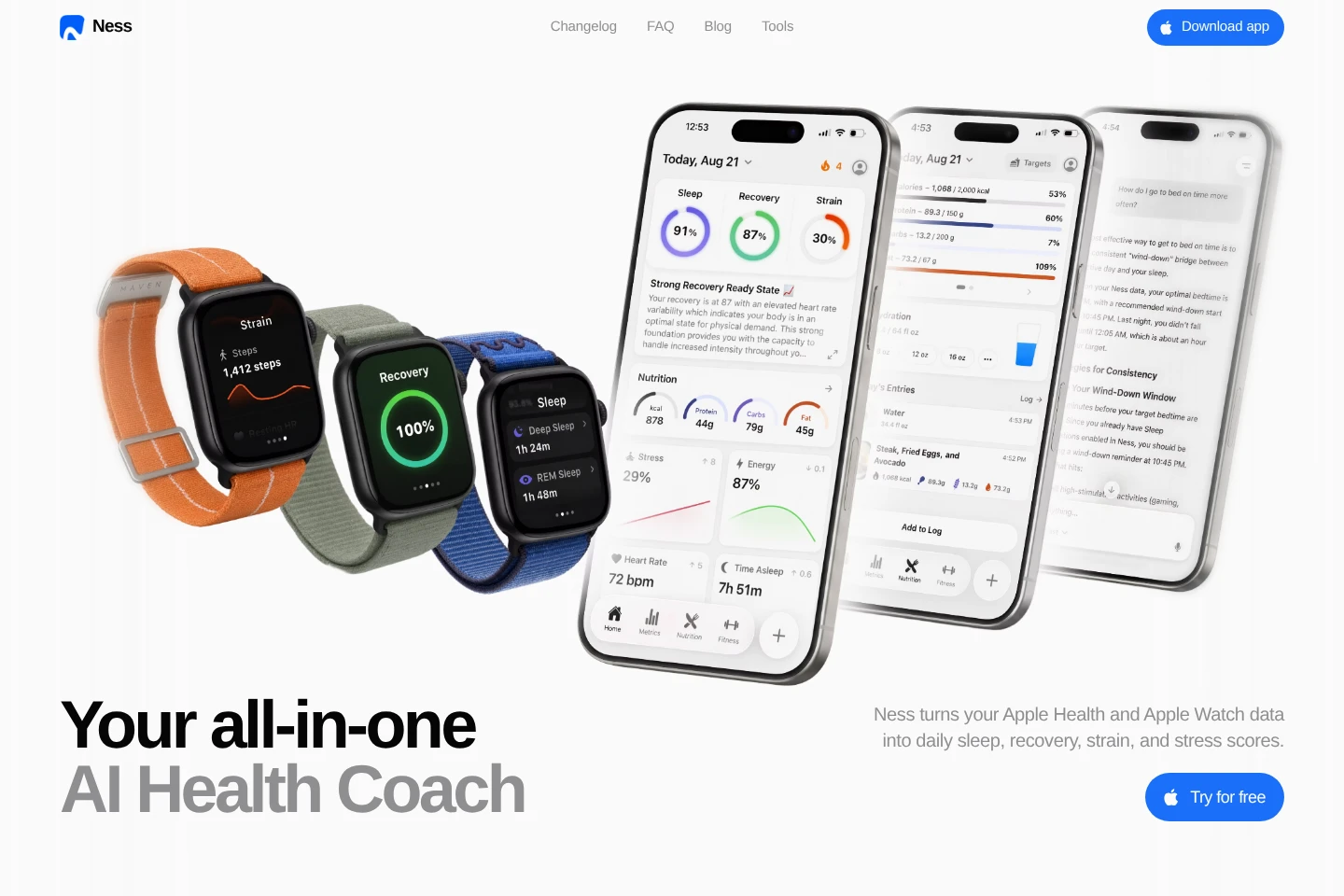
Ness is an iPhone and Apple Watch health-coaching app that analyzes Apple Health data to provide daily scores and guidance. It supports food and drink logging by search, chat, voice, photo, or Lock Screen, tracks nutrition and hydration, and explains uploaded lab results in context with health data.
- AI Lifestyle
- Health Assistants
- Calorie Counters
- Fitness
- Nutrition
- Apple Health AI coach
- nutrition and hydration tracking
- sleep recovery strain scores
Capabilities
Daily health scores
Daily scores summarize sleep, recovery, strain, and stress using Apple Health and Apple Watch data. Users can open a score for more detail or ask Ness about it.
AI health coaching
The coach gives daily guidance and answers health questions using sleep, activity, nutrition, and other health data. It uses AI models and web search to ground responses.
Food and drink logging
Food and drinks can be logged by search, chat, voice, photo, or Lock Screen. Ness tracks nutrients, including fiber, sodium, vitamins, and minerals, from logged items.
Lab result explanations
Users can upload lab results for explanations of what results mean and how they relate to other health data. The feature provides explanations, not a medical-device diagnosis.
Health metrics and trends
Ness keeps metric history and displays long-term comparisons across weeks and months. Stress is shown as a daily timeline, and energy as an hourly view based on stress, rest, and workouts.
Apple Watch views
The Apple Watch app displays health scores at a glance without opening the iPhone app. Ness is available for iPhone and Apple Watch.
Pricing
Pricing and billing details are not stated in the supplied pages. Compare current plan and payment information in the App Store before subscribing.
Use cases
Review daily health and recovery
When checking how sleep, recovery, strain, and stress relate to the day, users review Ness's daily scores and open individual scores for details. They can also ask the coach about the data.
Log meals, drinks, and hydration
When recording what they eat and drink, users add entries through search, chat, voice, photos, or the Lock Screen. Ness tracks hydration and nutrients from the logged items.
Understand uploaded lab results
When they want help interpreting lab results alongside personal health information, users upload the results to Ness. The app explains each result in relation to other health data; it is not a medical device.
Compare health metrics over time
When following changes in health metrics, users view Ness's stored history and compare weeks or months. This makes changes in tracked measures visible over time.
Limitations
Ness is not a medical device, so its coaching and lab-result explanations are not a medical diagnosis.
The app is offered for iPhone and Apple Watch; the supplied pages do not identify Android or other platform versions.
Who it is for
iPhone users who want daily guidance based on Apple Health and Apple Watch data
People who want to log food and drinks and follow hydration and nutrient intake
People seeking explanations of uploaded lab results alongside their health data
FAQ
What does Ness do with Apple Health data?
Ness uses Apple Health and Apple Watch data to calculate daily sleep, recovery, strain, and stress scores and provide health guidance. Users can inspect scores and ask the coach about their health data.
How can I log food and drinks?
Ness supports logging by search, chat, voice, photo, or Lock Screen. It tracks nutrients from logged items and also provides hydration tracking.
Can Ness explain lab results?
Yes. Users can upload lab results and Ness explains what each result means in relation to other health data. Ness is not a medical device.
Does Ness have an Apple Watch app?
Yes. Ness is available for iPhone and Apple Watch, and the watch app shows scores at a glance without opening the phone.
How much does Ness cost?
The supplied pages do not state a price or plan details. They link to the App Store and use the phrase “Try for free,” which does not establish whether a permanent free plan or a trial is available.
Comments