


Luw.ai - AI-powered architecture visualization for professional designers
Launched on Feb 23, 2025Luw.ai is an AI-powered architecture visualization platform that helps architects and designers transform ideas into stunning renderings in seconds. With 18+ AI tools including Interior AI, Exterior AI, and 3DGen, you can upload photos and generate professional interior and exterior designs. Perfect for real estate marketing, renovation projects, and architectural concept visualization.
What is Luw.ai — AI-Powered Architectural Design Visualization Platform
If you've ever tried to visualize what a room could look like after a renovation, you know the frustration. Traditional rendering takes days, requires expensive software, and usually needs a professional designer to operate. For most homeowners, getting a professional-grade design visualization has been simply out of reach—until now.
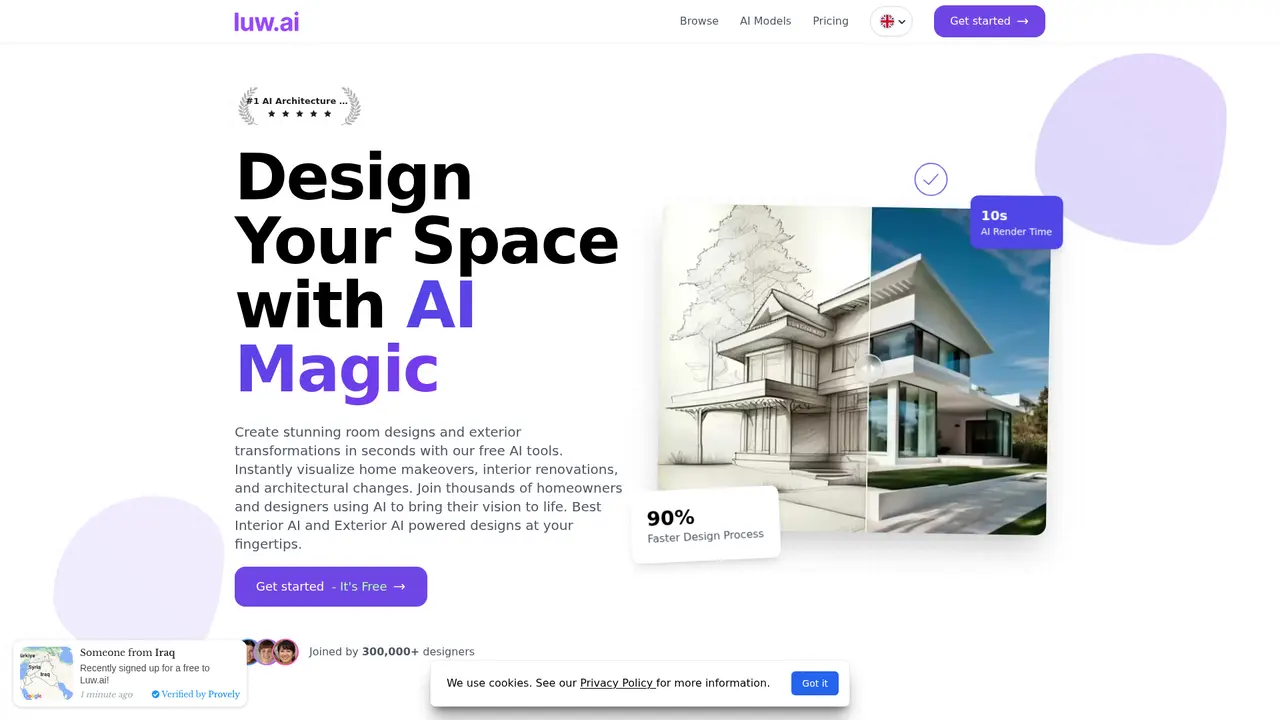
Luw.ai is an AI-driven platform that transforms the way architects, designers, and homeowners approach space design. Whether you're a professional architect working on a commercial project or a homeowner curious about how a new paint color might look in your living room, Luw.ai puts professional-grade rendering capabilities right at your fingertips. The platform generates stunning interior and exterior design renderings in just 10 seconds—something that previously required hours of work from skilled 3D artists.
What makes Luw.ai particularly powerful is its simplicity. You don't need any design experience or technical skills. Simply upload a photo of your space, choose from a range of design styles, and the AI does the rest. Within seconds, you'll see multiple design options that would have taken days to create using traditional methods.
The platform has already earned the trust of over 300,000 registered designers who have collectively generated more than 25,000,000 design projects. With a verified rating of 4.9 out of 5 from over 1,000 reviews, it's clear that users consistently achieve the results they need. Companies like PWC, RE/MAX, Zillow, Airbus, AT&T, Amazon, Compass, DHL, Coldwell Banker, and Century 21 rely on Luw.ai for their design visualization needs—ranging from real estate marketing to large-scale architectural projects.
:::card{type="summary" title="TL;DR"}
- 18+ AI design tools covering interior, exterior, 3D, and video generation
- 10-second AI rendering with 90% faster design workflows
- Compatible with all major 3D software including 3ds Max, Revit, SketchUp, and Blender
- Trusted by 300,000+ designers and enterprise clients worldwide :::
---
Luw.ai's Core Features
The platform offers a comprehensive suite of AI-powered tools designed to handle every aspect of architectural visualization. Each tool is built around real user needs, focusing on delivering practical results rather than just impressive technology.
Interior AI V2 & Exterior AI V2
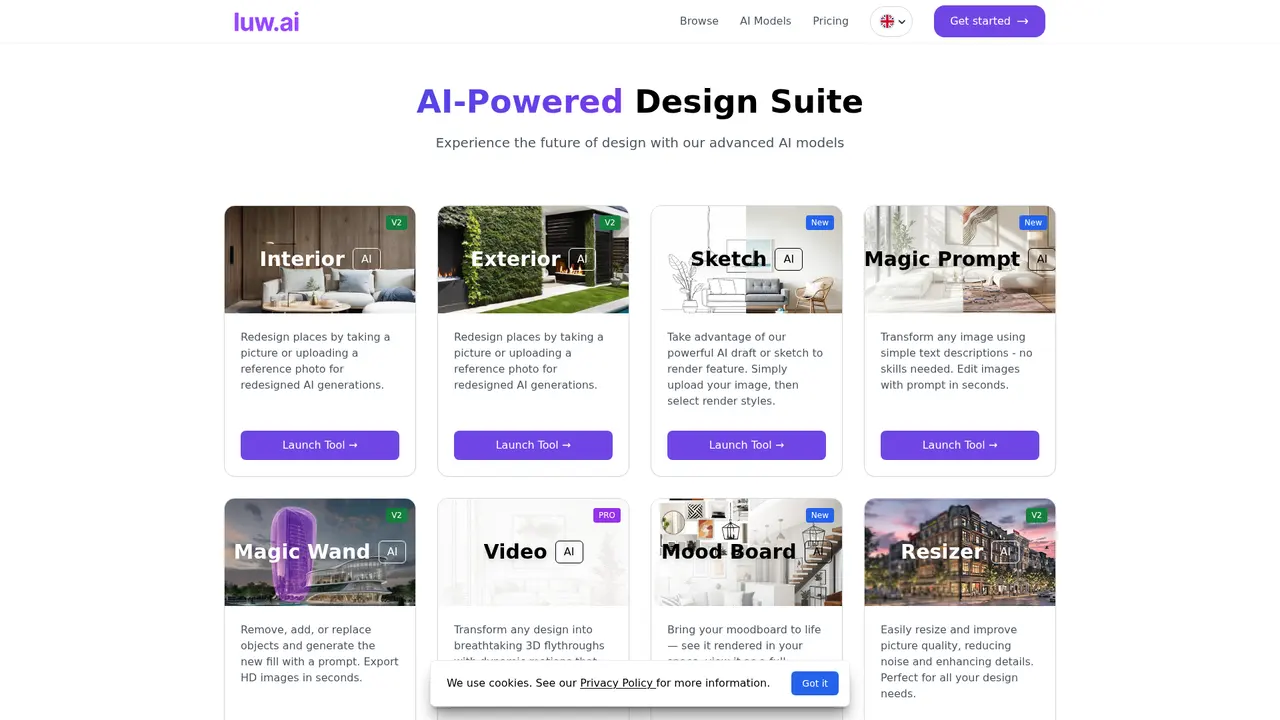
These are the heart of the Luw.ai experience. Interior AI V2 lets you upload any room photo and instantly generates multiple design options—whether you're looking to renovate a kitchen, redesign a bedroom, or reimagine an entire floor plan. Exterior AI V2 does the same for building facades and landscapes, perfect for homeowners considering curb appeal upgrades or architects presenting facade renovation options to clients. Both tools complete rendering in just 10 seconds, giving you instant visual feedback on design decisions.
Sketch AI
Not everyone works digitally from the start. Sketch AI transforms hand-drawn sketches into professional-quality renderings, bridging the gap between initial concept and polished presentation. This is invaluable for designers who want to quickly communicate ideas to clients or for clients who have their own vision they'd like to see visualized. Simply upload your sketch, describe your intended outcome, and watch it come to life.
Magic Wand AI V2
Sometimes you don't want to redesign an entire room—you just need to change one element. Magic Wand AI V2 allows for precise局部修改, letting you remove unwanted objects, add new elements, or adjust specific areas while preserving the rest of your image. Describe what you want changed, and the AI intelligently fills in or modifies just that section.
3DGen V2
For projects requiring three-dimensional representation, 3DGen V2 converts text descriptions or existing images into detailed 3D models. These models can be exported and used in other 3D software, making the tool a powerful bridge between AI visualization and professional workflows. Architects can quickly generate multiple 3D options to present to clients, dramatically speeding up the design iteration process.
Video AI PRO
Static images are powerful, but sometimes you need to show spaces in motion. Video AI PRO transforms your static designs into immersive 3D flythrough animations—perfect for real estate listings, hotel presentations, or client demonstrations. Instead of describing how a space flows, you can show potential buyers or investors exactly what to expect.
ArchiGPT V2
Think of this as having an AI architectural consultant available 24/7. ArchiGPT V2 provides conversational assistance for design decisions, including feng shui recommendations, space utilization analysis, and personalized design suggestions. It's particularly valuable for projects where cultural considerations or spatial optimization are important, helping users make informed decisions backed by architectural principles.
Additional Tools
The platform includes many more specialized tools: Resizer AI V2 for AI-powered upscaling up to 8x resolution (crucial for large-format printing), Remove Furniture AI for virtual staging, Change Background AI for product and real estate photography, Pattern AI for generating tileable textures, Landscape AI for garden and exterior design, and Expand AI for AI-powered image extension that intelligently fills in missing architectural elements.
---
Who's Using Luw.ai — Use Cases
Luw.ai serves a diverse range of users, from industry professionals to everyday homeowners. Understanding which tools match your needs can help you get started quickly.
Home Renovation Visualization
If you're planning a home improvement project, Luw.ai eliminates the guesswork from design decisions. Upload a photo of your current room, select your preferred styles, and see multiple renovation options within minutes. This helps you make confident decisions before committing to expensive renovations. You'll avoid the common problem of "it looked different in my imagination" and actually see how different layouts, colors, and furniture arrangements will look in your specific space.
Real Estate Marketing
Real estate professionals use Luw.ai to transform vacant properties into inviting spaces through virtual staging. Instead of showing empty rooms that struggle to connect with buyers, agents can present multiple furnished styles that help potential buyers envision themselves in the space. This approach has been shown to increase property appeal and shorten sales cycles—properties with quality visualizations simply perform better in competitive markets.
Architectural Design Iteration
Architects and design studios use Luw.ai to rapidly iterate through design concepts. Traditional rendering can take hours or days, but Luw.ai generates multiple options in seconds. This 90% efficiency improvement means architects can explore more design variations, present better options to clients, and ultimately deliver superior results. One professional interior designer, Sarah Gabriel, reported generating over 50 room designs in a single week—work that would previously have taken months.
Hotel and Hospitality Renovation
The hospitality industry has found particular value in Luw.ai's capabilities. L'Exclusive hotels used the ArchiGPT optimization tools to redesign luxury suites and villas, significantly reducing renovation costs while improving booking rates. Being able to visualize changes before committing to construction saves substantial resources and helps hoteliers make decisions that positively impact guest experience and revenue.
Designer-Client Communication
Design professionals often struggle to communicate abstract concepts to clients. Luw.ai solves this by transforming rough ideas into photorealistic renderings in moments. Whether starting from a sketch or a verbal description, designers can quickly show clients what they mean, iterate on feedback, and build consensus around design directions. This dramatically improves client satisfaction and reduces revision cycles.
3D Rendering Acceleration
For teams already working in 3D software, Luw.ai accelerates the rendering pipeline significantly. Take a screenshot from any 3D model—created in tools like 3ds Max, Revit, SketchUp, or Blender—and enhance it with AI. Rendering time drops from hours to seconds, while the results maintain professional quality suitable for client presentations and marketing materials.
:::card{type="tip" title="💡 Choosing the Right Tools"}
- Homeowners: Start with Interior AI to visualize renovations; use Landscape AI for outdoor projects
- Real Estate Agents: Combine Remove Furniture AI, Change Background AI, and Video AI for listing presentations
- Professional Designers: Use the full toolkit, especially Sketch AI for concept work and 3DGen V2 for client presentations
- Architects: Focus on Exterior AI, 3DGen V2, and ArchiGPT for design consultation :::
---
Technical Capabilities and Compatibility
Luw.ai is built for professionals who need reliable, high-quality output without sacrificing workflow flexibility. The technical foundation addresses the real demands of architectural visualization work.
Performance and Speed
The platform's AI rendering completes in just 10 seconds—a dramatic improvement over traditional rendering pipelines that can take hours. This speed doesn't come at the cost of quality; the output maintains the professional standards expected in architectural presentations and marketing materials. Users consistently report 90% faster design workflows, enabling more iterations and better final results.
Output Quality
Designs can be exported at HD, 4K, or 8K resolution, with Resizer AI V2 providing 4x (Basic) or 8x (Pro) AI-powered upscaling. This means your visualizations will look sharp whether displayed on a website, printed in a brochure, or presented on a large screen. The platform handles the technical complexity of high-resolution output automatically.
Software Compatibility
One of Luw.ai's strongest technical advantages is broad compatibility. The AI tools work with output from all major 3D modeling software, including Autodesk 3ds Max, Revit, SketchUp, Blender, and virtually any other 3D application. The workflow is simple: create your 3D model in whatever software you prefer, take a screenshot, and import it into Luw.ai for AI-enhanced rendering. This eliminates the need to learn new software or change established workflows.
Mac users have an additional option: the Luw Screenshot application, which provides an optimized capture experience for Mac users importing their work into the platform.
Continuous Improvement
The platform maintains an active development roadmap, with multiple tools already updated to V2 versions indicating significant performance and quality improvements. This commitment to ongoing development ensures users benefit from the latest advances in AI visualization technology.
::::grid :::card{type="advantages"}
- Speed: 10-second rendering vs. hours with traditional methods
- Quality: Professional 4K/8K output suitable for any application
- Compatibility: Works with all major 3D software (3ds Max, Revit, SketchUp, Blender)
- Flexibility: 18+ specialized tools cover every visualization need
- Learning Curve: Intuitive interface requires no technical expertise ::: :::card{type="disadvantages"}
- Free Tier Limitations: Free version limited to 3 generations per day with watermarked output, non-commercial use only
- Internet Required: Cloud-based processing requires stable internet connection
- Style Constraints: While highly versatile, AI-generated results may not perfectly match highly specific or unconventional design visions without iteration ::: ::::
---
Luw.ai Pricing Plans
Choosing the right plan depends on your usage volume and professional needs. All paid plans include commercial licensing, secure payment via Stripe, and the flexibility to cancel anytime.
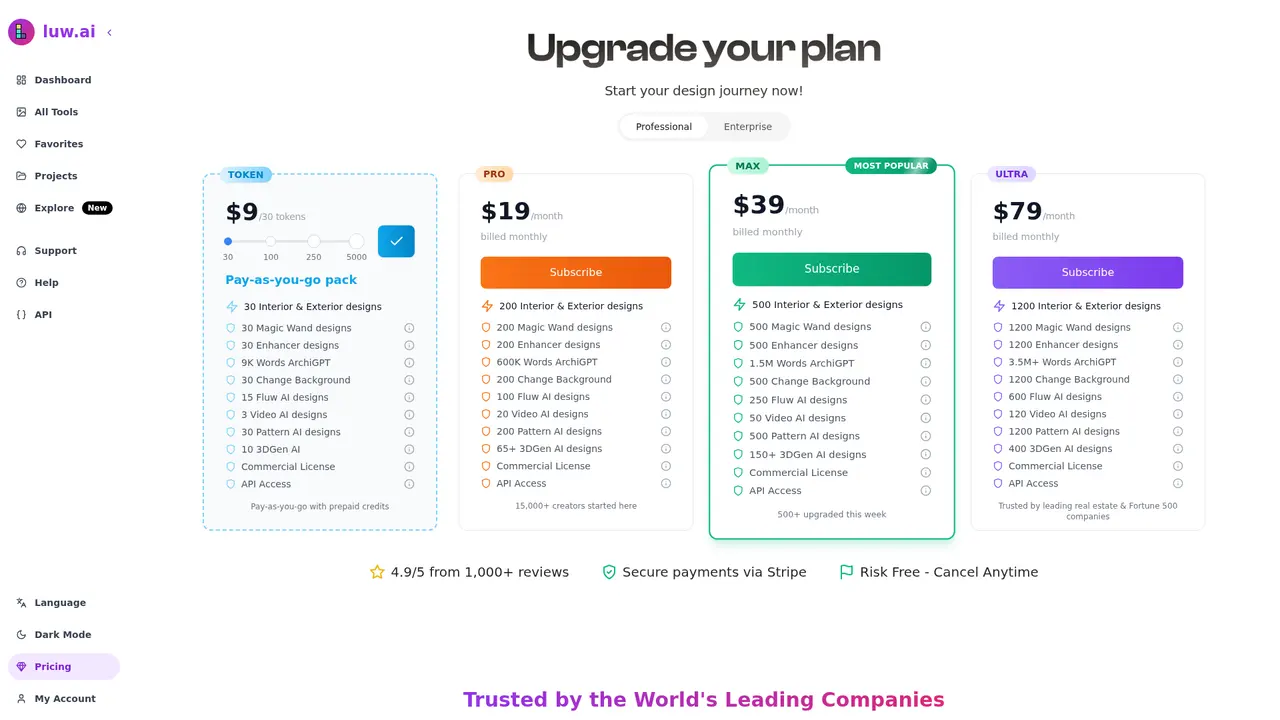
| Plan | Price | Generation Limit | Best For | |------|-------|------------------|----------| | Free | $0 | 3/day | Personal experimentation, exploring the platform | | TOKEN | $9/30 tokens | Pay-as-you-go | Occasional users who need occasional renders | | PRO | $19/month | 200 Interior/Exterior | Individual designers, homeowners with projects | | MAX (Popular) | $39/month | 500 total designs | Professional designers, real estate agents | | ULTRA | $79/month | 1,200 total designs | Teams, agencies, high-volume users |
The MAX plan at $39/month represents the best value for most professional users, offering 500 generations monthly—sufficient for active design work—with full commercial licensing. It's the platform's most popular choice among professional interior designers and real estate marketers.
All paid plans include full commercial rights to designs created on the platform, meaning you can use renderings in client presentations, marketing materials, and commercial projects without attribution. The Free plan is ideal for evaluation purposes but outputs watermarked images limited to non-commercial use only.
Payment processing uses Stripe's secure infrastructure, and all plans can be cancelled at any time with no penalties—there's no risk in trying the platform to see if it fits your workflow.
---
Frequently Asked Questions
:::card{type="faq" title="What exactly is Luw.ai and what does it do?"} Luw.ai is an AI rendering platform that helps architects, designers, and homeowners generate professional-quality interior and exterior design visualizations in seconds. The platform uses artificial intelligence to transform photos, sketches, or text descriptions into stunning renderings—eliminating the need for expensive software or design expertise. :::
:::card{type="faq" title="Which 3D software is Luw.ai compatible with?"} Our AI tools work with renders from any 3D modeling software, including Autodesk 3ds Max, Revit, SketchUp, Blender, and many others. Simply take a screenshot of your 3D view and import it into Luw.ai for AI-enhanced rendering. Mac users can download the Luw Screenshot app for an optimized capture experience. :::
:::card{type="faq" title="Can I modify specific parts of a design rather than the entire image?"} Yes. The Magic Wand tool allows you to mask and highlight specific areas for modification. Describe the change you want, and the AI will generate modifications while preserving the rest of your image. This is perfect for testing individual design elements without regenerating entire renderings. :::
:::card{type="faq" title="Can I use Luw.ai for commercial projects?"} Yes. All designs created with paid plans include full commercial licensing, meaning you can use them in client presentations, marketing materials, property listings, and commercial work. The free version outputs watermarked images and is limited to non-commercial use only. :::
:::card{type="faq" title="How do I access HD/4K/8K export or Supersize functionality?"} To export high-resolution images, click the "Export" button on any image and select "Download Resized Image." This ensures your design maintains quality at 4x (Basic) or 8x (Pro) magnification—suitable for large-format printing and high-resolution displays. :::
:::card{type="faq" title="Can I use hand-drawn sketches with Luw.ai?"} Absolutely. Upload your hand-drawn sketch and describe your desired outcome. The AI will transform it into a complete rendered design within seconds. This is ideal for quickly visualizing concepts or communicating ideas to clients. :::
:::card{type="faq" title="Who can use Luw.ai?"} Luw.ai is designed for everyone—from professional architects and interior designers to homeowners, real estate agents, hotel managers, and anyone without design experience. The intuitive interface means you can generate design visualizations without technical skills or specialized software knowledge. :::
Related Content

Copy.ai Review 2026: AI Copywriting Made Easy
Our honest Copy.ai review for 2026. We test Content Agents, AI Workflows, pricing ($29-$249/mo), and compare it to Jasper and Writesonic. Find out if it's worth it for your marketing team.

Rytr Review 2026: Is This Budget AI Writer Worth It?
Our hands-on Rytr review for 2026. We test features, pricing, content quality, and compare it to Jasper & ChatGPT. Find out if Rytr is the best budget AI writing tool.

Word Changer - Free AI tool to rewrite and improve your writing instantly
Writing always using repetitive words or need to avoid plagiarism? Word Changer is a free AI writing assistant that instantly rewrites any text with richer vocabulary and appropriate tone. Get multiple versions with one click, adjust formality level, check readability - all for free!

Unite - AI-powered platform for romantic fantasies and dream couple moments
Explore romantic fantasies and create special moments for your dream couple. This AI-powered platform lets you generate personalized romantic content and experience exclusive AI-created romantic experiences.
Comments