

- Monthly visits
- 0
- 2026-09
Google Maps Lead Finder Agents - AI powered Google Maps lead extraction for coding agents
You no longer need to manually switch between multiple tools to collect local business lead data. This hosted Remote MCP layer seamlessly integrates Google Maps scraping and data enrichment directly into your AI coding agent workflows. It returns structured JSON or markdown leads including business names, phones, websites and public contact info. You can run lead generation jobs entirely within your existing agent loops without extra UI operations. It only extracts publicly available data to ensure 100% honest and reliable lead quality.
- AI Marketing
- Lead Generation
- AI Agent Framework
- Self-hosted
- RAG
- API Available
- Open Source
75Views
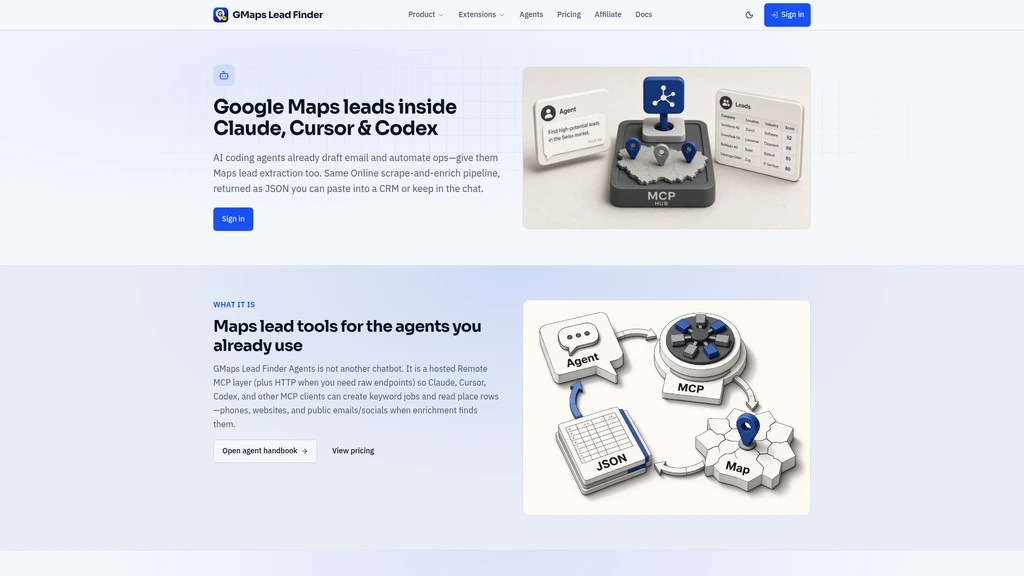
What is GMaps Lead Finder Agents
If you have ever spent hours jumping between your AI coding agent, a browser-based Google Maps scraper, and your CRM to build local outreach lists, you know how easily that breaks your workflow flow. Pasting partial results back into Claude, manually copying data into spreadsheets, and waiting for separate scrape sessions to finish adds unnecessary friction to work that should run on its own. GMaps Lead Finder Agents solves this exact problem. It is a hosted Remote MCP (Model Context Protocol) layer paired with HTTP endpoints that lets popular AI coding agents like Claude, Cursor, and Codex pull Google Maps lead extraction and enrichment directly into their existing workflows, no separate standalone UI required.
Because it runs on the exact same mature data pipeline used by the widely trusted online GMaps lead extractor, you do not have to trade data accuracy for workflow speed. All the enrichment logic, credit tracking, and validation rules you already know from the web version carry over directly to the agent integration.
No separate dedicated UI to learn or load: everything runs inside your existing AI agent workspace
No fake contact data: every returned email and social profile is a publicly visible real record
Full compatibility with all MCP-enabled AI coding agents, no vendor lock-in for your workflow
The core capabilities of GMaps Lead Finder Agents
The tool connects natively to any MCP-compatible AI coding agent through simple HTTP endpoints, so you never have to leave your IDE or agent chat window to run lead extraction. All output comes back to you as structured data: full business names, verified phone numbers, public websites, publicly listed emails, and visible social media profiles when available, formatted either as JSON or markdown tables that plug straight into your next step.
You do not need to handle complex task management manually. Your agent can run a complete end-to-end workflow on its own: create a new keyword extraction job, poll the server for real-time status updates, automatically paginate through large result sets, and feed the finished lead data directly into CRM upload scripts or outreach sequence builders. The tool follows a strict no-invention data policy: if a public email or social profile is not available from Google Maps and the supporting enrichment pipeline, that field stays empty instead of being filled with synthetic guessed contact information.
No UI context switching required: lead extraction runs entirely inside your existing AI agent loop
Natural language prompts return ready-to-use structured tables, no manual data formatting work
Requires basic familiarity with MCP configuration to set up on your local agent environment
Does not include a built-in visual dashboard for browsing raw scrape results
Who is using GMaps Lead Finder Agents
Four main groups of professionals get the most consistent value from GMaps Lead Finder Agents, each using the integration to cut hours of manual work from their weekly routines. If you are an SDR working directly in Claude or Cursor to build outreach lists, you can type simple prompts to generate niche location-specific lead sets like "dentists in Austin TX" and pull complete name, phone, and website tables ready to import into your cold outreach sequences in seconds. You will not need to manually copy results from a browser tab into your scripted outreach workflow.
If you run a marketing agency that serves multiple local clients across different cities, you can batch process multi-city extraction briefs with one keyword per client city, all running directly in your IDE. No more manual zip file downloads or constant UI babysitting to wait for each individual job to finish. AI builders working with Codex use the tool to build fully autonomous loops: your script can create a new lead extraction job, poll for completion, pull structured JSON results, and push the full dataset straight to your connected CRM without any human intervention. Lead operations teams use the integration to build dedicated enrichment workflows that only pull verified public contact records, eliminating the risk of bad data polluting your database.
If your use case requires manual visual review of extraction results before you add leads to your system, use the public web-based online extractor version alongside the agent integration. You can switch back and forth between the two tools and share the same account credits.
Get started with GMaps Lead Finder Agents
You can complete full setup of GMaps Lead Finder Agents in 5 minutes or less. First, visit the official GMaps Lead Finder website, sign into your account, and navigate to the Account page to locate your unique personal API key prefixed with gmf_. If you do not have an account yet, you can register for free and pick any free or paid plan that supports agent functionality to get started immediately.
Second, run the official MCP add command for your specific AI coding agent environment. For Claude users, the exact command is claude mcp add --transport http gmaps-finder https://gmapsleadfinder.com/mcp --header "Authorization: Bearer gmf_YOUR_API_KEY" — just replace the placeholder API key text with the personal key you copied from your account page. Once the command runs successfully, your AI agent will automatically detect the new available lead extraction tools.
Third, test the connection with a simple natural language prompt to run your first keyword lead extraction job. You do not need to write custom API calls or configure extra settings before your first result set returns. The only system prerequisites are an MCP-compatible AI coding agent already installed on your machine, and an active GMaps Lead Finder plan that includes agent access.
Test your first few jobs with small, specific keyword queries (for example "10 bookstores in Portland") before running large volume extractions that pull hundreds of rows. This helps you confirm the output formatting matches what you need before you use your credits on bigger tasks.
GMaps Lead Finder Agents vs online extractor
Because GMaps Lead Finder Agents uses the exact same underlying pipeline as the online web extractor, many users ask which version they should use for their daily work. Both tools share identical data enrichment logic, credit calculation rules, and raw data sources, so you never get different accuracy levels depending on which interface you use. The difference comes down to your workflow context and what you are trying to accomplish.
Feature | GMaps Lead Finder Agents | Online Extractor |
|---|---|---|
Primary operation location | Runs inside your AI agent / IDE workspace | Runs in a standalone web browser UI |
Best for | Automated workflows, script integration, autonomous loops | Manual visual review, multi-keyword zip batch tasks, ad-hoc single extractions |
User groups | SDRs using AI agents, AI builders, lead ops teams, dev-focused agencies | Non-technical users, account managers reviewing lead data |
Required tools | MCP-compatible AI coding agent | Standard web browser |
Output delivery | Directly to agent workflow as JSON/markdown | Downloadable CSV, in-browser preview |
Context switching | None (stays in existing workflow) | Requires leaving IDE/agent environment |
If you need lead data that feeds directly into an existing scripted sequence or autonomous loop, the agent version is the faster choice. If you want to browse through results one by one, adjust multi-keyword batch filters in the UI, or quickly export a zip file of results, the online extractor will be the better fit. Most active users keep both available for different use cases, under the same account and credit balance.
Frequently asked questions
No. Both the MCP agent integration and the online web extractor run on exactly the same core data pipeline. If a public contact or business detail is not accessible to the web extractor, the agent tool will not be able to retrieve it either, so the field will remain empty.
No extra separate fees apply. All agent-capable online plans that are available after sign-in include full MCP agent access, using the same credit system you already use for the web extractor.
GMaps Lead Finder Agents works with any AI coding agent that supports the MCP standard, including Claude, Cursor, and Codex. Any agent that can add HTTP-based MCP layers will work with this integration.
Yes. You can replicate any keyword-based job you ran in the web extractor with a simple natural language prompt inside your agent, and you will consume the same number of credits for equivalent result counts.
No. The system follows a strict no-invented data policy. If no public email or social profile can be found for a business through the public enrichment pipeline, that field is left blank, and no synthetic guessed data is added to fill the gap.
After you sign into your GMaps Lead Finder account, the full handbook with all HTTP endpoint details, parameter references, and error code descriptions is available directly in your account dashboard.


Comments