

- Monthly visits
- 0
- 2026-09
GFPGAN Online - Restore Old Photos and Blurry Faces Free, No Watermark, No Account Required
GFPGAN Online is a browser-based AI photo restoration tool built on the open-source GFPGAN face restoration model, designed to fix blurry faces, colorize black-and-white photos, and remove light scratches from old images without requiring local software setup. It serves casual users, family history enthusiasts, photo studios, and anyone looking to recover detail from faded, low-resolution, or damaged vintage photographs. The platform offers free daily credits, watermark-free standard downloads, and optional high-resolution 2K/4K output for printing and professional use cases.
- AI Image
- Photo Restoration
- Image Editing
- Image Generation
- Open Source
258Views
Core Capabilities
GFPGAN Online runs the open-source Tencent ARC Lab GFPGAN face restoration model directly in the browser. It does not require users to install Python, download model files, or own a dedicated graphics card. The platform supports JPG, PNG, and other common image formats up to 30 MB in file size.
The tool can process four main types of photo damage:
Blurry, out-of-focus, or soft faces, to restore clear detail for eyes, teeth, and hair while preserving the original person's recognizable features
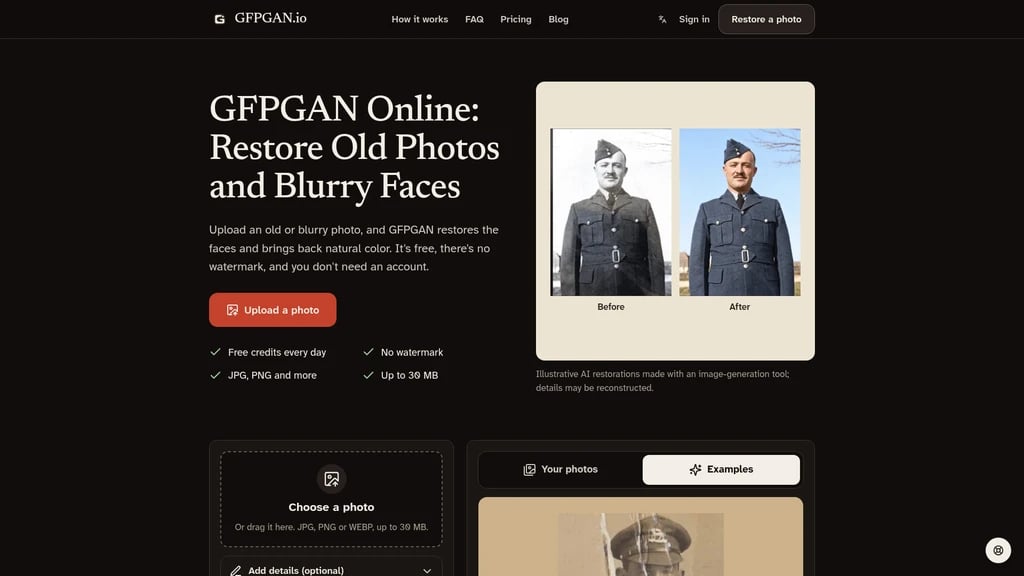
Faded, yellowed, or black-and-white photos, with automatic colorization that restores natural tones to vintage prints
Light scratches, dust spots, creases, and small tears across the image surface
Low-resolution, blocky images that have been repeatedly saved, re-shared, or scanned from tiny old prints
Workflow
Restoring a photo takes three simple steps:
Upload your scanned or phone-captured photo directly on the site
The AI automatically detects every face in the image and rebuilds lost detail removed by blur and aging
Use the comparison slider to view the restored result against the original image, then download the output file. Standard resolution downloads are always free with no watermark. 2K and 4K high-resolution downloads are available as part of paid plans for printing and large format use.
Supported Use Cases
The tool is built for several common user scenarios:
Family history projects, to clean up old album photos before sharing with family groups or adding to family trees
Memorial preparation, to recover clear usable versions of small or out-of-focus photos for service materials or framed prints
Photo gifts, where restored vintage photos can be printed in high resolution as anniversary presents for older family members
Professional photo studio workflows, where paid plans include commercial usage rights for processing client photos. Batch processing and API access are listed as upcoming features.
Limitations
GFPGAN Online openly states its constraints to avoid misleading users:
It works reliably for blurry faces, faded prints, light scratches, and group photos where all faces are still partially visible
It cannot meaningfully restore faces that are fully obscured by large tears, heavy stains, or where core facial features (eyes, nose, mouth) are completely missing. It notes that any tool claiming to fully recover entirely lost facial detail is generating an invented new face rather than restoring the original.
Comparison to CodeFormer
The platform provides a direct side-by-side comparison with the popular CodeFormer face restoration model:
GFPGAN Online requires no manual tuning, while self-hosted CodeFormer requires adjusting a fidelity slider manually to avoid generating unrecognizable faces
GFPGAN Online includes native colorization for black-and-white photos, which self-hosted CodeFormer does not offer natively
It runs fully on mobile phones with no installation, while self-hosted CodeFormer only works on devices with a suitable GPU and Python environment
2K and 4K output is consistent on the platform, whereas maximum output resolution for self-hosted CodeFormer depends entirely on the user's local hardware.
Free and Paid Terms
All users get 4 free credits per day, which is enough to process 2 photos. Standard resolution downloads are free, with no watermark applied to any output. Paid plans add 2K and 4K download access, higher quality output, and full commercial usage rights for professional users.


Comments