

Flux 3 — AI Image Generator - Create and edit 4K images with AI in seconds
Tired of complex image editing tools and expensive subscriptions? Flux 3 is a powerful AI image generator and editor that lets you create and transform visuals using simple text prompts. Powered by Black Forest Labs Flux 3 engine, it supports text-to-image generation, natural language image editing, and 4K output for free. With 50+ preset prompts across 18 categories and a flexible pay-per-use credit system with no subscription required, Flux 3 makes professional-grade AI imaging accessible to everyone.
- AI Image
- Image Generation
- Image Editing
- NLP
- Content Creation
406Views


What Is Flux 3 — AI Image Generator
Remember the last time you needed a professional-looking image but didn't want to spend hours wrestling with layers, masks, and complex editing tools? Or when you found an AI image generator that promised great results — only to hit a paywall or confusing subscription trap? If that sounds familiar, you're not alone.
Flux 3 is built to change that. Powered by Black Forest Labs Flux 3 engine, it's an online AI image generator and editor that runs entirely in your browser — no downloads, no installations, no steep learning curve. You simply type what you want, and Flux 3 creates it. Want to edit an existing image? Just describe the change in natural language, like "replace the background with a sunset beach," and it's done.
This approach has earned Flux 3 Featured badges on six platforms — Shipstry, ShowMeBestAI, NavFolders, Similarlabs, Startup Fast, and That App Show — showcasing its reliability and quality in the competitive AI image generation space.
What sets it apart? You get 4K image output for free, access to 50+ preset prompts across 18 creative categories, and a flexible pay-per-use credit system that lets you buy what you need without committing to a monthly subscription. Whether you're a designer, marketer, or just someone exploring AI art, Flux 3 brings professional-grade image creation within reach.
Natural language editing — modify images by simply describing what you want, no masks or layers needed
Free 4K output — generate print-ready images without spending a dime
No subscription lock-in — pay-per-use credits mean you only pay for what you actually create
Your Team's Most-Wanted Creative Features
Flux 3 packs a thoughtfully designed set of capabilities that turn image creation from a tedious chore into a fluid, creative conversation. Here's what you can actually do with it.
Edit Images Naturally — Just Describe the Change
You can edit images using plain text instructions. Want to swap a gray sky for a golden sunset? Type it. Need to change a model's outfit from casual to formal? Type it. Flux 3's context-aware engine understands scene structure, lighting, and spatial relationships, so edits look natural — not pasted on. It supports editing with up to 3 reference images simultaneously, making complex compositions feel effortless.
Generate Images from Text in Seconds
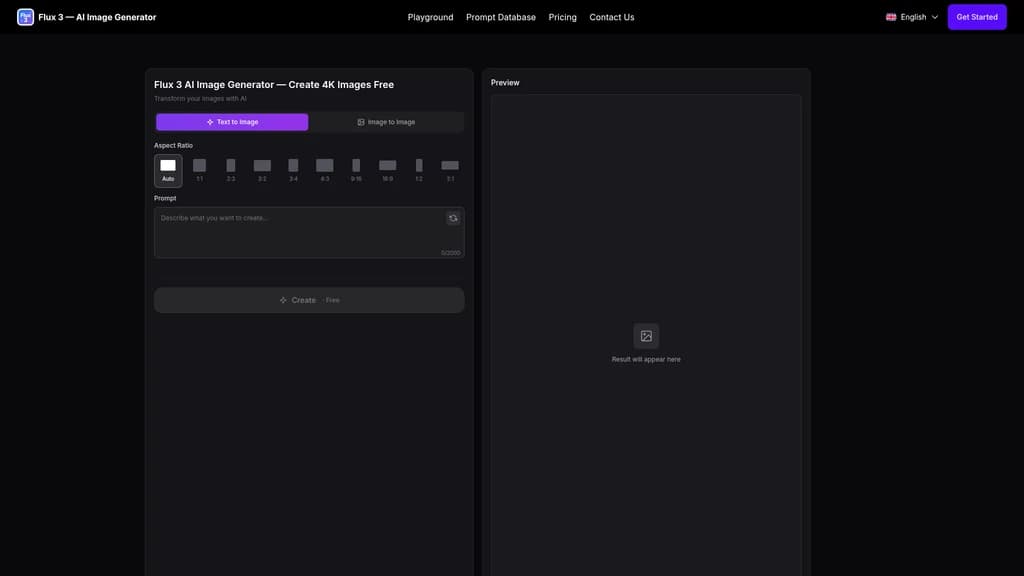
Type a description and get a 4K image in seconds. With a 2000-character prompt limit, you can be as detailed as you like. Choose from 18 categories — portraits, 3D toy designs, style transfers, creative art, educational illustrations, and more. It's your concept-to-visual shortcut.
Keep Characters and Styles Consistent with Image-to-Image
Upload a reference image, and Flux 3 preserves facial features, hairstyles, and clothing details while adding new elements or changing the environment. Turn a real photo into an anime character. Place your product into a completely new scene. The consistency is impressive enough for professional character design workflows.
Ultra-High Definition Output (4K Free, 8K for Pro)
Free users generate 4K images — plenty for social media, web, and most print needs. Pro users unlock the 8K AI model for billboard-ready, large-format output. Pair it with the built-in AI Photo Upscaler for 4x super-resolution upscaling.
Context-Aware Editing That Understands Your Scene
Flux 3 doesn't just swap pixels — it understands context. The Self-Flow framework preserves original lighting, shadows, and textures so edits feel cohesive. Change a product's background, and the lighting on the product adjusts naturally. Swap a character's outfit, and the fabric folds still make sense.
Switch Between Six FLUX.2 Models On the Fly
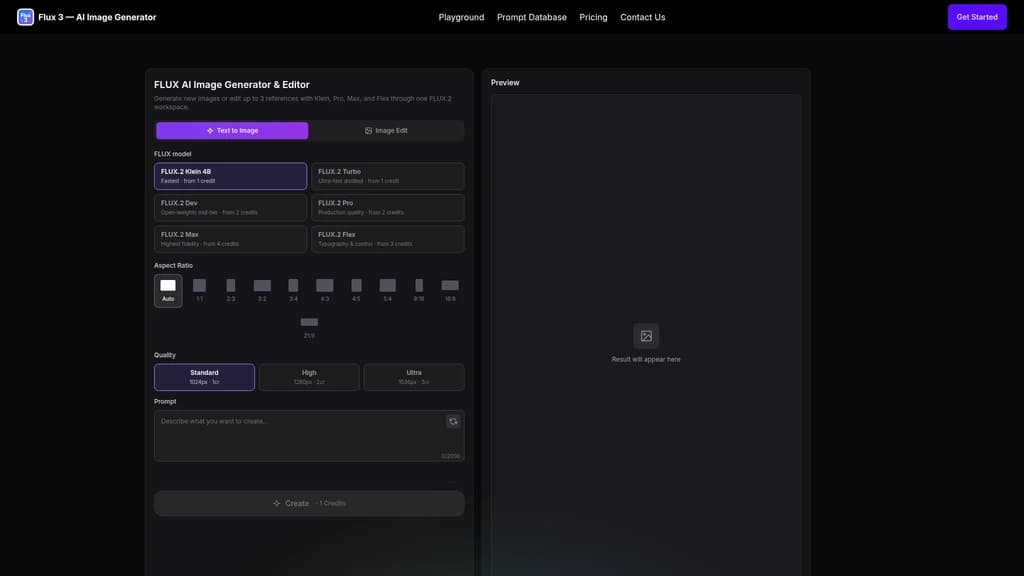
Need speed? Use FLUX.2 Klein (starts at 1 credit). Need maximum fidelity? Switch to FLUX.2 Max (from 4 credits). Need precise typography control? FLUX.2 Flex has you covered. All six models — Klein, Turbo, Dev, Pro, Max, and Flex — are accessible from the same workspace, no page refresh required.
No installation required — works entirely in your browser
No subscription needed — pay with credits, on your terms
Free 4K output — professional quality at zero cost
Natural language editing — edit by describing, not masking
Full commercial license — all generated images are yours to use
Free credits are limited — heavy users will need a paid plan
8K output is Pro-only — free tier maxes out at 4K
Requires stable internet — it's cloud-based, not offline-capable
Who Actually Uses Flux 3?
Flux 3's versatility means it serves very different workflows. Here are five real scenarios showing how different roles put it to work.
Content Creators and Designers
If you're a designer racing against a deadline, you know the pain of turning a rough idea into a visual mockup in minutes — not hours. With Flux 3's text-to-image and natural language editing, you can generate concept art, iterate on variations, and refine details by simply typing what you envision. What used to take an afternoon now takes a few minutes.
Social Media Managers and Marketers
Creating a consistent visual feed across Instagram, LinkedIn, and TikTok is a production nightmare. Flux 3's batch processing combined with preset prompts lets you generate a series of on-brand images in one go. Same style, multiple formats, dramatically less time.
AI Art Enthusiasts and Developers
For those who want to push beyond static images, FLUX 3 Dev offers open-weight access to a multimodal model that generates images, 20-second videos with native audio, and even motion predictions — all from a single unified framework. It's end-to-end multimedia creation without switching tools.
E-commerce Sellers
Professional product photography is expensive. Instead of renting a studio, upload your product photo and type a prompt like "place this on warm ivory stone with soft morning light." Flux 3 handles the background replacement while keeping your product intact. Professional-grade product visuals in seconds — no studio required.
Educators and Data Professionals
Need a diagram for tomorrow's lecture or a visualization for a conference talk? Flux 3's educational prompts can generate whiteboard-style math explanations, labeled English learning scenes, and even scientific data visualizations like t-SNE scatter plots, 3D loss landscape topology maps, and tokamak magnetic field lines. Abstract concepts become visual stories in moments.
Start with the Starter Pack ($50 for 100 credits, no subscription) — it's a low-risk way to explore. Browse the 50+ preset prompts across 18 categories to get a feel for what's possible, and you'll be generating impressive images within minutes.
Getting Started in Minutes
Flux 3 is designed so you can create your first image in under 60 seconds. Here's how.
Step 1: Go to flux-3.net or jump straight into the Playground. No account? No problem — you can start with free credits right away, no credit card required.
Step 2: Choose your mode — Text to Image to generate something new, or Image to Image / Natural Language Editing to work with an existing image.
Step 3: Write your prompt. Be as descriptive as you like (up to 2000 characters). Or upload a reference image if you're using Image to Image mode. Select your model (Flux 3 Dev is the default recommendation) and your output quality — Standard, High, or Ultra.
For best results, make your prompts clear and specific. Add style keywords like "photorealistic," "anime," or "cinematic lighting." Flux 3's prompt adherence is excellent — the more detail you give, the closer the result matches your vision.
Step 4: Choose your aspect ratio — 1, 2, 3, 4, 9, 16, and more. Hit generate, and watch your idea come to life in seconds.
New user bonus: Visit the Prompt Database with 50+ pre-written prompts across 18 categories. Copy one, paste it in, and you'll see what Flux 3 can do without writing a single word.
Choosing the Right Plan for Your Workflow
Flux 3 uses a credit-based system — you buy credits and spend them per generation. No subscriptions required unless you want the better per-credit rate. Your credit consumption depends on three factors: the model you choose (Klein starts at 1 credit, Max at 4), the mode (text generation vs. image editing), and your output quality level (Standard, High, Ultra).
OneTime Packs — Pay Once, Use Forever
Plan | Price | Credits | Key Benefits |
|---|---|---|---|
Starter Pack | $50 | 100 | No subscription + Fast generation + Commercial license + No watermark |
Pro Pack | $100 | 220 | No subscription + Fast generation + Commercial license + No watermark |
These are perfect for occasional users who want full flexibility without recurring payments.
Subscription Plans — Better Value for Regular Users
Plan | Per Credit | Original Price/Mo | You Pay/Mo | Credits/Mo | Key Benefits |
|---|---|---|---|---|---|
Starter (Monthly) | $0.20 | $358.80 | $118.80 | 600 | High quality + Commercial license |
Pro (Monthly) | $0.17 | $599.88 | $286.80 | 1,700 | High quality + Commercial license |
Enterprise (Monthly) | $0.15 | $1,199.88 | $766.80 | 5,000 | High quality + Commercial license |
All subscription plans are marked "Save ~50% vs monthly" — offering significantly lower per-credit pricing for consistent users.
A note on commercial use: Every image you download — free or paid — comes with a commercial license. You're free to use them in marketing, advertising, design, and business projects without extra fees.
We recommend light users start with the Starter Pack ($50 for 100 credits) to test the waters. For frequent creators, the Pro monthly subscription ($286.80/month for 1,700 credits) offers the best balance of volume and per-credit value.
Common Questions
Is Flux 3 free?
Yes. The free tier gives you introductory credits without requiring a credit card. If you need more, upgrading to Pro unlocks additional credits, faster generation speeds, and access to the 8K AI model.
Is Flux 3 better than Flux 2?
Absolutely. Flux 3 delivers sharper details, significantly better prompt adherence, improved lighting and composition, and supports 8K output. Black Forest Labs built Flux 3 as a substantial upgrade over Flux 2 across every quality metric.
Can Flux 3 generate 8K images?
Yes — Flux 3 Pro users can access the 8K AI model for ultra-high-resolution output suitable for large-format printing and professional display.
Is Flux 3 better than Midjourney?
Flux 3 offers competitive quality powered by the Black Forest Labs Flux 3 engine, with the added advantage that it's available to use online for free — no download required. It performs particularly well in prompt adherence and style consistency.
How do credits work?
Credit cost depends on three factors: the model you use (Klein is cheaper, Max costs more), the mode (text generation vs. image editing), and the output quality level (Standard, High, or Ultra).
Do I need a subscription to use Flux 3?
Not at all. All Flux 3 tools operate on a pay-per-use credit system — buy credits as you need them, no recurring subscription required. OneTime purchase options are also available.
Can I use generated images commercially?
Yes. All downloaded images come with a commercial license. Whether you're on the Free tier or a Pro plan, you can use your generated images in marketing, advertising, design, and business projects without restrictions.
Will Flux 3 be open-sourced?
Flux 3 is currently available as a cloud service with Free and Pro tiers. For those interested in open-weight access, FLUX 3 Dev provides multimodal capabilities. For open-source plans, we recommend following Black Forest Labs' official announcements.


Comments