


Maeve Social - All-in-one social media management platform
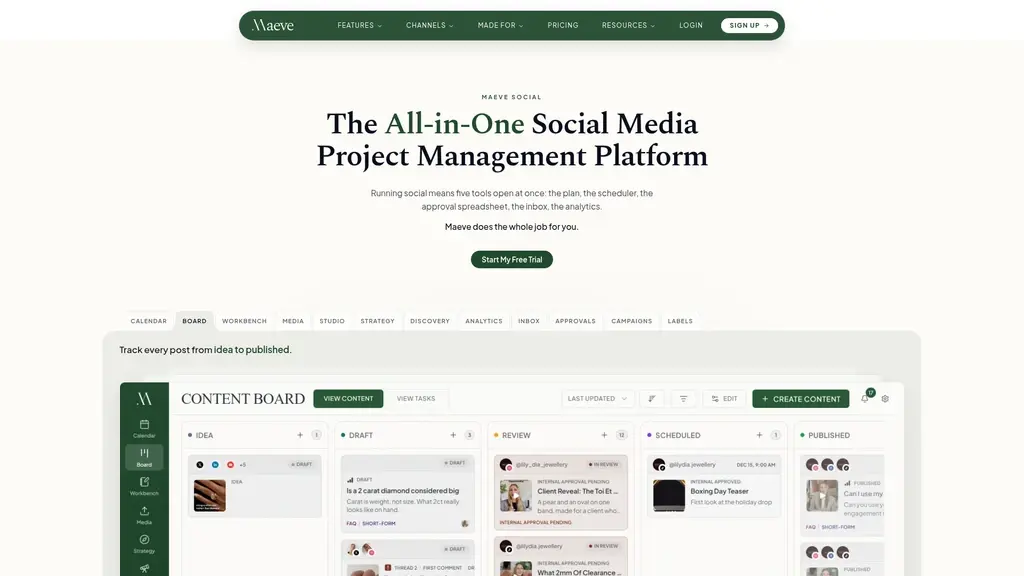
Launched on Aug 20, 2026Managing social media across nine platforms means juggling schedulers, spreadsheets, and inboxes. Maeve Social consolidates publishing, project management, approvals, unified inbox, and analytics into one tool. Stop guessing what to post with built-in competitor discovery and trend tracking. Write once, publish everywhere, and generate branded client reports automatically. Simplify your entire social media workflow today.
What Is Maeve Social?
Picture your average Tuesday as a social media manager. You've got four or five browser tabs pinned open all day: a scheduling tool for Instagram and TikTok, a sprawling spreadsheet tracking content ideas, a folder of drafts waiting for client sign-off, the native inboxes of each platform, and a reporting setup that involves screenshotting analytics and typing numbers into a slide deck by hand.
It doesn't take long for this to fall apart. Captions get rewritten for every platform because each one needs a different tone or length. Media gets reformatted again and again. A client DM lands in the Facebook inbox while you're staring at the Instagram tab, and it sits unanswered for two days. When reporting time arrives, you assemble screenshots from five different dashboards and hope the numbers add up.
The real cost isn't just time. Every tool you juggle is a place where context gets lost, messages slip, and mistakes happen. The brief lives in a Google Doc, the script in another file, the schedule in a tool — none of them connected to the actual content you're publishing.
Maeve Social exists to collapse all of that into a single workspace. Instead of maintaining a separate scheduler, planning spreadsheet, approval folder, inbox, and reporting tool, Maeve Social handles the entire social media workflow — plan, create, schedule, approve, respond, and report — in one place.
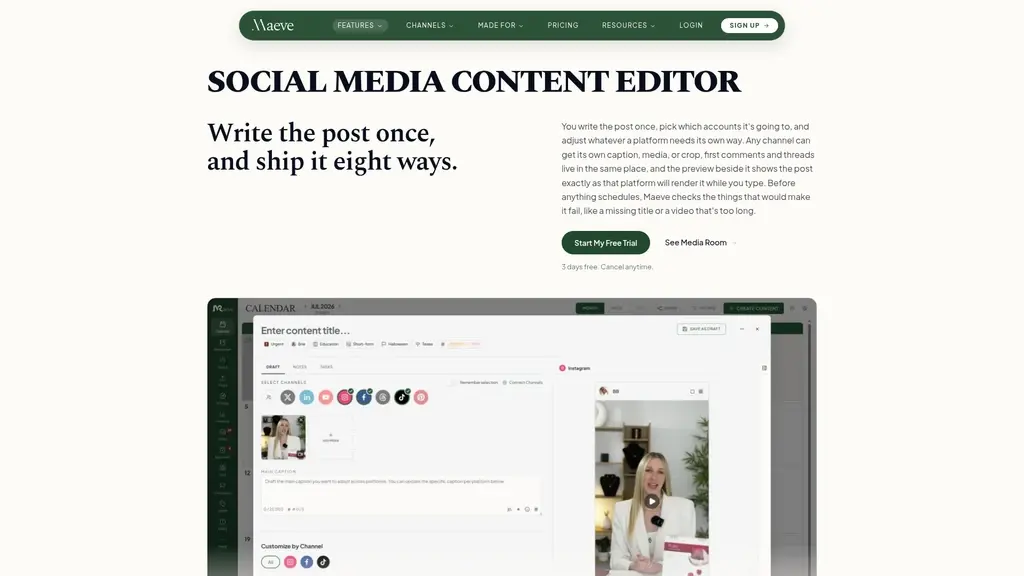
The platform lets you publish to 9+ platforms from a single composer, so you write your content once, pick your channels, adjust what each platform needs, and publish on schedule. Comments, DMs, mentions, and reviews from every platform land in one unified inbox. Approvals — both internal and client-facing — live in a single queue. Analytics consolidate automatically and export as branded PDF reports.
Built for freelancers, agencies, and teams, Maeve Social replaces the patchwork of tools that makes social media management feel like constantly putting out fires, with one organized system where every piece of content carries its context with it.
Replace 5+ separate tools with one consolidated workspace
Content decisions driven by built-in competitor discovery, not guesswork
Approvals and messages unified — nothing slips through the cracks
Write once, publish to 9+ platforms from a single composer
Auto-generated analytics reports your clients actually want to read
Maeve Social Core Features
Discovery: Stop Guessing What to Post
The pain: Every content meeting ends with "what do we post next week?" and someone shrugs. You're posting on instinct, hoping what worked for you last quarter still works — but you have no real data on what your audience or competitors actually respond to.
The solution: Maeve's built-in Discovery tracks the Instagram accounts you select and shows you follower growth, posting frequency, and which posts performed well. On TikTok, it surfaces trending hashtags, sounds, and searches. You're not guessing anymore — you're watching what's already working for competitors and adapting those patterns into your own strategy.
The benefit: Content decisions become data-driven. You build content pillars from proven formats instead of hunches, and every post has a strategic reason to exist.
Publishing to 9+ Platforms: Write Once, Publish Everywhere
The pain: Every post means logging into five apps, rewriting the caption for each platform's voice, resizing media three different ways, and scheduling everything separately. That's hours every week spent on repetitive work.
The solution: Maeve's composer lets you write your content once, pick which channels to publish to, tweak what a specific platform needs changed, and schedule everything to go out on time. No logging in and out, no duplicate work.
The benefit: You reclaim hours every week — time you can spend on strategy, engagement, or literally anything else.
Workbench: Where Briefs, Scripts, and Schedules Live Together
The pain: Your brief lives in Google Docs, your script in a shared drive, your media in a folder, and your schedule in the publishing tool. Four different places, none of them connected. Context gets lost every single time.
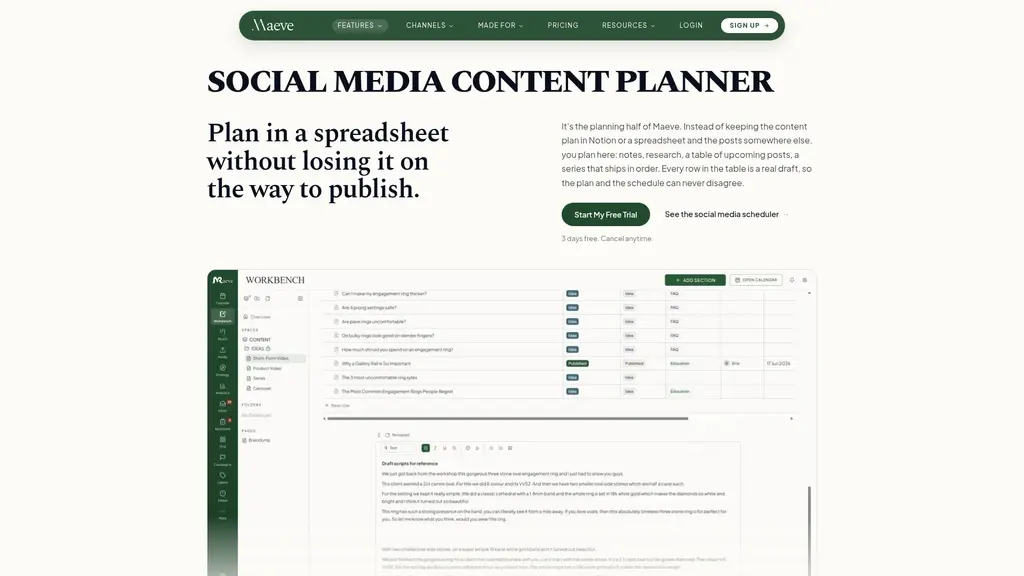
The solution: The Workbench keeps the brief, the script, the media, and the schedule together with the content itself. A spaces and pages tree organizes everything, and a short-form video planning table groups your posts by publish month, showing status, video status, and pillar columns at a glance.
The benefit: Everyone on the team sees the same picture — what's being made, why, and when it goes live — without digging through four apps.
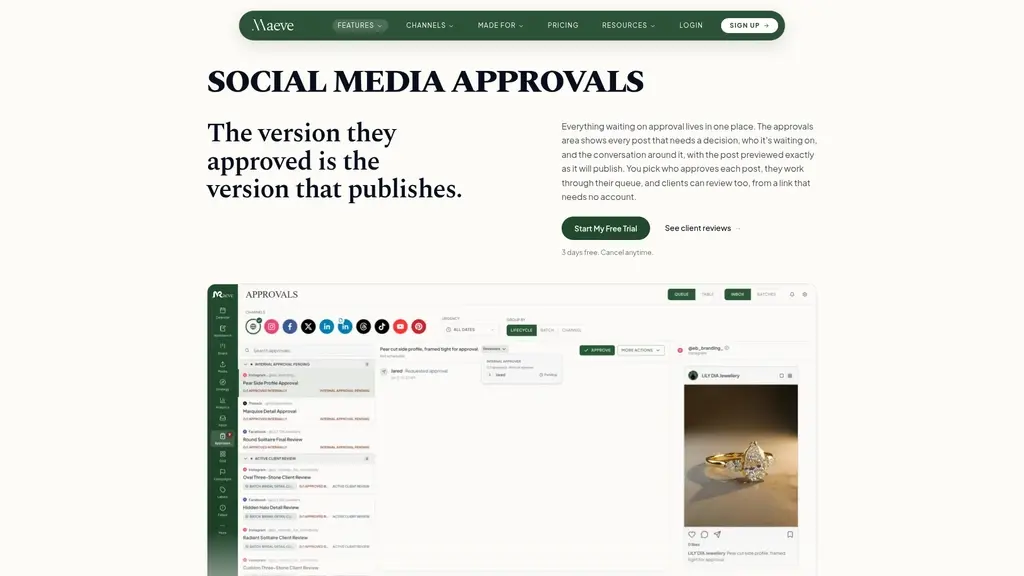
Approvals: One Queue, No More Chasing
The pain: "Has the client approved the March calendar yet?" How many times have you asked that question and scrolled through your sent folder trying to recall what you even shared with them?
The solution: Maeve centralizes approvals. Every approval waiting on you or your client lands in one queue — a single place to look instead of hunting through emails and folders. You can send a whole month of content in one link, and clients review it without needing a paid seat.
The benefit: No more "just checking in" messages. You know exactly what's waiting and what's been approved.
Unified Inbox: Nothing Missed, Nothing Lost
The pain: Comments on your Instagram post, a DM on Facebook, a mention on LinkedIn, and a Google review — four platforms, four inboxes, one manager trying to be everywhere. Messages slip through all the time.
The solution: Maeve brings comments, DMs, mentions, and reviews into one queue. Assign a thread to whoever should handle it, set up auto-replies for the questions you answer constantly, and see each conversation alongside a preview of the related post.
The benefit: Zero missed messages, faster response times, and accountability for every thread.
Analytics & Client Reports: Professional Results in Minutes
The pain: Reporting week is the worst week. Screenshotting dashboards, typing numbers into a slide deck, formatting it so it looks professional, and sending it off hoping the client doesn't notice the inconsistencies.
The solution: Maeve consolidates all your analytics in one place, compares them to the previous period automatically, and exports polished PDF reports with your branding on the cover.
The benefit: Reports that took half a day to assemble now take minutes — and they look more professional than anything you were building by hand.
If you're new to Maeve, set up Discovery and the Composer first. Discovery immediately shows you what's working in your niche, and the Composer instantly removes the grind of posting to multiple platforms. These two features deliver visible ROI within your first week — everything else (approvals, inbox, reports) can be configured as you go.
True all-in-one consolidation: Plan, publish, approve, respond, and report in a single tool — no more juggling five subscriptions
Discovery built in: Competitor research and trend tracking come standard, replacing the need for a separate research tool
Agency-focused by design: Client review links, branded PDF reports, and a client portal are built for serving multiple accounts professionally
Learning curve for new users: Consolidating five tools into one means there's more to learn upfront than a single-purpose scheduler
Yearly billing only: All plans are billed annually via Stripe, which means a larger upfront commitment compared to monthly plans
Who Uses Maeve Social
Freelancers & Small Businesses
The pain: You're the strategist, the designer, the writer, the scheduler, and the account manager — all in one person. Every extra tool you add to your workflow is another thing you have to maintain, and you're already stretched thin.
The scenario: A solo freelancer managing their own brand or 2–3 small clients uses the Basic plan at $20/month — one user, two workspaces, 20 social connections, and 800 AI credits monthly. Publishing, the social inbox, analytics, and content planning all live in one place.
The benefit: You run your entire operation without juggling tools. Discovery feeds your content strategy, the composer handles cross-platform publishing, and reports generate themselves.
Agencies Serving Multiple Clients
The pain: You're managing approvals and reports across many accounts, and every client expects a professional, consistent experience. Chasing sign-offs and hand-assembling branded reports eats into your margins.
The scenario: An agency with several clients uses the Standard plan at $79/month — 5 team members, 5 workspaces, 50 social connections, and 1,500 AI credits. Client review links work without giving clients seats. PDF analytics reports carry your branding.
The benefit: Clients get a polished, branded experience and approve a month of content in one click — and you stop spending afternoons building reports by hand.
Content Teams
The pain: The strategist writes briefs, the designer makes media, the writer scripts captions, and the coordinator schedules — but nothing syncs up. The brief is in one doc, the delivery timeline in another, and the calendar somewhere else entirely.
The scenario: A content team uses the Workbench with content pillars and a publishing table grouped by month, showing status and video status for every piece.
The benefit: Everyone works from the same view. Strategy, creation, and scheduling stay aligned because all the context lives with the content.
Large Agencies
The pain: At scale, coordination breaks down. You need visibility into what every team member is doing, and nobody wants to chase approval statuses across dozens of accounts.
The scenario: Large agencies use the Premium plan at $158/month — unlimited team members, workspaces, and social connections, plus team performance insights and a dedicated Success Manager.
The benefit: Enterprise-level coordination without enterprise-level complexity. You can see team performance, manage unlimited client accounts, and get white-glove support when you need it.
Social Media Managers
The pain: Response times are your biggest embarrassment. A customer asks a question in the comments at 3 PM and doesn't hear back until the next morning because you were managing the Instagram inbox while the question sat in Facebook.
The scenario: A social media manager routes the unified inbox — comments, DMs, mentions, reviews — into one queue, assigns threads to the right people, and sets up auto-replies for frequently asked questions.
The benefit: Faster response times across every platform, and nothing slips through because there's no inbox you're not looking at.
Solo users and freelancers should start with Basic ($20/month) — it covers publishing, inbox, analytics, and 20 social connections, which is more than enough for most independent operators. Upgrade to Standard only when you're managing multiple clients who need approvals and branded reports, or when your team grows past one person. Agencies at scale should budget for Premium from the start — the unlimited connections and dedicated support are worth it once you're juggling many accounts.
Maeve Social Pricing Plans
The value proposition behind Maeve's pricing is straightforward: you're replacing the cost of 4–5 separate tool subscriptions with one consolidated one. A typical stack — a scheduler, an analytics tool, an inbox solution, a competitor research platform, and a reporting add-on — easily runs past $150/month combined. Maeve replaces all of it starting at $20/month.
Plan | Price | Team Size | Workspaces | Social Connections | AI Credits/mo | Key Features | Best For |
|---|---|---|---|---|---|---|---|
Basic | $20/mo (billed $240/yr) | 1 user | 2 | 20 | 800 | Publishing to 9+ platforms, social inbox, analytics, content workbench, media room, 20GB storage | Freelancers & small businesses |
Standard | $79/mo (billed $950/yr) | 5 members | 5 | 50 | 1,500 | Everything in Basic + approvals, client review links & portal, all-channel analytics, PDF reports, 50GB storage | Agencies & growing teams |
Premium | $158/mo (billed $1900/yr) | Unlimited | Unlimited | Unlimited | 3,000 | Everything in Standard + team performance insights, dedicated Success Manager, white-glove phone support, 100GB storage | Large agencies & businesses |
Basic — $20/month
Designed for freelancers and small businesses running a solo operation. You get one user account, two workspaces, 20 social connections, and 800 AI credits monthly. Publishing to 9+ platforms, the social inbox for comments/DMs/reviews, advanced analytics, content workbench, media room with 20GB storage, and Canva import all come standard. If you're a solo freelancer who wants everything in one tool without breaking the bank, this is your entry point.
Standard — $79/month
The sweet spot for agencies and growing teams. You get five team members, five workspaces, 50 social connections, and 1,500 AI credits. On top of Basic, you unlock internal collaboration and approvals, client review links (no client seat required), a client portal, keyword auto-replies, all-channel aggregate analytics, branded PDF reports, and 50GB storage. If you serve multiple clients and want to present a professional face to every one of them, this plan pays for itself quickly.
Premium — $158/month
Built for large agencies and businesses managing at scale. Unlimited team members, workspaces, and social connections, plus 3,000 AI credits. You also get team performance insights, a dedicated Success Manager, white-glove phone support, and 100GB storage. When you're juggling dozens of accounts and need enterprise-level coordination, this plan delivers.
The ROI framing is simple: if Standard replaces a stack of a scheduler ($30+/mo), an inbox tool ($20+/mo), an analytics platform ($40+/mo), and a spreadsheet you've been managing by hand, you're already ahead at $79/month — and you've eliminated the hours of manual work on top of the subscription costs.
All plans are billed yearly and paid securely via Stripe.
Before choosing a plan, add up what you currently pay for your scheduler, analytics tool, inbox platform, competitor research, and any reporting add-ons. In most cases, even the Premium plan is cheaper than your current stack — and it eliminates the manual work those other tools don't even cover. Start with the plan that matches your team size, and remember that Maeve supports the full lifecycle from solo freelancer to full agency.
Real User Scenarios and Workflow Outcomes
From Guesswork to Data-Driven
Before: You post three times a week and hope. Engagement is flat, and you have no idea why. Every strategy meeting starts with "what does the algorithm want?" and ends with everyone shrugging.
After: You set up Discovery to track your top three competitors' Instagram accounts. You see their follower growth patterns, how often they post, and which posts actually performed well. On TikTok, you're monitoring trending hashtags and sounds. Your content pillars now come from proven formats — you're publishing strategically, not on instinct. Strategy meetings start with data instead of guesses.
From Scattered to Consolidated
Before: The brief for March's campaign is in a Google Doc. The scripts are in a shared drive. The media is scattered across folders. The schedule lives in your publishing tool. Getting anyone on the team up to speed means sending them four links and a 20-minute explanation.
After: The brief lives in the Workbench. The media sits in the Media Room. Approvals flow through one queue. The schedule on the calendar. Everything is connected to the content itself — if someone joins the project mid-month, they open one view and see the whole picture: what's being made, why, when it publishes, and what's been approved.
From Manual Reporting to Automated
Before: Reporting week takes the better part of two days. You screenshot every dashboard, type numbers into a slide deck, reformat charts so they're legible, and hope the client doesn't notice the inconsistent data ranges.
After: Maeve consolidates your analytics automatically, compares them to the previous period, and exports a polished PDF with your branding on the cover. You send it to the client through the portal. The whole process takes minutes, and the report looks better than anything you assembled by hand.
From Overwhelming Inbox to Organized Queue
Before: A client asks a question in the comments on Instagram while you're replying to DMs in Facebook Messenger. You forget about the comment entirely, and the client mentions it in next week's status call. Awkward.
After: Comments, DMs, mentions, and reviews from every platform flow into one unified inbox. You assign threads to the right people, set up auto-replies for the questions you hear weekly, and see every conversation alongside a preview of the related post. Nothing slips, and your response times improve noticeably.
From Proof-of-Work Struggles to Client Confidence
Before: Every monthly meeting with your client starts with you showing screenshots and reciting numbers from memory. The client can't easily see what's been done, what's approved, or what's scheduled — and the relationship ends up dependent on your spotty PDF exports.
After: You send one link covering an entire month of content. The client reviews it in the portal, leaves approvals, and you never have to send a "did you get my email?" follow-up again. Branded reports show up automatically each period. The client sees a professional, organized operation — and your relationship strengthens because the work is visible and approvals happen on time.
Frequently Asked Questions
Yes — that's the core design. Maeve covers planning (Workbench, content pillars, calendar), publishing (composer to 9+ platforms), approvals (internal and client), engagement (unified inbox), and reporting (analytics with branded PDF exports). Most users eliminate a scheduler, a planning spreadsheet, an approval workflow, a separate inbox tool, and a manual reporting setup. If a tool in your stack handles one of these functions, Maeve already has a built-in equivalent.
Discovery tracks the Instagram accounts you select and surfaces follower growth, posting frequency, and top-performing posts, plus trending hashtags, sounds, and searches on TikTok. It's more tightly integrated than a standalone research tool — the insights connect directly to your content planning and publishing workflow. For most freelancers and agencies, it replaces the need for a separate competitor research subscription entirely.
No. You write your content once, but the composer lets you tweak what each platform needs — captions, media, and formatting can be adjusted per channel before publishing. The point is you're not starting from scratch for each platform; you're adapting one source of content rather than creating five versions from nothing.
On the Standard and Premium plans, you send clients a review link covering their content. They review and approve without needing a seat, account, or subscription. It's a much lower-friction experience for them — no new software to learn, just a link to click and approve. This is a major feature for agencies who want a professional review process without the overhead of onboarding clients into a tool.
Absolutely. The Workbench supports internal collaboration with roles and permissions (Standard plan and up), so drafts, briefs, scripts, and media can go through internal review before anything reaches the client approval stage. The content board, task board, and labels give you visibility into what everyone is working on.
The Basic plan includes a Media Room with folders and Canva import, plus 20GB of media storage and advanced analytics. You get consolidated analytics compared to the previous period — but PDF export and the client portal are part of the Standard plan. If you only need internal analytics and don't serve clients who require branded reports, Basic covers you fully.
For most solo freelancers, yes. Basic gives you one user account, two workspaces, 20 social connections, 800 AI credits, publishing to 9+ platforms, the unified social inbox, advanced analytics, and a 20GB media room. It covers the full workflow for solo operation. If your clients need branded PDF reports or structured client review links, you'd need to step up to Standard — but if you're managing a handful of small accounts, Basic handles the complete daily workflow.
All plans are billed yearly and paid via Stripe. If you outgrow your plan, you can upgrade to the next tier at any time — your credits, connections, and features expand immediately. If you're moving between Standard and Premium as client volume changes, upgrading is the common path. For downgrading, plan for it at renewal time to avoid prorated complications. The flexibility to upgrade on demand means you never have to wait to grow.
Related Content
Copy.ai Review 2026: AI Copywriting Made Easy
Our honest Copy.ai review for 2026. We test Content Agents, AI Workflows, pricing ($29-$249/mo), and compare it to Jasper and Writesonic. Find out if it's worth it for your marketing team.

Rytr Review 2026: Is This Budget AI Writer Worth It?
Our hands-on Rytr review for 2026. We test features, pricing, content quality, and compare it to Jasper & ChatGPT. Find out if Rytr is the best budget AI writing tool.

Word Changer - Free AI tool to rewrite and improve your writing instantly
Writing always using repetitive words or need to avoid plagiarism? Word Changer is a free AI writing assistant that instantly rewrites any text with richer vocabulary and appropriate tone. Get multiple versions with one click, adjust formality level, check readability - all for free!

Unite - AI-powered platform for romantic fantasies and dream couple moments
Explore romantic fantasies and create special moments for your dream couple. This AI-powered platform lets you generate personalized romantic content and experience exclusive AI-created romantic experiences.
Comments