


AITable.ai - AI-powered visual database for building applications without code
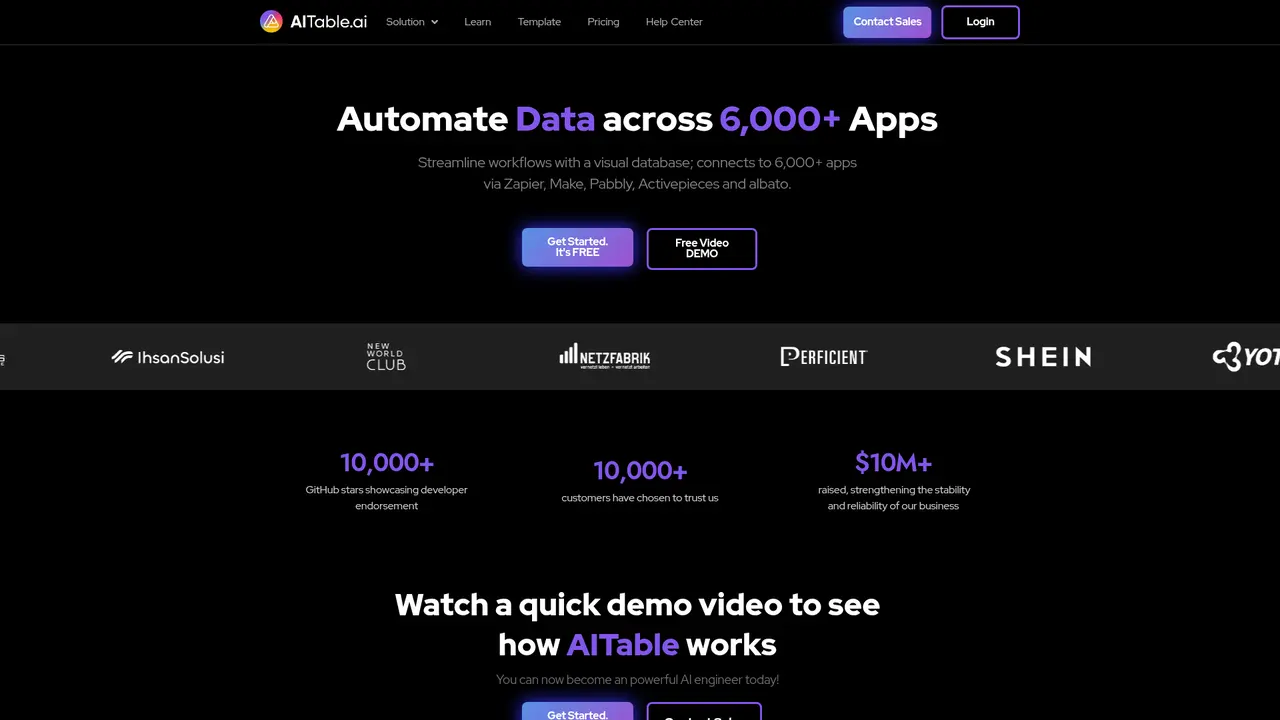
Launched on Feb 23, 2025AITable.ai is an AI-powered visual database that enables users to build applications without coding. It offers AI chat-based data queries, workflow automation, and 6000+ app integrations. With SOC 2 Type I and GDPR certification plus 10,000+ GitHub stars, it's a secure solution for businesses of all sizes.
What is AITable.ai
If you've ever struggled with spreadsheets that feel limited the moment your data needs become more complex, you're not alone. Traditional spreadsheet tools were never designed to handle the kind of dynamic data management that modern teams need—whether it's tracking customer relationships, managing project sprints, or building internal tools without writing code.
AITable.ai is an AI-powered visual database that transforms how you work with data. Instead of choosing between a simple spreadsheet and a complex database, you get a platform that combines the best of both worlds—intuitive visual interfaces with powerful AI capabilities that let you build applications, automate workflows, and derive insights from your data without touching a single line of code.
What makes AITable.ai stand out is its deep AI integration. The platform doesn't just store your data; it helps you work smarter. Need to analyze sales trends? Ask in plain English and get instant charts. Want to build a customer service bot? Describe what you need and watch it get created. Looking to automate repetitive tasks? Let AI generate the workflow for you.
:::card{type="summary" title="TL;DR"}
- AI-powered visual database combining spreadsheets with intelligent applications
- No-code platform for building CRM, project management, and data tools
- 10,000+ GitHub stars, recognized as "Airtable's quality alternative"
- SOC 2 Type I certified, GDPR compliant, 256-bit encryption
- Integrates with 6,000+ apps via Zapier, Make, Pabbly, and more
- Open-source version available for self-hosting :::
---
Core Features of AITable.ai
Here's what you can actually do with AITable.ai—and more importantly, how it helps your team save time and work more effectively.
AI-Powered Visual Database
You can use this to organize any type of data with views that match how your team thinks. Whether you prefer seeing projects as Kanban boards, timelines, calendars, or mind maps, AITable.ai renders multiple views from a single data source. This means when you update a record in one view, it updates everywhere instantly—no more syncing spreadsheets or version conflicts.
Supported views include: Table (spreadsheet-like), Gallery (card view), Kanban (board), Gantt (timeline), Calendar, Architecture (org charts), and Mind Map.
Business Intelligence Copilot
You can use this feature to query your database using natural language instead of writing SQL. Simply ask questions like "Show me sales by region this quarter" and the AI generates both the answer and relevant visualizations. This democratizes data analysis across your team—anyone can get insights without needing technical skills.
- GPT-3.5 queries: 1 credit per request
- GPT-4 queries: 20 credits per request
One-Click Form Builder
You can use this to collect data from customers, prospects, or team members without building forms from scratch. Click to generate a form from any table, customize fields as needed, and share via link. Perfect for lead generation, event registrations, and feedback collection.
Automation Workflows
You can use this to connect AITable.ai with the tools you already use—Slack, email, Google Sheets, and 6,000+ other applications through integrations with Zapier, Make, Pabbly, Activepieces, and Albato. Set up triggers like "when a new form submission arrives, automatically send a Slack message to the sales team."
AI Workflow Generator
You can use this to describe what you need in plain language—"I want to automate my approval process for expense reports"—and the AI builds the workflow for you. This dramatically accelerates how quickly you can implement new processes.
AI Writing Assistant
You can use this to generate marketing copy, emails, blog posts, and product descriptions instantly. Overcome writer's block by describing what you need and letting AI create first drafts you can refine.
AI Customer Service Bot Builder
You can use this to create ChatGPT-powered chatbots trained on your own data. Deploy them on your website to handle customer inquiries, qualify leads, or provide product support—without writing any code.
Multi-View Project Management
You can use this to switch between views seamlessly for the same project. A product launch might need a Gantt timeline for planning, Kanban boards for execution, and a Calendar for stakeholder meetings—all from one dataset.
::::grid :::card{type="advantages"}
- Comprehensive functionality: Database, project management, CRM, forms, and automation in one platform
- Deep AI integration: From data queries to content generation, AI is woven throughout the experience
- Competitive pricing: Free tier available; Plus plan at $39/month vs. Airtable's $20+/user
- Open-source option: Self-host your own instance with full data ownership
- 6,000+ integrations: Connect to virtually any tool your team uses ::: :::card{type="disadvantages"}
- Relatively newer platform: Open-sourced in 2022 compared to established competitors
- API rate limits: QPS ranges from 2-10 depending on plan, which may constrain high-volume integrations
- Learning curve: Advanced features require time to master for teams new to no-code platforms ::: ::::
---
Who Is Using AITable.ai
Understanding how others use AITable.ai helps you envision what's possible for your own team. Here are the most common use cases.
Lightweight CRM
If you're a small business or sales team, you can use AITable.ai to centralize all customer information—companies, contacts, interactions, and deal stages—in one searchable platform. Track sales pipelines visually with Kanban views, set follow-up reminders, and see完整的客户生命周期。
效果: 销售流程透明化,团队协作改善,客户转化率提升。
Project Management & Sprint Tracking
If you run agile development teams, you can use AITable.ai's Sprint management template to break down work into sprints, assign tasks, and track progress. Switch between list, board, and timeline views depending on what you need to see.
效果: 迭代过程可视化,进度实时跟踪,团队协作效率提升。
Content Marketing & SEO
If you're managing content production, you can use AITable.ai to build a content calendar that tracks topics, writers, deadlines, and SEO performance. Connect with your publishing tools and analytics platforms for a complete picture.
效果: 内容生产流程化,SEO效果可衡量,发布节奏可控。
OKR Goal Management
If you need to align team goals with company objectives, you can use AITable.ai to create OKR tracking dashboards. Everyone sees their contributions toward bigger goals, and progress updates automatically.
效果: 目标透明,上下对齐,绩效评估有据可依。
Inventory & Supply Chain Management
If you manage products or materials, you can use AITable.ai to track stock levels, supplier information, reorder points, and delivery schedules. Visual dashboards help you spot issues before they become problems.
效果: 库存实时可视化,采购决策有数据支撑,缺货风险降低。
Video Production Process Management
If you run a creative team, you can use AITable.ai to manage video projects from brief to delivery. Collect requirements via forms, track progress on Kanban boards, and view everything on executive dashboards.
效果: 制作流程标准化,交付效率提升,沟通成本降低。
Client Project Consulting Management
If you run a consultancy or agency, you can use AITable.ai to track project hours, budgets, and deliverables. Generate invoices from time entries and maintain visibility into project profitability.
效果: 工时准确计费,项目盈利可评估,客户汇报更专业。
User Research & Product Feedback
If you build products, you can use AITable.ai to systematically collect, categorize, and act on user feedback. Build workflows that take feedback from collection through analysis to product decisions.
效果: 用户声音系统化,产品迭代有据可依,团队决策更高效。
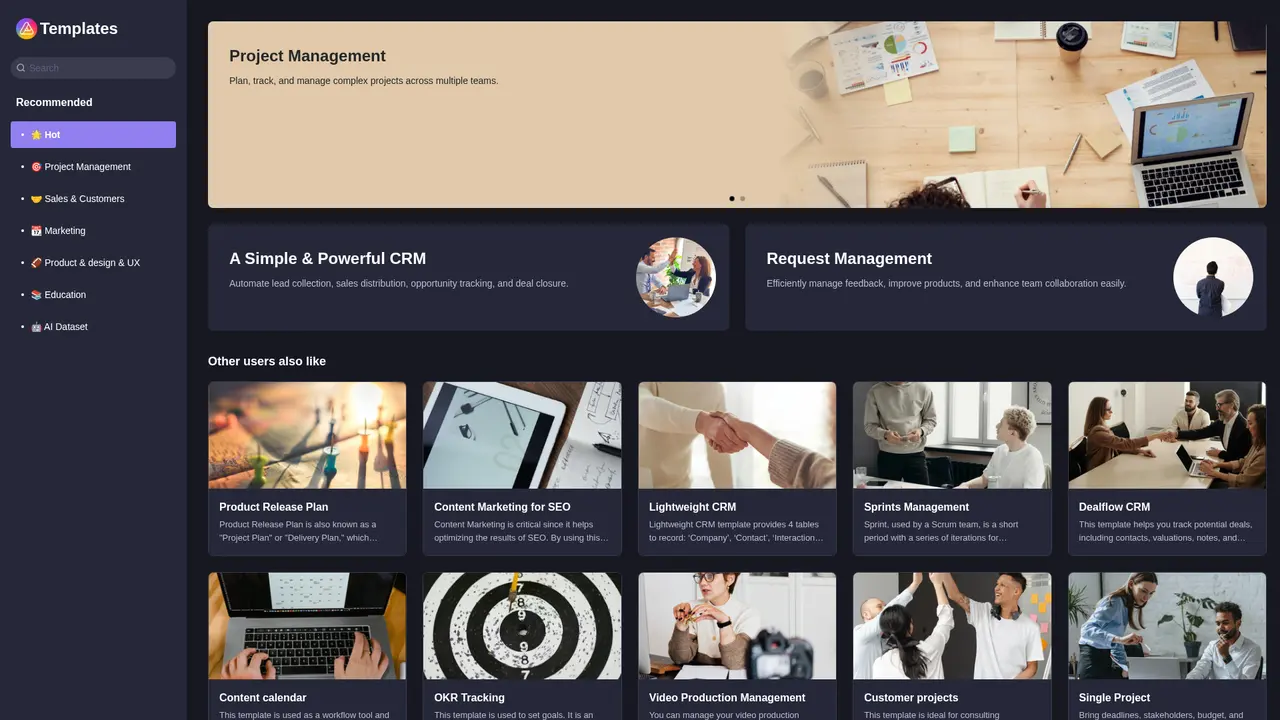
:::card{type="tip" title="💡 Choosing the Right Template"} Start with a template that matches your use case. The template library at aitable.ai/template has pre-built solutions for CRM, project management, content calendars, OKRs, and more. Plus and higher plans unlock CRM, project management, BI, and marketing automation features. :::
---
Getting Started with AITable.ai
Ready to try AITable.ai? Here's how to go from sign-up to your first working application in under 10 minutes.
Step 1: Create Your Account
Visit aitable.ai and sign up with your email. The Free plan requires no credit card and gives you 2 seats—perfect for trying things out or personal use.
Step 2: Build Your First Workspace
Once logged in, you can start from a blank canvas or choose from the template library. Templates for CRM, project management, content calendars, OKRs, and other common use cases give you a head start with pre-configured fields and views.
Step 3: Add Data and Explore Views
Create your first records and experiment with different views. Try switching from Table view to Gallery or Kanban to see how your data transforms. Remember: all views update from the same source, so you never need to re-enter data.
Step 4: Enable AI Features
Navigate to settings and activate the Business Intelligence Copilot. Start with simple queries like "show me all records from last month" to get comfortable with natural language searching. You'll quickly see how AI makes data accessible to everyone on your team.
Step 5: Set Up Automations
Create your first automation by defining a trigger (like "new form submission") and an action (like "send Slack message"). The visual builder makes it easy to connect AITable.ai with your existing tools.
Step 6: Explore the API
If you're building custom integrations, check out the developer documentation at developers.aitable.ai. API rate limits vary by plan (QPS 2-10), so choose a plan that matches your integration needs.
:::card{type="tip" title="💡 Pro Tips for New Users"}
- Start with templates: The template library has solutions for virtually every common use case. Customize rather than build from scratch to save time.
- Test AI queries with GPT-3.5 first: It costs only 1 credit per query vs. 20 for GPT-4. Validate your queries work before using the more powerful model.
- Use views strategically: Different team members may prefer different views. Everyone can work from the same data without compromising on how they see it. :::
---
Pricing and Usage Limits
Choosing the right plan depends on your team's size and needs. Here's a clear breakdown:
Plan Comparison
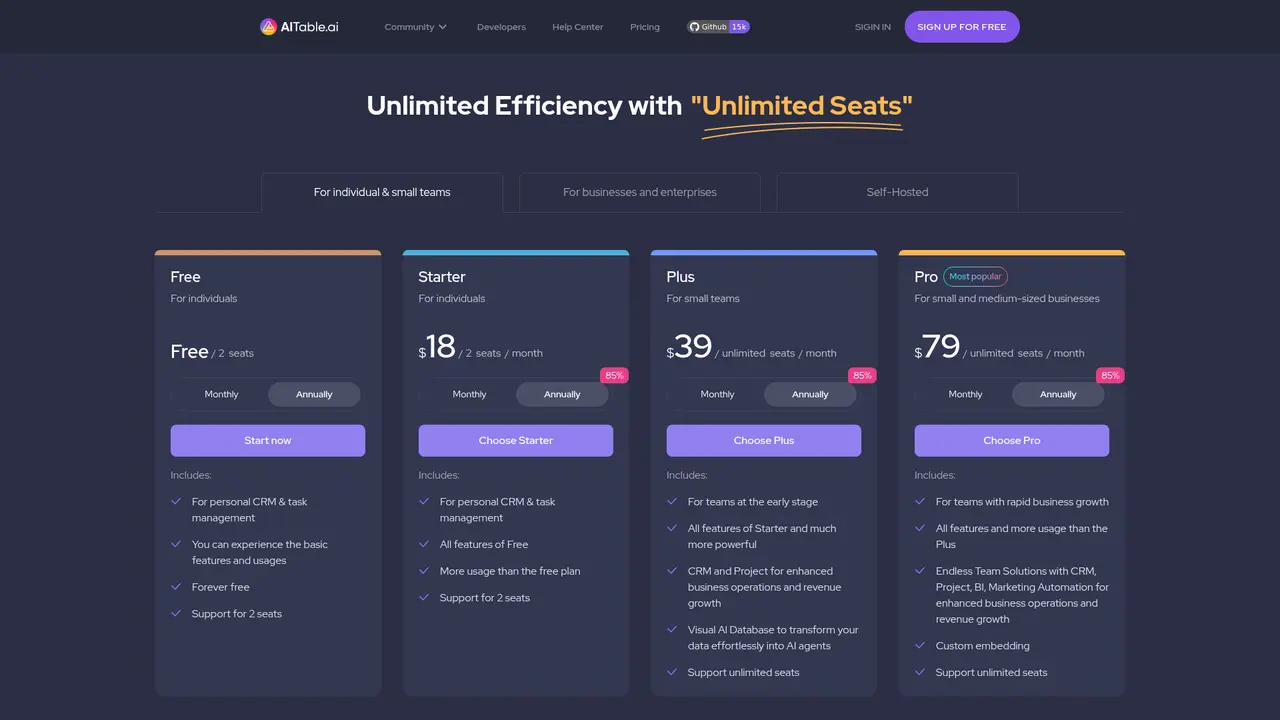
| Feature | Free | Starter | Plus | Pro | |---------|------|---------|------|-----| | Price | $0 | $18/month | $39/month | $79/month | | Seats | 2 | 2 | Unlimited | Unlimited | | File Nodes | 20 | 300 | 600 | 3,000 | | Records per Datasheet | 100 | 10,000 | 20,000 | 50,000 | | Total Records per Space | 250 | 100,000 | 200,000 | 500,000 | | Columns per Datasheet | 30 | 60 | 80 | 120 | | Attachment Storage | 1 GB | 20 GB | 50 GB | 500 GB | | Gantt Views | 2 | 10 | 20 | 50 | | Calendar Views | 2 | 10 | 20 | 50 | | Forms | 2 | 10 | 50 | 100 | | Automation Runs/month | 30 | 500 | 1,000 | 10,000 | | API Requests/month | 60 | 500 | 1,000 | 10,000 | | API QPS | 2 | 5 | 5 | 10 | | AI Message Credits/month | 20 | 1,000 | 2,000 | 5,000 | | AI Agents | 1 | 2 | 3 | 30 | | Advanced Features | Basic | Basic | CRM, PM, BI, Marketing | Full enterprise |
Which Plan Should You Choose?
Free: Perfect for individuals exploring the platform, managing personal CRM, or small hobby projects.
Starter ($18/month): Ideal for individuals or pairs who need more capacity than Free provides—more records, storage, and API access.
Plus ($39/month): The sweet spot for early teams. Unlimited seats mean everyone can join, and you get CRM, project management, and AI features that unlock real productivity gains.
Pro ($79/month): For growing organizations that need scale—500GB storage, 10,000 automation runs, 30 AI agents, and enterprise controls like custom embeds and watermark management.
:::card{type="tip" title="💡 Making the Most of Your Plan"} AI credits go further than you might expect: GPT-3.5 queries cost just 1 credit, so even the Free plan's 20 credits let you experiment with AI features. Upgrade when your usage demands more capacity. :::
---
Frequently Asked Questions
:::card{type="faq" title="What exactly is AITable.ai?"} AITable.ai is an AI-powered visual database platform that helps you organize data, build applications, and automate workflows—no coding required. Think of it as a smart spreadsheet that can transform into CRM systems, project management tools, or custom business applications. :::
:::card{type="faq" title="Is AITable.ai really free?"} Yes, there's a permanent Free plan with 2 seats, 100 records per datasheet, 1GB storage, and 20 AI credits monthly. It's designed for individuals and small projects to get started without any commitment. :::
:::card{type="faq" title="What integrations does AITable.ai support?"} AITable.ai integrates with Zapier, Make, Pabbly, Activepieces, and Albato, giving you access to over 6,000 applications. You can connect to Slack, Gmail, Google Sheets, Salesforce, and virtually any other tool your team uses. :::
:::card{type="faq" title="How secure is my data?"} AITable.ai takes security seriously: it's SOC 2 Type I certified, GDPR compliant, and uses 256-bit SSL/TLS encryption for data in transit and 256-bit AES encryption for data at rest. Your data is regularly backed up to isolated locations. :::
:::card{type="faq" title="How much does AI cost?"} AI features use a credit system: Free plan gives 20 credits/month, Starter gives 1,000, Plus gives 2,000, and Pro gives 5,000. GPT-3.5 queries cost 1 credit; GPT-4 queries cost 20 credits. This means even Free users can experiment with AI features. :::
:::card{type="faq" title="Can I export my data?"} Absolutely. You can manually export to Excel or CSV format, or use the API for programmatic exports. Your data always belongs to you—no lock-in. :::
:::card{type="faq" title="How is AITable.ai different from Airtable?"} AITable.ai offers several advantages: more affordable entry pricing (Free and Plus tiers), deeper AI integration throughout the platform, an open-source version you can self-host, and faster product iteration. Users on G2 and Product Hunt have called it "a quality alternative to Airtable." :::
Related Content

Copy.ai Review 2026: AI Copywriting Made Easy
Our honest Copy.ai review for 2026. We test Content Agents, AI Workflows, pricing ($29-$249/mo), and compare it to Jasper and Writesonic. Find out if it's worth it for your marketing team.

Rytr Review 2026: Is This Budget AI Writer Worth It?
Our hands-on Rytr review for 2026. We test features, pricing, content quality, and compare it to Jasper & ChatGPT. Find out if Rytr is the best budget AI writing tool.

Word Changer - Free AI tool to rewrite and improve your writing instantly
Writing always using repetitive words or need to avoid plagiarism? Word Changer is a free AI writing assistant that instantly rewrites any text with richer vocabulary and appropriate tone. Get multiple versions with one click, adjust formality level, check readability - all for free!

Unite - AI-powered platform for romantic fantasies and dream couple moments
Explore romantic fantasies and create special moments for your dream couple. This AI-powered platform lets you generate personalized romantic content and experience exclusive AI-created romantic experiences.
Comments