


Supercreator.ai - AI-powered captions and beautiful videos one click
Launched on Feb 23, 2025Supercreator.ai is an AI video creation platform for creators that generates stunning videos with auto-captions in 32 languages with just one click. Features include multi-track timeline editor, recorder with teleprompter, and 50+ AI tools for professional content production.
What is Supercreator.ai
Creating professional video content shouldn't feel like a second job. If you've ever spent hours manually adding captions to your videos, wrestling with complicated editing software, or struggled to find your rhythm during on-camera recordings, you're not alone. These pain points are exactly why Supercreator.ai exists.
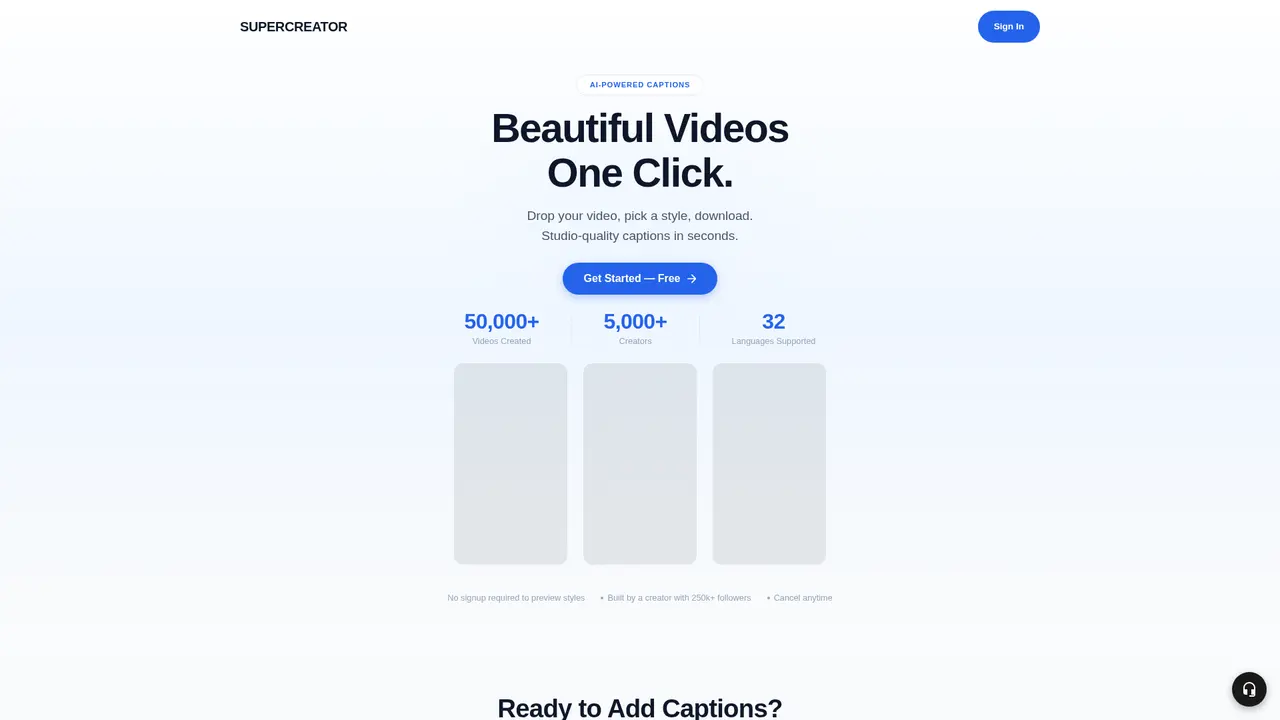
Supercreator.ai is an AI-powered video creation platform designed specifically for content creators, social media managers, and video bloggers who want to produce polished videos without the steep learning curve or time investment that traditional video editing requires. The platform's flagship feature—one-click AI caption generation—can transform your raw footage into social-media-ready content in seconds, supporting 32 languages so you can reach audiences worldwide.
What sets Supercreator.ai apart is its creator-first approach. Built by a content creator with 250,000+ followers, the platform genuinely understands the daily challenges you face. This isn't just another tech tool built by engineers who've never filmed a video for social media. Every feature reflects real-world creator needs, from the intuitive interface to the workflow-saving automation tools.
The numbers speak for themselves: over 50,000 videos have been created using Supercreator.ai, and more than 5,000 creators now rely on the platform for their content production. Whether you're just starting your creator journey or you're a seasoned professional managing multiple social accounts, Supercreator.ai meets you where you are.
One of the most user-friendly aspects? You can preview caption styles without even registering. The platform removes barriers between you and great content, letting you test drive the features before committing. No credit card required for preview, no watermarks—just clean, professional results.
:::card{type="summary" title="TL;DR"}
- One-click AI caption generation in 32 languages
- 4-in-1 creative suite: Supercut Editor, Record, Storyboard, and Studio
- 50+ AI tools for image, video, and audio processing
- Built by creators, for creators—250k+ follower expertise behind every feature
- No registration needed to preview styles, no watermarks :::
---
Core Features That Transform Your Workflow
Supercreator.ai packs powerful capabilities into an intuitive browser-based interface. Rather than overwhelming you with complexity, the platform organizes everything around your actual创作流程 (creation workflow). Here's how each feature serves your needs.
AI-Powered Captions are the heart of the platform. The AI transcribes your audio and applies beautiful, stylized caption designs automatically. With support for 32 languages and generation times measured in seconds, you can finally keep up with your posting schedule without sacrificing quality. These captions are optimized for social media formats—Reels, YouTube Shorts, TikTok—where attention-grabbing text can make or break your video's performance.
Recorder with Teleprompter solves one of the most frustrating parts of on-camera content: memorizing your script. The built-in teleprompter auto-scrolls your script while you record, with visual aids and story mode options to keep you on track. The result? Fewer retakes, less post-production editing, and more confident on-camera delivery.
Multi-Track Timeline Editor brings professional editing capabilities to your browser. You get multi-layer timelines, overlay controls, and advanced editing features—without installing any software. This means you can edit anywhere, on any computer, without being tied to a specific workstation. The learning curve is dramatically shorter than traditional professional tools like Premiere Pro or Final Cut.
Storyboard Editor helps you plan and organize your content before you even start recording. Visual project management lets you structure scripts, plan multi-part series, and maintain consistent style across your content library. If you've ever struggled to keep track of ideas, planned videos, and ongoing series, this feature brings order to the chaos.
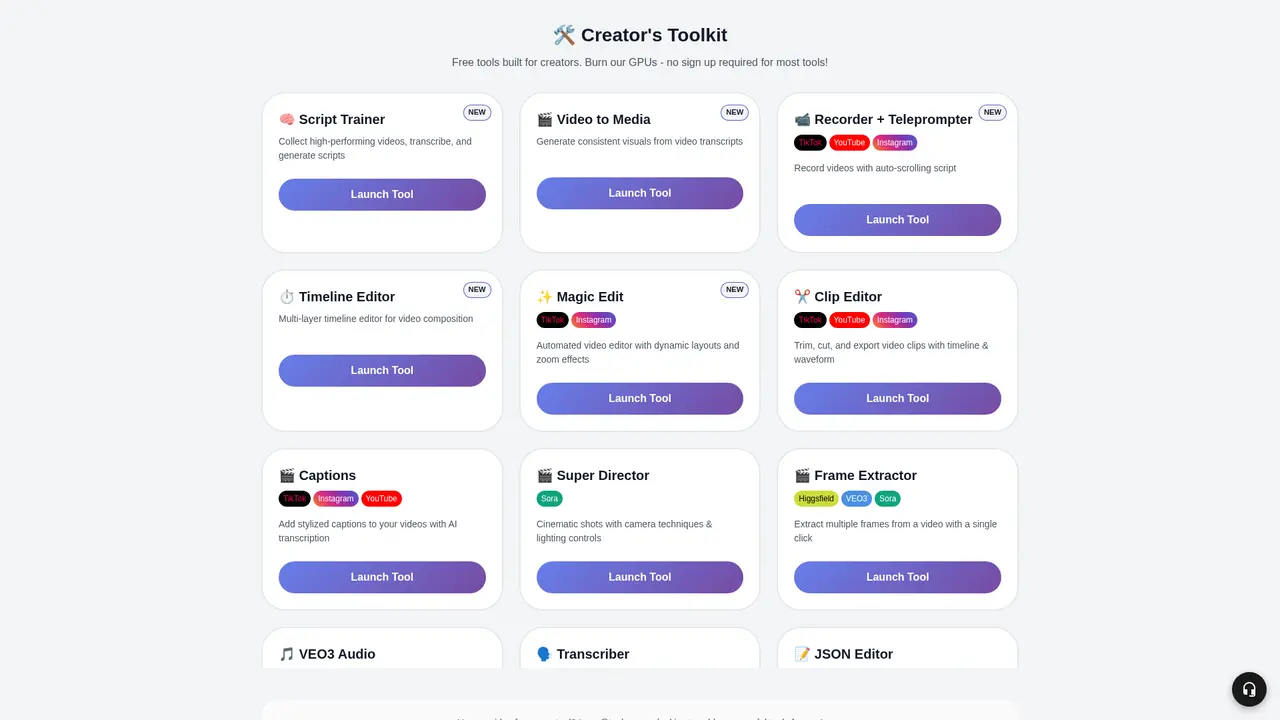
AI Studio is where the magic intensifies. With over 50 AI tools spanning image generation, video generation, and audio processing, you have unprecedented creative flexibility. Want to enhance your footage, generate custom visuals, or experiment with AI-powered effects? The studio provides a sandbox for pushing your content further.
Script Trainer is a particularly clever feature for growth-minded creators. Upload high-performing videos from competitors or industry leaders, and the AI transcribes them and generates scripts. This gives you a structural breakdown of what makes certain videos successful—without spending hours manually taking notes.
Super Director offers cinema-quality effects including lens controls and lighting adjustments for creators who demand premium visual quality.
VEO3 Audio Enhancement addresses a specific pain point for creators using Google's VEO3: the robotic audio quality. This AI-powered audio enhancement tool smooths out synthetic-sounding voiceovers, making them feel more natural and engaging.
:::card{type="tip" title="💡 The 4-in-1 Creative Suite"} The platform integrates four core tools: Supercut Editor for timeline editing, Record for filming with teleprompter, Storyboard for project planning, and Studio for AI experimentation. All four are available on every paid plan—the only difference is your monthly credits. :::
::::grid :::card{type="advantages"}
- One-click generation: AI handles transcription, timing, and styling in seconds
- Multi-language support: 32 languages mean you can expand beyond your native audience
- No registration required: Preview styles and test features before signing up
- All-in-one browser: Edit anywhere without installing software
- Creator-built: Every feature reflects real creator experience, not engineering assumptions ::: :::card{type="disadvantages"}
- Credit-based system: AI features consume credits; base editing functions are free
- No credit rollover: Unused credits don't accumulate month-to-month
- Internet required: Browser-based tool needs stable connection ::: ::::
---
Who Should Use Supercreator.ai
Wondering if this platform fits your specific situation? Let's walk through the most common creator scenarios where Supercreator.ai makes a real difference.
If you're a social media content creator struggling with manual captioning, this platform is built for you. Adding captions by hand is tedious—you're looking at 30-60 minutes per video for something an AI can do in seconds. With 32 language options, you can also easily repurpose content for international audiences. Creators using Supercreator.ai report 10x faster publishing after switching to AI-powered captions.
If you produce on-camera videos like tutorials, vlogs, or thought leadership content, the teleprompter feature alone justifies trying the platform. Nothing kills productivity like forgetting your lines mid-sentence and having to restart. The visual aids and auto-scrolling script help you deliver confident, polished delivery in one take—dramatically reducing your post-production workload.
If you're new to video editing, the multi-track timeline editor offers professional capabilities without the overwhelming complexity of industry-standard software. You don't need to spend months learning Premiere Pro. The browser-based interface is intuitive, and the AI assists with technical decisions like caption placement and timing.
If you manage content at scale—whether that's multiple social accounts, a content agency, or a brand with regular video needs—the storyboard editor becomes invaluable. Visual project planning helps you maintain consistency, plan series content, and keep your content calendar organized.
If you're a competitive creator looking to learn from top performers, the Script Trainer feature provides a genuine edge. Instead of manually analyzing what makes viral videos work, you can upload any video, get an instant transcript, and study the script structure. Understanding the "why" behind successful content helps you replicate proven patterns in your own work.
:::card{type="tip" title="💡 Choosing Your Starting Point"} If you're just starting out or producing modest volumes, Silver gives you solid foundation. If you're publishing consistently multiple times per week or managing client work, Gold or Max provide the credits you'll need for AI-intensive workflows. :::
---
Getting Started in Minutes
Ready to see what Supercreator.ai can do for your content? Here's how to go from curious to creating in just a few steps.
Step 1: Explore the platform. Visit https://www.supercreator.ai to learn about features and see examples. The site gives you a clear picture of what's possible before you commit any information.
Step 2: Preview without commitment. You can actually test caption styles right on the website—no account required, no watermarks on the preview. This means you can verify the quality meets your standards before going further.
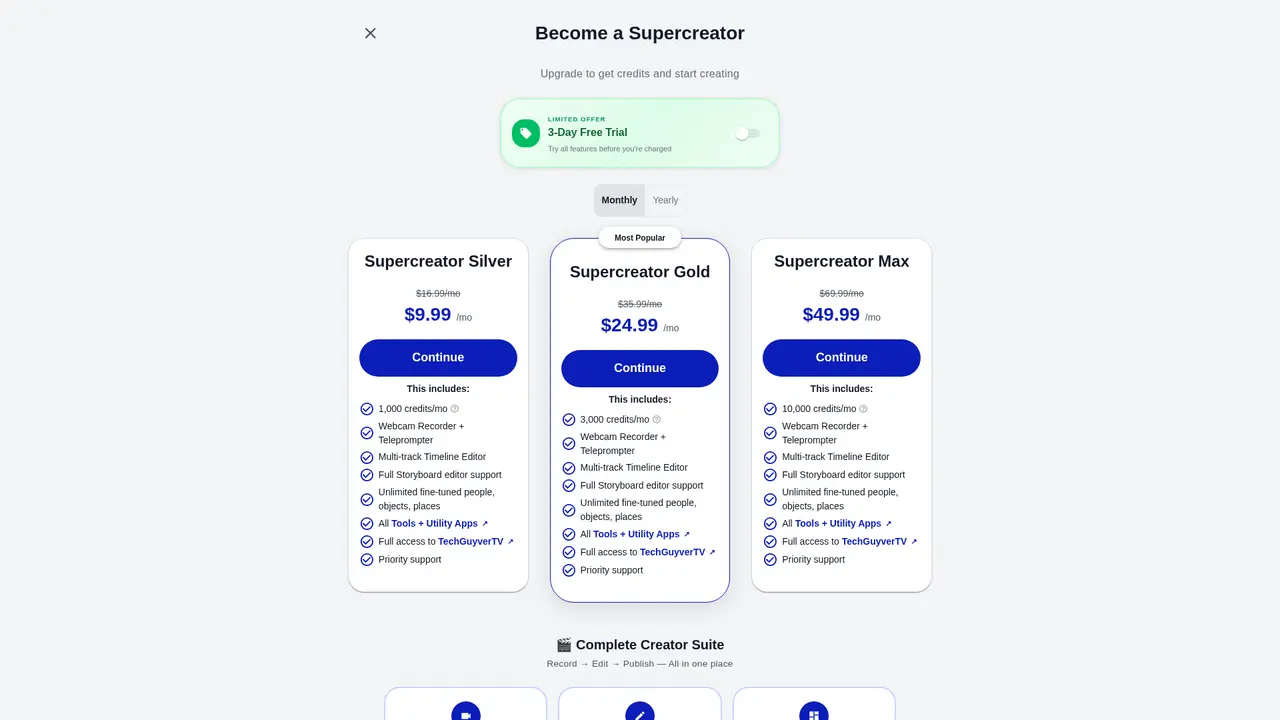
Step 3: Start your free trial. When you're ready, sign up for the 3-day free trial that unlocks all features. This is the full experience: all four tools in the creative suite, access to AI Studio, everything. You can explore thoroughly and decide if the platform fits your workflow. Cancel anytime before the trial ends with no charges.
Step 4: Choose your plan. After the trial, select the tier that matches your production volume:
- Silver ($9.99/month): 1,000 credits—perfect for testing the waters
- Gold ($24.99/month): 3,000 credits—ideal for regular creators
- Max ($49.99/month): 10,000 credits—best for high-volume producers
Step 5: Understand credit usage. Credits power the AI features: video generation, voice cloning, image enhancement, and smart editing tools. The core editing functions—timeline editing, recording, and storyboard organization—don't consume credits. This means you can always edit, even if you've used your monthly AI credits.
:::card{type="tip" title="💡 Maximize Your Trial"} During your 3-day trial, experiment with all 50+ AI tools in Studio. Find which ones match your content style. Many creators discover features they didn't know would transform their workflow. Try the Script Trainer with a competitor's viral video to see exactly how it breaks down successful content structure. :::
---
Pricing Plans
Supercreator.ai uses a straightforward credit-based subscription model. Every plan gives you access to the complete 4-in-1 creative suite—Supercut Editor, Record, Storyboard, and Studio. The only difference between tiers is your monthly credit allocation.
Free Trial: 3 days, full access to all features, cancel before the trial ends to avoid any charges.
| Plan | Price | Credits/Month | Best For | |------|-------|---------------|----------| | Silver | $9.99/month (originally $16.99) | 1,000 | New creators, small-scale production, testing the platform | | Gold | $24.99/month (originally $35.99) | 3,000 | Consistent creators, social media managers, regular posting schedules | | Max | $49.99/month (originally $69.99) | 10,000 | High-volume producers, professional teams, agencies |
All plans include:
- Webcam Recorder with Teleprompter
- Multi-track Timeline Editor
- Full Storyboard Editor support
- Unlimited fine-tuned people, objects, and places
- All Tools and Utility Apps
- Full access to TechGuyverTV
- Priority support
Upgrade anytime: When you upgrade, you immediately receive credits prorated for the remaining days in your billing cycle. For example, upgrading from Silver to Gold mid-month would give you approximately 2,000 additional credits right away.
Downgrade gracefully: When you choose a lower tier, your current benefits continue until the next billing cycle—you won't lose access mid-month.
Cancel anytime: No lock-in contracts, no hidden fees. If your needs change, you can cancel without hassle.
:::card{type="tip" title="💡 Credit Strategy"} AI-intensive features like video generation and voice cloning consume more credits than basic tools. If you're primarily doing captioning and timeline editing, Silver may work well. For heavy AI studio usage, Gold or Max provide better value per credit. :::
---
Frequently Asked Questions
:::card{type="faq" title="What's included in the subscription?"} Every plan gives you complete access to the full 4-in-1 creative suite: Supercut Editor, Record, Storyboard, and Studio. There's no feature gating between plans—all four tools are available to every subscriber. The only difference is your monthly credit allowance. :::
:::card{type="faq" title="What do credits power?"} Credits drive all the AI features: AI video generation, voice cloning, image enhancement, and smart editing tools. Non-AI functions—using the timeline editor, recording with the teleprompter, and organizing your storyboard—don't consume any credits. You can always edit, even with zero credits remaining. :::
:::card{type="faq" title="Is there a free trial?"} Yes. You get a 3-day free trial with complete access to all features. Explore everything the platform offers before deciding. Simply cancel before the trial period ends and you won't be charged. :::
:::card{type="faq" title="How do upgrades and downgrades work?"} Upgrades apply immediately, and you receive prorated credits for the rest of your billing cycle. For instance, upgrading from Silver to Gold mid-month would instantly add roughly 2,000 credits. Downgrades take effect at the start of your next billing cycle, so you keep your current benefits until then. :::
:::card{type="faq" title="Can I try it without a credit card?"} The platform allows you to preview caption styles without registration, so you can test quality before providing any payment information. For the full trial, you'll need to provide payment details, but you can cancel before being charged. :::
:::card{type="faq" title="Do credits roll over?"} No. Your credit allocation refreshes each billing cycle, and any unused credits from the previous month don't carry over. Plan your AI feature usage accordingly. :::
:::card{type="faq" title="What's the cancellation policy?"} You can cancel your subscription anytime with no penalties or hidden fees. Your access continues until the end of your current billing period. :::
Related Content

Copy.ai Review 2026: AI Copywriting Made Easy
Our honest Copy.ai review for 2026. We test Content Agents, AI Workflows, pricing ($29-$249/mo), and compare it to Jasper and Writesonic. Find out if it's worth it for your marketing team.

Rytr Review 2026: Is This Budget AI Writer Worth It?
Our hands-on Rytr review for 2026. We test features, pricing, content quality, and compare it to Jasper & ChatGPT. Find out if Rytr is the best budget AI writing tool.

Word Changer - Free AI tool to rewrite and improve your writing instantly
Writing always using repetitive words or need to avoid plagiarism? Word Changer is a free AI writing assistant that instantly rewrites any text with richer vocabulary and appropriate tone. Get multiple versions with one click, adjust formality level, check readability - all for free!

Unite - AI-powered platform for romantic fantasies and dream couple moments
Explore romantic fantasies and create special moments for your dream couple. This AI-powered platform lets you generate personalized romantic content and experience exclusive AI-created romantic experiences.
Comments