


Slick - AI-powered video editor for viral short-form content
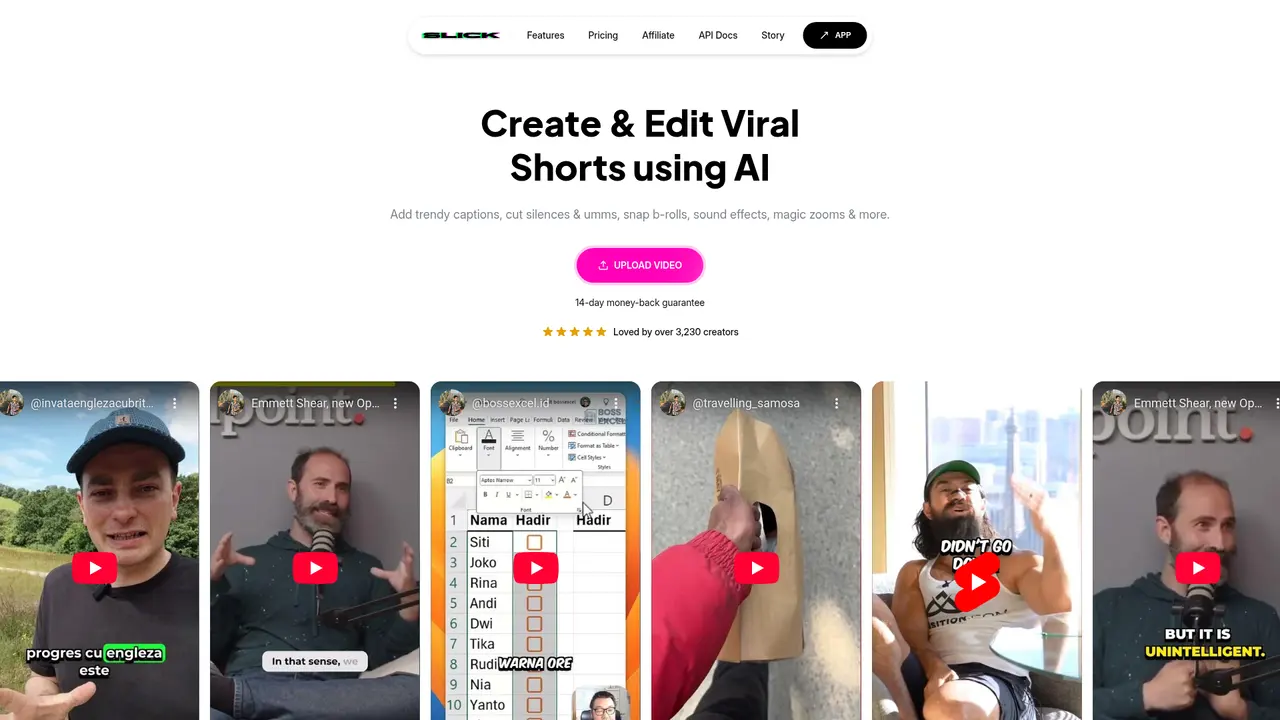
Launched on Feb 23, 2025Slick is an AI-powered video editing tool designed for creating viral short-form content. You can generate TikToks, YouTube Shorts, and Instagram Reels with auto-captions, B-roll matching, and magic zooms. Supports 106 languages with a 14-day money-back guarantee.
What is Slick
If you've ever spent hours editing a short video, struggling to make it engaging enough to go viral, you're not alone. Short-form video content has become the dominant format across TikTok, YouTube Shorts, and Instagram Reels, but the editing process remains time-consuming and technically demanding for most creators. You know your content is valuable, but the friction of editing often keeps you from posting as frequently as you'd like.
That's where Slick comes in. Slick is an AI-powered video editing tool designed specifically for short-form content creators who want to produce professional-quality videos without the steep learning curve or hours of manual work. Whether you're a solo creator, a social media manager for a brand, or part of an MCN agency, Slick automates the most tedious parts of video editing so you can focus on creating content that connects with your audience.
What makes Slick different is its comprehensive AI feature set. The platform automatically generates accurate subtitles in 106 languages, intelligently matches B-roll footage to your video content, creates eye-catching magic zoom effects, and removes filler words and dead air with a single click. You can import videos up to 4K resolution and export at 60 FPS in any aspect ratio—from vertical 9:16 for TikTok to square 1:1 for Instagram.
The results speak for themselves. Over 3,230 creators have already adopted Slick as their go-to editing solution. One user, Jason, saw his Slick-edited video reach 80,000 views—a testament to what happens when professional editing meets compelling content. With an 80% of customers choosing the Starter plan, it's clear that Slick delivers real value at accessible price points.
:::card{type="summary" title="TL;DR"}
- AI-driven automated video editing for TikTok, YouTube Shorts, and Instagram Reels
- Supports 106 languages with 4K/60FPS export capability
- 14-day full refund guarantee with flexible subscription options
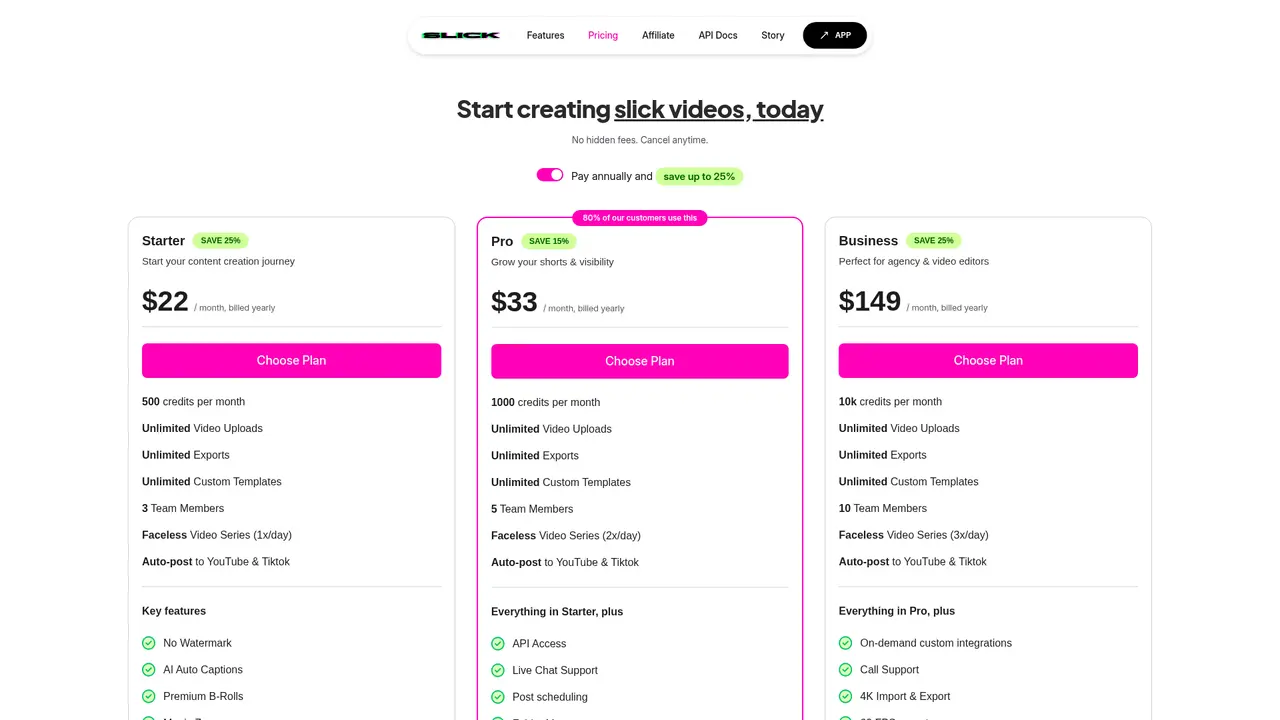
- Four pricing tiers from $22/month (annual) to custom Enterprise plans
- Trusted by 3,230+ creators with proven viral content results :::
Slick's Core Features
Here's what you can accomplish with Slick—and more importantly, how each feature translates into real time savings and better content.
AI B-roll automatically finds and inserts relevant footage that matches your video's content. Instead of manually searching through stock libraries, Slick's AI analyzes what you're saying and suggests premium B-roll that fits naturally. You can also upload your own footage for a fully customized touch.
Trendy Captions keep your content feeling fresh and platform-native. The template library updates weekly, so your captions always match the latest viral styles on TikTok and Reels. Every aspect is 100% customizable—from font and color to positioning and animation—so your brand identity shines through.
Filler Word Removal is a game-changer for interview and talking-head videos. Slick's audio analysis identifies "ums," "ahs," and awkward pauses, then automatically cuts them out while preserving natural flow. The same technology removes dead air and silent segments, keeping your audience engaged from start to finish.
Video to Shorts lets you repurpose long-form YouTube content into viral-ready short clips. Simply paste a YouTube URL, and Slick's AI identifies the most compelling moments—whether that's a punchline, a key insight, or a dramatic beat—and automatically edits them into perfectly timed short-form videos.
Magic Zooms add professional dynamic movement to your footage. The AI intelligently determines where zoom effects will have the most impact, creating that energetic, scroll-stopping quality that viral videos share.
Background Music & Sound Effects includes access to trendy sound effects and auto-generated emojis that sync with your content's energy. You can also upload your own audio tracks for complete creative control.
Post Scheduling (available on Pro and above) lets you queue up content and publish directly to YouTube and TikTok at optimal times—perfect when you're batch-creating content in one sitting.
Faceless Video Series generates automated videos without requiring you to appear on camera. This is ideal for faceless niches like educational content, storytelling, or brand accounts. Depending on your plan, you can generate 1-3 automated videos per day.
::::grid :::card{type="advantages"}
- High automation: AI handles 80% of the editing work that typically takes hours
- 106 language support: Create multilingual content for global audiences
- 14-day refund guarantee: Try risk-free with full money-back guarantee
- No watermarks: Professional output for every platform
- All-in-one platform: Captions, B-roll, music, effects, and scheduling in one place ::: :::card{type="disadvantages"}
- Free tier limited: No permanent free plan—starts at $22/month
- AI editing logic: May require some manual adjustments for perfect results
- Credit system: Monthly credit limits mean high-volume users need higher tiers ::: ::::
Who Uses Slick
Slick serves creators across the spectrum—from solo beginners just starting their content journey to established teams at MCN agencies. Here's how different creators apply Slick to their specific challenges.
If you're a短视频创作 struggling with editing, Slick solves your biggest bottleneck. Rather than spending hours learning complex editing software, you upload your footage and let AI handle everything—subtitles, B-roll, transitions, and sound design. What used to take 3-4 hours now takes minutes, and the quality is consistently professional.
If you're a YouTube creator wanting to repurpose long content, the Video to Shorts feature is built exactly for this use case. Upload your 20-minute explainer video, and Slick automatically extracts 5-10 shareable clips optimized for TikTok and Shorts. One piece of content becomes a week's worth of social posts.
If you're expanding into global markets, Slick's 106-language support means you can translate subtitles and create localized versions in minutes rather than hours. The AI maintains accuracy across languages, helping you authentically connect with international audiences.
If you're building a consistent posting schedule, Faceless Video Series combined with Post Scheduling creates an almost hands-off content machine. Set your parameters once, and Slick generates and publishes 1-3 videos daily—perfect for growing your presence without burnout.
If you're working with a team, Slick's collaboration features support 3-10 team members with folder management for organized project workflows. Agencies managing multiple creator accounts can onboard new team members quickly while maintaining brand consistency.
:::card{type="tip" title="💡 Choosing the Right Plan"} Start with Starter if you're a solo creator publishing 1-3 times per week. Upgrade to Pro when you need Post Scheduling and higher volume. Choose Business for teams or agencies managing multiple accounts. :::
Slick's Pricing Plans
Slick offers transparent, tiered pricing designed to match your production volume. All plans include core AI features with no watermarks, and annual billing saves you up to 25%.
| Plan | Price (Monthly/Annual) | Credits | Captions/Month | Team Members | File Size | |------|------------------------|---------|----------------|--------------|-----------| | Starter | $22/year | 500/month | 120 min | 3 | 600MB | | Pro | $33/year | 1,000/month | 300 min | 5 | 1GB | | Business | $149/year | 10,000/month | 1,200 min | 10 | 1.5GB | | Enterprise | Custom | Custom | Custom | Custom | Custom |
Every plan includes: AI自动字幕, Premium B-rolls, Magic Zooms, AI自动剪辑, 视频进度条, AI Hook & Title, and watermark-free exports.
The math works in your favor. One user reported being quoted $15 per video by a professional editor—Slick pays for itself in just a few videos. With 80% of customers starting on the Starter plan, it's the sweet spot for most individual creators.
:::card{type="tip" title="💡 Maximize Your Savings"} Annual billing saves 15-25% compared to monthly payments. All plans come with a 14-day full refund guarantee, so you can try risk-free and upgrade when your needs grow. :::
Slick vs Competitors
You have options in the AI video editing space—CapCut, Minvo, and other tools all promise to simplify short-form content creation. Here's how Slick stacks up.
When compared to CapCut, Slick delivers notably higher transcription accuracy according to user reviews. While CapCut offers a generous free tier, Slick's AI automation is more comprehensive out of the box—you get intelligent B-roll matching, magic zooms, and automated filler word removal without piecing together multiple features.
Against Minvo, which offers similar functionality, users report that Slick executes better. As one creator put it: "Slick does the same things as Minvo but this does it better"—with particularly strong results in subtitle accuracy and automatic clip selection for Video to Shorts.
Slick's key advantages are its accuracy-first approach, complete feature integration, and risk-free trial. The 14-day refund policy lets you validate the tool against your specific workflow before committing. And at prices starting at $22/month with annual savings, the ROI is clear—users consistently report the software pays for itself within the first few videos.
::::grid :::card{type="advantages"}
- Higher accuracy: Users report superior subtitle transcription compared to CapCut
- Complete feature stack: All AI tools integrated—no feature gaps or upsells
- 14-day refund: Full money-back guarantee, no questions asked
- Proven results: 80,000+ view videos created by users
- Cost efficiency: Pays for itself in just a few videos vs hiring editors ::: :::card{type="disadvantages"}
- Newer to market: Less brand recognition than established players like CapCut
- No permanent free tier: Unlike some competitors, Slick requires a paid plan
- Credit-based system: High-volume creators need Business tier for sufficient credits ::: ::::
Frequently Asked Questions
:::card{type="faq" title="How often can I upload videos to Slick?"} Upload frequency depends on your plan's monthly credit allocation. Starter gives you 500 credits per month (roughly 120 minutes of subtitle processing), Pro offers 1,000 credits, and Business provides 10,000 credits. One minute of video typically costs around 4-5 credits. :::
:::card{type="faq" title="How long does it take to generate videos?"} Generation time varies based on video length, complexity, and current server demand. Most short-form videos (under 3 minutes) process within a few minutes. Longer videos or complex features like Video to Shorts may take longer. :::
:::card{type="faq" title="Can I try Slick before subscribing?"} Yes. Slick offers a 14-day full refund guarantee. Subscribe, test all features with your actual content, and if it doesn't meet your expectations, request a full refund within 14 days—no questions asked. :::
:::card{type="faq" title="Can I buy a custom plan?"} Yes. The Enterprise plan offers custom pricing tailored to your specific needs. Contact the team at shivansh@slick.is to discuss volume requirements, custom integrations, or dedicated support. :::
:::card{type="faq" title="Can I cancel my subscription at any time?"} Absolutely. You can cancel your subscription anytime from your account settings. You'll retain access until the end of your billing period, and there are no cancellation fees or long-term commitments. :::
:::card{type="faq" title="Can I change my plan?"} Yes, you can upgrade or downgrade your plan at any time. Upgrades take effect immediately with prorated billing. Downgrades apply at the start of your next billing cycle. :::
:::card{type="faq" title="Can I get a discount?"} Annual billing provides the best value—saving 15-25% compared to monthly payments. The discount increases with higher-tier plans. :::
:::card{type="faq" title="Is my content secure?"} Slick maintains a comprehensive privacy policy (updated August 11, 2024) and is GDPR compliant. You retain full ownership of your content, and you can request deletion of your data at any time. The platform does not collect personal information from users under 13. :::
Related Content

Copy.ai Review 2026: AI Copywriting Made Easy
Our honest Copy.ai review for 2026. We test Content Agents, AI Workflows, pricing ($29-$249/mo), and compare it to Jasper and Writesonic. Find out if it's worth it for your marketing team.

Rytr Review 2026: Is This Budget AI Writer Worth It?
Our hands-on Rytr review for 2026. We test features, pricing, content quality, and compare it to Jasper & ChatGPT. Find out if Rytr is the best budget AI writing tool.

Word Changer - Free AI tool to rewrite and improve your writing instantly
Writing always using repetitive words or need to avoid plagiarism? Word Changer is a free AI writing assistant that instantly rewrites any text with richer vocabulary and appropriate tone. Get multiple versions with one click, adjust formality level, check readability - all for free!

Unite - AI-powered platform for romantic fantasies and dream couple moments
Explore romantic fantasies and create special moments for your dream couple. This AI-powered platform lets you generate personalized romantic content and experience exclusive AI-created romantic experiences.
Comments