Logo
ProductsBlogs
Submit

Categories

  • AI Coding
  • AI Writing
  • AI Image
  • AI Video
  • AI Audio
  • AI Chatbot
  • AI Design
  • AI Productivity
  • AI Data
  • AI Marketing
  • AI DevTools
  • AI Agents

Featured Tools

  • Coachful
  • Wix
  • TruShot
  • AIToolFame
  • ProductFame
  • Google Gemini
  • Jan
  • Zapier
  • LangChain
  • ChatGPT

Featured Articles

  • The Complete Guide to AI Content Creation in 2026
  • 5 Best AI Agent Frameworks for Developers in 2026
  • 12 Best AI Coding Tools in 2026: Tested & Ranked
  • Cursor vs Windsurf vs GitHub Copilot: The Ultimate Comparison (2026)
  • 5 Best AI Blog Writing Tools for SEO in 2026
  • 8 Best Free AI Code Assistants in 2026: Tested & Compared
  • View All →

Subscribe to our newsletter

Receive weekly updates with the newest insights, trends, and tools, straight to your email

Browse by Alphabet

ABCDEFGHIJKLMNOPQRSTUVWXYZOther
Logo
English中文PortuguêsEspañolDeutschFrançais|Terms of ServicePrivacy PolicyTicketsSitemapllms.txt

© 2025 All rights reserved

  • Home
  • /
  • Products
  • /
  • AI Writing
  • /
  • PowerModeAI - Create stunning decks in seconds
PowerModeAI

PowerModeAI - Create stunning decks in seconds

PowerModeAI is your ultimate solution for creating polished presentations in mere minutes. Forget the frustration of starting from scratch; our AI-powered slide generator takes your inputs and generates a complete deck instantly. Whether you need to present, teach, or sell, PowerModeAI streamlines your workflow, allowing you to focus on your message while we handle the design.
AI WritingPaidSummarizationContent CreationCopywriting
Visit Website
Product Details
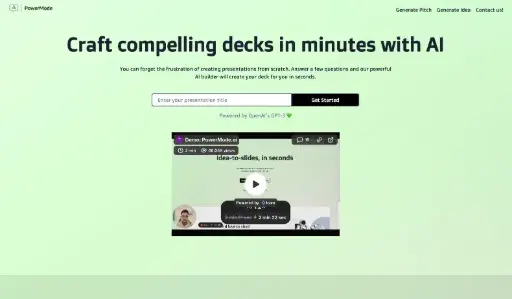
PowerModeAI - Main Image

Transform your presentation process with AI—effortlessly craft professional decks without the hassle.

How It Works

PowerModeAI leverages advanced AI technology to simplify the presentation creation process. Here's how it works:

  • User Input: Respond to a few prompts about your presentation goals.
  • AI Generation: Our powerful AI analyzes your inputs and designs a tailored presentation deck.
  • Instant Edits: Easily revise and iterate your deck with quick prompts.
  • Final Touches: Make last-minute adjustments without stress, ensuring your deck is ready when you are.

Usage

Using PowerModeAI is a breeze. Follow these steps to create your deck:

  1. Visit powermodeai.com and log in or sign up.
  2. Answer prompts regarding your presentation topic and goals.
  3. Review the generated deck and make any desired edits.
  4. Iterate quickly by providing additional instructions for adjustments.
  5. Finalize your presentation and download or present it directly from the platform.

Sales Presentations

Use PowerModeAI to create compelling sales decks that win over clients.

Teaching Classes

Prepare engaging class presentations with minimal effort, focusing on content delivery.

Team Meetings

Streamline your meeting preparations by quickly generating presentations.

Startup Pitches

Craft impactful pitches for your startup in record time.

Workshops

Create dynamic workshop presentations that keep your audience engaged.

Conference Presentations

Ensure your conference talks are polished and professional with AI-generated slides.

Features

  • Instant Deck Generation: Create fully developed presentations in seconds, saving you hours of work.
  • User-Friendly Interface: Intuitive design makes it easy for anyone to create professional presentations.
  • AI-Powered Editing: Quickly iterate and revise your deck with smart AI suggestions.
  • Customizable Templates: Choose from a variety of templates to suit your presentation needs.
  • Multi-Purpose Usage: Ideal for sales pitches, teaching, and sharing ideas with teams.
  • Real-Time Collaboration: Work with your team to build presentations in real-time.

Basic Plan (Monthly): $19/month

  • Access to all AI features
  • Up to 10 presentations per month
  • Basic support

Pro Plan (Monthly): $49/month

  • Unlimited presentations
  • Advanced customization options
  • Priority support

Enterprise Plan (Annually): Custom Pricing

  • Team collaboration features
  • Custom branding options
  • Dedicated account manager

FAQ

  1. What is PowerModeAI and how does it work?

PowerModeAI is an AI-powered presentation builder that generates polished decks based on your input. You simply answer a few questions, and the AI creates a fully developed presentation.

  1. Can I try PowerModeAI for free?

Yes, PowerModeAI offers a trial plan that allows you to explore its features before committing to a subscription.

  1. How quickly can I create a presentation with PowerModeAI?

You can generate a stunning presentation in seconds, allowing you to focus on your message.

  1. What types of presentations can I create with PowerModeAI?

You can create sales decks, teaching materials, team meeting presentations, and more with PowerModeAI.

  1. Is there a limit to the number of presentations I can create?

The Basic Plan allows up to 10 presentations per month, while the Pro Plan offers unlimited presentations.

  1. How does the editing process work in PowerModeAI?

You can quickly revise and iterate your deck by providing additional instructions to the AI.

  1. What if I need help using PowerModeAI?

PowerModeAI provides support options based on your subscription plan, including priority support for Pro users.

  1. Can I collaborate with my team using PowerModeAI?

Yes, PowerModeAI offers real-time collaboration features for teams.

Explore AI Potential

Discover the latest AI tools and boost your productivity today.

Browse All Tools
PowerModeAI
PowerModeAI

PowerModeAI is your ultimate solution for creating polished presentations in mere minutes. Forget the frustration of starting from scratch; our AI-powered slide generator takes your inputs and generates a complete deck instantly. Whether you need to present, teach, or sell, PowerModeAI streamlines your workflow, allowing you to focus on your message while we handle the design.

Visit Website

Featured

Coachful

Coachful

One app. Your entire coaching business

Wix

Wix

AI-powered website builder for everyone

TruShot

TruShot

AI dating photos that actually get matches

AIToolFame

AIToolFame

Popular AI tools directory for discovery and promotion

ProductFame

ProductFame

Product launch platform for founders with SEO backlinks

Featured Articles
Cursor vs Windsurf vs GitHub Copilot: The Ultimate Comparison (2026)

Cursor vs Windsurf vs GitHub Copilot: The Ultimate Comparison (2026)

Cursor vs Windsurf vs GitHub Copilot — we compare features, pricing, AI models, and real-world performance to help you pick the best AI code editor in 2026.

5 Best AI Agent Frameworks for Developers in 2026

5 Best AI Agent Frameworks for Developers in 2026

Compare the top AI agent frameworks including LangGraph, CrewAI, AutoGen, OpenAI Agents SDK, and LlamaIndex. Find the best framework for building multi-agent AI systems.

Information

Views
Updated

Related Content

Copy.ai Review 2026: AI Copywriting Made Easy
Blog

Copy.ai Review 2026: AI Copywriting Made Easy

Our honest Copy.ai review for 2026. We test Content Agents, AI Workflows, pricing ($29-$249/mo), and compare it to Jasper and Writesonic. Find out if it's worth it for your marketing team.

15 Best AI Writing Tools in 2026: Tested & Compared
Blog

15 Best AI Writing Tools in 2026: Tested & Compared

We tested 15+ AI writing tools for blogging, SEO, and copywriting. See our honest rankings, pricing breakdowns, and which AI writer is best for your needs in 2026.

BlipCut AI Video Translator - Translate videos to over 130 languages effortlessly
Tool

BlipCut AI Video Translator - Translate videos to over 130 languages effortlessly

BlipCut AI Video Translator is an advanced online tool designed for content creators, marketers, and educators seeking to translate videos into over 130 languages effortlessly. It offers features such as batch video translation, AI voice cloning, and multi-speaker recognition, ensuring high accuracy and quick processing. Users can also generate subtitles and transcribe audio, making it a comprehensive solution for video localization and enhancement. With its user-friendly interface and robust functionality, BlipCut enables you to expand your global audience and enhance content accessibility.

Subtiled - Create edit sync subtitles
Tool

Subtiled - Create edit sync subtitles

Subtiled is a powerful and easy-to-use online subtitle editor designed for creating, synchronizing, and translating subtitles for videos. With support for multiple formats like YouTube, Vimeo, mp4, and mp3, it simplifies the process of matching subtitles to your video's audio. The tool offers automatic subtitle generation, manual transcription, and styling options for fonts, colors, and positioning. Ideal for content creators, translators, and professionals, Subtiled ensures high-quality subtitles with features like undo/redo, hotkeys, and project sharing.
