
- Monthly visits
- 4,384
- 2026-10
- Monthly growth -49.4%
PolaFilm - Create AI photo effects, film colors, and Polaroid layouts
PolaFilm is an online photo editor for applying film-color filters, Polaroid frames, typography, and AI effects. Upload photos to adjust lighting, weather, backgrounds, or portraits, then export images in available resolutions. AI effect costs and download quotas depend on the membership plan, and points can also be purchased separately.
- AI Image
- Photo Editors
- Image Generators
- AI photo effects
- film color filters
- Polaroid photo editor
Capabilities
AI photo effects
Apply AI-generated lighting, weather, seasonal, background-change, and portrait-retouch effects to an uploaded photo. Choose an effect and settings; the workflow requires an account, email verification, and points or an eligible plan allocation.
Film color filters
Apply film-style color filters to uploaded photos and adjust image settings. The editor includes filter categories and an AI assistant that can analyze an image and suggest a suitable filter.
Reference color matching
Find filters with color tones similar to a reference image. Upload or paste a supported image or XMP file, and the system scans the filter library for similar colors.
Frames and typography
Add photo frames and decorative text to an image, then adjust text styling and placement. The editor offers Polaroid and film-strip frame styles, typography samples, fonts, and controls for size and opacity.
Cloud project storage
Save editable photo projects to Cloud PL for later editing. Available slot counts depend on the plan, and Free and Plus do not include Cloud project storage.
Pricing
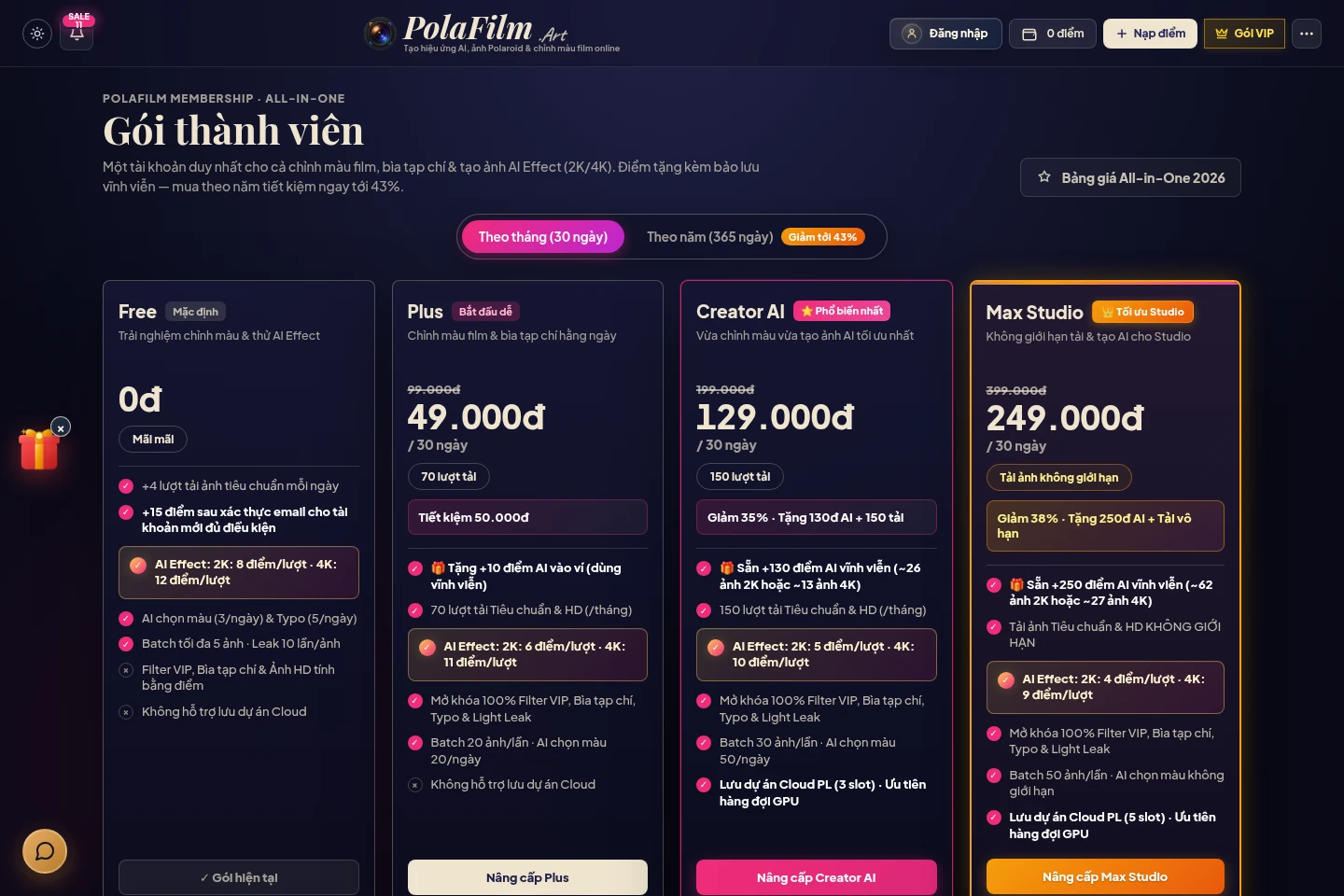
PolaFilm offers a permanent free plan and recurring 30-day or 365-day memberships. Compare download quotas, AI Effect point costs, AI color-selection limits, batch size, and Cloud storage when choosing a plan.
| Plan | Price | Included features and limits |
|---|---|---|
| Free | 0đ, forever |
|
| Plus | 49,000đ / 30 days |
|
| Creator AI | 129,000đ / 30 days |
|
| Max Studio | 249,000đ / 30 days |
|
The pricing page offers monthly and annual billing options and identifies the annual term as 365 days, but the supplied page excerpt does not show annual plan prices. Memberships do not renew automatically; payment is by VietQR bank transfer.
Use cases
Apply an AI effect to a portrait
When a portrait needs changed lighting, weather, a new background, or retouching, upload it and select an AI Effect category and preset. Adjust available settings and export the result; generation uses points or plan allowances.
Find a filter matching a reference photo
When a photo should use colors similar to a reference, upload or paste the reference image and run the color-matching tool. PolaFilm searches its filter library and presents similar filter choices.
Create a framed photo with custom text
When preparing a designed photo, choose a frame, add typography or a note, and adjust its size, position, and appearance. Export the edited photo using the available download options.
Limitations
AI Effect requires an account and email verification before generation; the page also specifies point costs or plan allocations for use.
Free accounts have four standard image downloads per day; other download quotas and AI point costs vary by membership plan.
Cloud project storage is unavailable on Free and Plus; Creator AI includes three slots and Max Studio includes five.
Uploaded source images must be no larger than 50 MB each and use one of the listed supported image formats.
The homepage warns that the built-in Facebook and Zalo browsers can have problems running the photo editor.
Who it is for
Photo editors who want AI effects and portrait retouching
Creators applying film-style color filters and photo frames
Editors who need batch processing or saved Cloud projects
FAQ
How much do AI Effect generations cost?
The point cost depends on the membership plan and output resolution. Free lists 8 points for 2K and 12 points for 4K; Plus, Creator AI, and Max Studio list lower per-generation costs.
Can I continue editing after my plan download allowance is used?
Yes. PolaFilm says points can be used as a fallback after plan allowances run out, and separately purchased points do not expire.
Does PolaFilm automatically renew a paid membership?
No. The pricing page says memberships are paid by bank transfer through VietQR for each cycle and are not automatically charged; an expired plan returns to Free unless renewed.
Which plans include Cloud project storage?
Creator AI includes three Cloud PL slots and Max Studio includes five. Free and Plus do not include Cloud project storage.
What should I do if I entered the wrong bank-transfer reference?
Contact support through Zalo or Messenger with a screenshot of the successful transaction. The pricing page says support can check the payment and activate the plan.


Comments