

PhotoRepair

PhotoRepair - AI photo repair toolkit to restore and fix damaged photos for free

Launched today

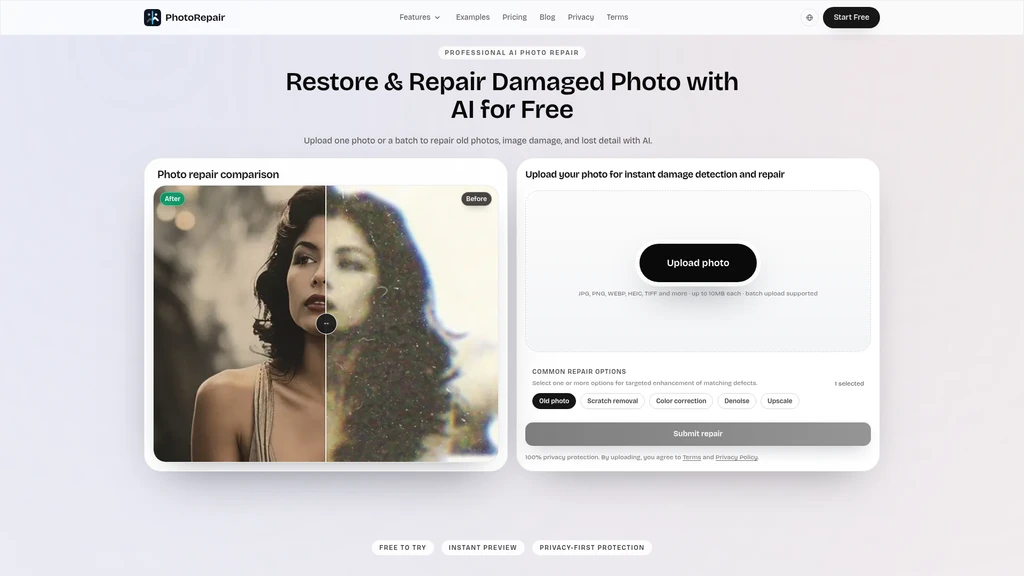
PhotoRepair is a browser-based AI photo restoration tool that lets users upload single or batch images to fix scratches, blur, faded colors, low resolution, and damaged old photos directly in the browser. It is designed for casual users, family archivists, and anyone looking to recover detail from old printed photos, scanned archives, or soft-focus portrait captures without installing desktop software. The platform offers a free trial with instant preview, and pay-as-you-go credit packs for full high-resolution downloads.
2ViewsAI ImageFreemiumPrivacy FocusedImage UpscalingImage EditingImage Generation

Core Features

PhotoRepair offers six targeted, purpose-built repair modes for common damaged photo issues:

  • Remove Scratches from Photos: Cleans light scratches, fold marks, and scan lines without creating a smeared look on the source image.

  • Fix Blurry Photos: Improves clarity for shaky, soft, or out-of-focus photos without introducing harsh digital sharpening halos.

  • Restore Old Photos: Combines fading correction, yellowing removal, scratch cleaning, and softness recovery in a single workflow.

  • Restore Faded Photo Color: Recovers washed-out color balance and restores natural tones without over-saturating skin or background elements.

  • Increase Photo Resolution: Upscales small or compressed low-res photos to a higher usable size for sharing and light print use, no stretched artificial artifacts.

  • Portrait Restoration: Repairs facial detail on old portraits while preserving natural skin texture to avoid an overprocessed fake look.

Supported Uploads and Workflow

The platform supports JPG, PNG, WEBP, HEIC, HEIF, TIFF, and BMP image formats, with maximum individual file size set to 10MB, and batch upload functionality available. The repair process follows three simple steps:

  1. Upload one or multiple original photos from your local device directly in the browser.

  2. Select the repair modes that match the main damage type on your image. You can combine multiple modes for more complex damage.

  3. Review the side-by-side before and after preview, then download the full high-resolution restored file when you are satisfied with the result.

Privacy Design

All uploaded images and generated repair results are never used for any other public or training purposes. All source and processed files are automatically deleted from server records within 24 hours, following automated cleanup rules. No desktop software installation is required to use any of the functions.

Pricing Plans

  • Free Tier: No credit card required. New users can sign in to start a free trial, access all repair modes, and view instant before-and-after previews of their repaired images.

  • Starter Pack: One-time $4.9 purchase for 100 credits (10 total full repairs), including full-resolution downloads and access to all repair modes, at roughly $0.49 per repair.

  • Pro Pack: One-time $15.9 purchase for 400 credits (40 total full repairs), including all features from the Starter Pack, at roughly $0.40 per repair for high-volume users.

Use Case Guidance

For most users, start by selecting the repair mode that addresses the most dominant damage type on your photo first. If you still notice residual noise or low resolution after the first pass, you can then add the denoise or upscale step to refine the final result. This targeted selection produces more natural final outputs compared to generic one-click filters that apply the same changes to every image.

Comments

Comments

No comments yet. Be the first to share your thoughts!