
Logo
ProductsBlogs
Submit

Categories

  • AI Coding
  • AI Writing
  • AI Image
  • AI Video
  • AI Audio
  • AI Chatbot
  • AI Design
  • AI Productivity
  • AI Data
  • AI Marketing
  • AI DevTools
  • AI Agents

Featured Tools

  • Coachful
  • Wix
  • TruShot
  • AIToolFame
  • ProductFame
  • Google Gemini
  • Jan
  • Zapier
  • LangChain
  • ChatGPT

Featured Articles

  • The Complete Guide to AI Content Creation in 2026
  • 5 Best AI Agent Frameworks for Developers in 2026
  • 12 Best AI Coding Tools in 2026: Tested & Ranked
  • Cursor vs Windsurf vs GitHub Copilot: The Ultimate Comparison (2026)
  • 5 Best AI Blog Writing Tools for SEO in 2026
  • 8 Best Free AI Code Assistants in 2026: Tested & Compared
  • View All →

Subscribe to our newsletter

Receive weekly updates with the newest insights, trends, and tools, straight to your email

Browse by Alphabet

ABCDEFGHIJKLMNOPQRSTUVWXYZOther
Logo
English中文PortuguêsEspañolDeutschFrançais|Terms of ServicePrivacy PolicyTicketsSitemapllms.txt

© 2025 All rights reserved

  • Home
  • /
  • Products
  • /
  • AI Coding
  • /
  • Mcpserver - Connect and interact effortlessly with MCP protocols
Mcpserver

Mcpserver - Connect and interact effortlessly with MCP protocols

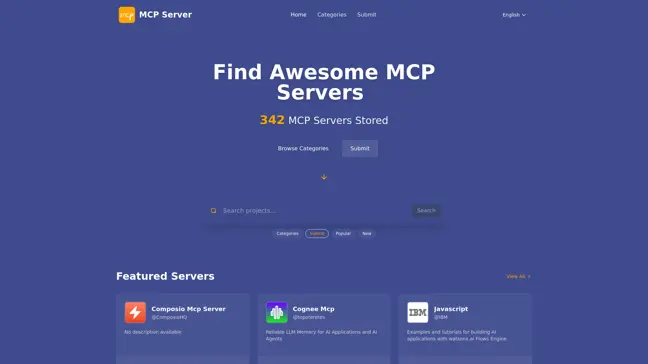
Mcpserver.cc provides a comprehensive hub for accessing various Model Context Protocol (MCP) servers that facilitate seamless interactions across different applications. With featured servers like Cognee, a reliable LLM memory server, and others that integrate with platforms like Spotify and Twitter, users can find tailored solutions for their needs. This platform also serves as a great resource with examples and tutorials for building AI applications, making it a must-visit for developers. No matter your skill level, Mcpserver.cc is designed to streamline your connection to the latest MCP technologies.
AI CodingFreeCode Generation
Visit Website
Product Details
Mcpserver - Main Image

Mcpserver.cc is the ultimate platform for exploring and interacting with diverse MCP servers. Whether you're a developer, content creator, or data enthusiast, there's something for everyone!

How It Works

Mcpserver operates on the Model Context Protocol (MCP), which standardizes how different applications communicate and exchange data. By providing a consistent API, MCP allows developers to build applications that leverage this interoperability. With servers offering functionalities from AI interactions, memory management, data storage, to social media integration, the platform caters to a wide array of use cases. Here’s how MCP works:

  • Standardized Protocols: All servers must adhere to the MCP, which ensures compatibility and straightforward integration.
  • Diverse Applications: Users can access various servers for specialized tasks, enhancing both productivity and creativity.
  • Real-time Data Exchange: The protocol supports swift data transaction, allowing applications to interact in real-time, valuable for AI and real-time analytics.
  • Expandable Framework: New servers can be added seamlessly, making it easy for developers to create and share innovative solutions.
  • Cross-Platform Compatibility: MCP servers work across different platforms, promoting a wide range of applications.
  • User-Friendly Interfaces: Most servers provide intuitive interfaces, ensuring that even those new to technology can navigate and leverage their functionalities effectively.

Usage

Using Mcpserver is straightforward. Here’s a step-by-step guide to help you get started:

  1. Visit the Website: Go to mcpserver.cc
  2. Explore Available Servers: Choose from various categories like Developer Tools, Media Content, and Data Storage.
  3. Select a Server: Click on a server to view its details, functionalities, and documentation.
  4. Follow Documentation: Each server comes with its guides or examples on how to integrate and use it effectively.
  5. Experiment and Build: Utilize the server’s features in your applications. Test out different functionalities to see what works best for your projects.
  6. Feedback and Community Support: Engage with the community to ask questions or share your experiences. Leverage user feedback to enhance your understanding of the MCP servers.

Developing AI Applications

Leverage MCP servers like Cognee to enhance AI memory and capabilities.

Building Data-Driven Solutions

Utilize data storage servers for better analytics and data management.

Integrating Social Media Features

Use Twitter MCP server to enhance social media engagement in applications.

Creating Media Content Solutions

Integrate Spotify MCP to create content that connects with audiences.

Constructing Prototypes

Experiment with various MCP servers to prototype application ideas.

Collaborating on Projects

Use MCP integration for seamless project collaboration across platforms.

Features

  • Diverse Server Access: Gain access to a variety of MCP servers covering different functionalities.
  • User-Centric Experience: The platform is designed with intuitive navigation for all user levels.
  • Real-Time Interactions: Interact with servers in real time to enhance application functionality.
  • Comprehensive Documentation: Each server offers detailed guides to assist users in effective integration.
  • Community Support: Engage with an active community for support and sharing experiences.
  • Regular Updates: New servers and features are added frequently, expanding capabilities.

FAQ

  1. What is Mcpserver?

Mcpserver is a platform for accessing various Model Context Protocol servers that enhance application interactions and integrations.

  1. How do I get started with Mcpserver?

Simply visit mcpserver.cc, explore the available servers, and follow the documentation provided for each server.

  1. Are there examples available for developers?

Yes, each server provides examples and tutorials to help you build your applications efficiently.

  1. Can I connect to social media using Mcpserver?

Absolutely, servers like Twitter MCP enable integration with social media functionalities.

  1. Is there community support available?

Yes, engage with the community to ask questions, give feedback, and share experiences.

  1. How often are new servers added?

Mcpserver regularly updates the platform with new servers and functionalities to expand options.

  1. What types of servers are available?

There are various server categories including Developer Tools, Data Storage, Media Content, and more.

  1. Is it free to use Mcpserver?

While some features may have free options, the full range of services may require subscription plans.

  1. What kinds of applications can I build with Mcpserver?

You can build AI applications, data-driven solutions, social media integrations, and more.

  1. How does the Model Context Protocol work?

The Model Context Protocol standardizes how applications communicate, enabling seamless integration and interaction.

Explore AI Potential

Discover the latest AI tools and boost your productivity today.

Browse All Tools
Mcpserver
Mcpserver

Mcpserver.cc provides a comprehensive hub for accessing various Model Context Protocol (MCP) servers that facilitate seamless interactions across different applications. With featured servers like Cognee, a reliable LLM memory server, and others that integrate with platforms like Spotify and Twitter, users can find tailored solutions for their needs. This platform also serves as a great resource with examples and tutorials for building AI applications, making it a must-visit for developers. No matter your skill level, Mcpserver.cc is designed to streamline your connection to the latest MCP technologies.

Visit Website

Featured

Coachful

Coachful

One app. Your entire coaching business

Wix

Wix

AI-powered website builder for everyone

TruShot

TruShot

AI dating photos that actually get matches

AIToolFame

AIToolFame

Popular AI tools directory for discovery and promotion

ProductFame

ProductFame

Product launch platform for founders with SEO backlinks

Featured Articles
12 Best AI Coding Tools in 2026: Tested & Ranked

12 Best AI Coding Tools in 2026: Tested & Ranked

We tested 30+ AI coding tools to find the 12 best in 2026. Compare features, pricing, and real-world performance of Cursor, GitHub Copilot, Windsurf & more.

Cursor vs Windsurf vs GitHub Copilot: The Ultimate Comparison (2026)

Cursor vs Windsurf vs GitHub Copilot: The Ultimate Comparison (2026)

Cursor vs Windsurf vs GitHub Copilot — we compare features, pricing, AI models, and real-world performance to help you pick the best AI code editor in 2026.

Information

Views
Updated

Related Content

Tabnine Review 2026: AI Code Completion for Teams — Features, Pricing & Verdict
Blog

Tabnine Review 2026: AI Code Completion for Teams — Features, Pricing & Verdict

Is Tabnine still worth it in 2026? We tested Tabnine's AI code completion for teams — covering features, pricing, privacy, and how it compares to GitHub Copilot and Cody.

12 Best Claude AI Alternatives for Coding in 2026 (Tested & Compared)
Blog

12 Best Claude AI Alternatives for Coding in 2026 (Tested & Compared)

Looking for a Claude AI alternative for coding? We tested 12 top AI coding tools — Cursor, GitHub Copilot, Windsurf, Codex CLI, Aider & more. Compare features, pricing & benchmarks.

Userpilot - Unlock user potential and drive product growth
Tool

Userpilot - Unlock user potential and drive product growth

Userpilot is a comprehensive product growth platform that helps businesses enhance user engagement, streamline onboarding processes, and collect valuable user feedback. With features like product analytics, in-app user engagement tools, and session replay capabilities, Userpilot enables teams to understand user behavior and optimize product experiences. The platform supports mobile-first designs and integrates easily with existing tech stacks, making it an ideal solution for companies looking to drive product-led growth.

UpwexIo - Boost Upwork Success with AI Tools
Tool

UpwexIo - Boost Upwork Success with AI Tools

UpwexIo is a cutting-edge Chrome extension tailored for Upwork users, offering AI-driven tools that enhance productivity and efficiency. Key features include an AI Proposal Generator that crafts personalized proposals based on job analysis, boosting acceptance rates. The AI Job Assistant evaluates job details and client history to recommend bidding, enhancing decision-making. Integration with Pipedrive CRM ensures seamless data management and workflow automation. Additionally, the AI-Powered Q&A feature streamlines communication by generating context-aware responses to client inquiries. With comprehensive analytics and reporting tools, UpwexIo provides insights into performance and success rates, enabling freelancers and companies to make data-driven decisions. Embrace UpwexIo to elevate your Upwork experience and secure more projects.

