Logo
ProductsBlogs
Submit

Categories

  • AI Coding
  • AI Writing
  • AI Image
  • AI Video
  • AI Audio
  • AI Chatbot
  • AI Design
  • AI Productivity
  • AI Data
  • AI Marketing
  • AI DevTools
  • AI Agents

Featured Tools

  • Coachful
  • Wix
  • TruShot
  • AIToolFame
  • ProductFame
  • Google Gemini
  • Jan
  • Zapier
  • LangChain
  • ChatGPT

Featured Articles

  • The Complete Guide to AI Content Creation in 2026
  • 5 Best AI Agent Frameworks for Developers in 2026
  • 12 Best AI Coding Tools in 2026: Tested & Ranked
  • Cursor vs Windsurf vs GitHub Copilot: The Ultimate Comparison (2026)
  • 5 Best AI Blog Writing Tools for SEO in 2026
  • 8 Best Free AI Code Assistants in 2026: Tested & Compared
  • View All →

Subscribe to our newsletter

Receive weekly updates with the newest insights, trends, and tools, straight to your email

Browse by Alphabet

ABCDEFGHIJKLMNOPQRSTUVWXYZOther
Logo
English中文PortuguêsEspañolDeutschFrançais|Terms of ServicePrivacy PolicyTicketsSitemapllms.txt

© 2025 All rights reserved

  • Home
  • /
  • Products
  • /
  • AI Design
  • /
  • MagicTouch2 - Transform your photo editing effortlessly
MagicTouch2

MagicTouch2 - Transform your photo editing effortlessly

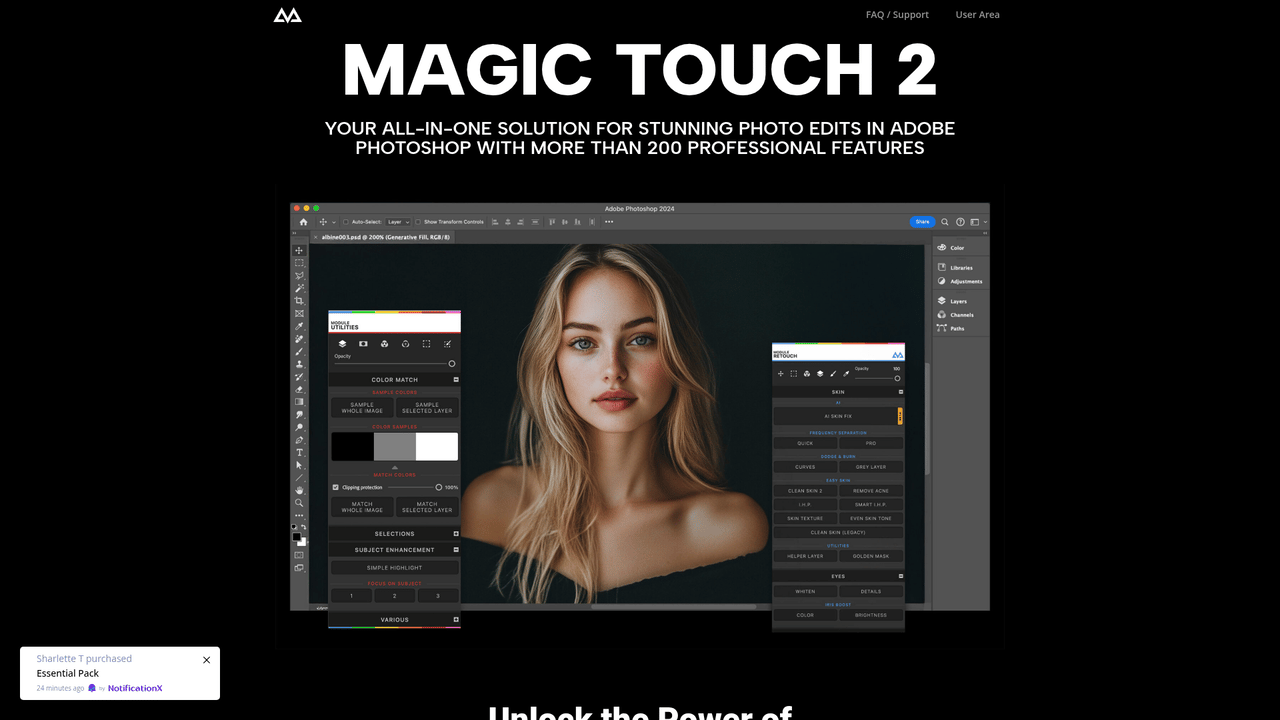
Magic Touch 2 is the all-in-one solution for anyone looking to enhance their photo editing experience in Adobe Photoshop. With an impressive array of more than 200 professional features, including AI-driven tools for face and body recognition, you'll find it easy to retouch images with minimal effort. Enjoy unlimited edits with no recurring fees, giving you a cost-effective way to unleash your creativity. The intuitive interface allows you to make adjustments in seconds—whether it’s perfecting skin, removing acne, or enhancing eye details. Magic Touch 2 is designed for both Mac and Windows, fully utilizing the capabilities of Apple Silicon chips while ensuring compatibility with Adobe Photoshop CC 2023 and above. From quick color corrections to complex overlays, Magic Touch 2 allows for a seamless editing workflow that lets you focus on creativity, not technicalities.

AI DesignFreeImage UpscalingImage EditingUI Design
Visit Website
Product Details
MagicTouch2 - Main Image

Unlock the potential of professional photo editing with Magic Touch 2. Packed with over 200 features and tools, it enhances your creativity while saving you time. Whether you’re a professional photographer or a beginner, this advanced editing panel simplifies the process, allowing you to achieve stunning results in a fraction of the time. Unlimited edits and a one-time payment model free you from recurring fees, making it the ultimate solution for every photo editor looking to elevate their work. Take the leap into the future of effortless editing today!

How Magic Touch 2 Works:

Magic Touch 2 integrates seamlessly with Adobe Photoshop, utilizing advanced AI algorithms to facilitate an effortless editing experience. Here are the core components:

  • AI Face & Body Recognition: Automatically detect and enhance facial features, such as eyes, nose, lips, and face shape.
  • One-Click Enhancements: Apply stunning looks and corrections with just a click, drastically reducing editing time.
  • Quick Actions: Streamlined processes for common tasks like color correction, retouching, and skin smoothing.
  • Robust Toolset: Over 200 tools including overlays, color grading, and professional polishing filters.
  • Creative Overlays: Unique and customizable overlays that can add an artistic touch to your photographs.
  • Unlimited Edits: Enjoy the freedom to edit an unlimited number of photos without any recurring fees.
  • Seamless Integration: Compatible with both Windows and Mac systems, ensuring a smooth workflow no matter your setup.
    This powerful toolkit is tailored to both novice and expert level users, enabling everyone to achieve professional-quality results effortlessly.

How to Use Magic Touch 2:

Using Magic Touch 2 is straightforward and user-friendly. Follow these simple steps to enhance your photo editing experience:

  1. Installation: First, install the Magic Touch 2 plugin. Ensure you have Adobe Photoshop CC 2023 or later. Open the panel within Photoshop.
  2. Import Your Image: Load the image you want to edit. This can be accomplished through the ‘File’ menu.
  3. Select a Feature: Choose from more than 200 features available. Whether it’s skin enhancement or eye editing, the options are plentiful.
  4. Apply One-Click Effects: Use the one-click enhancements for quick edits. This feature enables super-fast modifications while focusing on your creative vision.
  5. Make Adjustments: Tweak the results as needed. Explore color grading tools to perfect the overall aesthetic.
  6. Use Additional Tools: Take advantage of overlays and correction tools to polish your image further.
  7. Finalizing Your Editing: Once satisfied with the edits, save your work. Export in your desired format.
    Remember, practice makes perfect! The more you use Magic Touch 2, the more intuitive it becomes, allowing you to create beautiful edits quickly and efficiently.

Professional Photography

Perfect for seasoned photographers who need a powerful toolkit for efficient editing with high-quality results.

Social Media Influencers

Ideal for social media influencers looking to enhance their photo content with ease and speed.

E-commerce

Equip product photographers with tools to create attractive images that improve conversions.

Travel Photography

Best for travel photographers wanting to enhance their images quickly and effectively.

Event Photography

Perfect for event photographers needing to deliver high-quality images in a timely manner.

Personal Projects

Empowers hobbyists with advanced editing tools to bring their creative vision to life.

Features

  • AI Face & Body Recognition: Leverage advanced AI technology to edit facial features like eyes and lips effortlessly.
  • Unlimited Edits: Enjoy a one-time payment model allowing endless photo edits without extra fees.
  • One-Click Enhancements: Apply stunning photo filters and corrections with just a single click.
  • Advanced Overlays: Utilize custom overlays for unique artistic effects on images.
  • User-Friendly Interface: Navigable design that streamlines your editing workflow seamlessly.
  • Multiple Compatibility: Works on both Mac and Windows, optimizing the power of Apple Silicon chips.

FAQ

  1. What features does Magic Touch 2 offer?

Magic Touch 2 includes over 200 advanced features such as AI face recognition, one-click enhancements, and powerful overlays.

  1. Is there a subscription fee for Magic Touch 2?

No, Magic Touch 2 requires only a one-time payment, allowing for unlimited edits without additional fees.

  1. Can I use Magic Touch 2 on both Mac and Windows?

Yes, Magic Touch 2 is compatible with both Mac and Windows systems.

  1. How does AI Face & Body Recognition work in Magic Touch 2?

This feature automatically detects and allows quick editing of facial features like eyes, lips, and face shape.

  1. Do I need the latest version of Adobe Photoshop to use Magic Touch 2?

Yes, Magic Touch 2 requires Adobe Photoshop CC 2023 (24.0) or later.

  1. What if I encounter issues during installation?

Refer to our support documentation or contact customer service for assistance with the installation.

  1. Can I install Magic Touch 2 on multiple devices?

Yes, you can install Magic Touch 2 on as many devices as you wish with the same license.

  1. Are there free trials available for Magic Touch 2?

Currently, there is no free trial for Magic Touch 2, but a one-time purchase allows unlimited edits.


Explore AI Potential

Discover the latest AI tools and boost your productivity today.

Browse All Tools
MagicTouch2
MagicTouch2

Magic Touch 2 is the all-in-one solution for anyone looking to enhance their photo editing experience in Adobe Photoshop. With an impressive array of more than 200 professional features, including AI-driven tools for face and body recognition, you'll find it easy to retouch images with minimal effort. Enjoy unlimited edits with no recurring fees, giving you a cost-effective way to unleash your creativity. The intuitive interface allows you to make adjustments in seconds—whether it’s perfecting skin, removing acne, or enhancing eye details. Magic Touch 2 is designed for both Mac and Windows, fully utilizing the capabilities of Apple Silicon chips while ensuring compatibility with Adobe Photoshop CC 2023 and above. From quick color corrections to complex overlays, Magic Touch 2 allows for a seamless editing workflow that lets you focus on creativity, not technicalities.

Visit Website

Featured

Coachful

Coachful

One app. Your entire coaching business

Wix

Wix

AI-powered website builder for everyone

TruShot

TruShot

AI dating photos that actually get matches

AIToolFame

AIToolFame

Popular AI tools directory for discovery and promotion

ProductFame

ProductFame

Product launch platform for founders with SEO backlinks

Featured Articles
5 Best AI Blog Writing Tools for SEO in 2026

5 Best AI Blog Writing Tools for SEO in 2026

We tested the top AI blog writing tools to find the 5 best for SEO. Compare Jasper, Frase, Copy.ai, Surfer SEO, and Writesonic — with pricing, features, and honest pros/cons for each.

Cursor vs Windsurf vs GitHub Copilot: The Ultimate Comparison (2026)

Cursor vs Windsurf vs GitHub Copilot: The Ultimate Comparison (2026)

Cursor vs Windsurf vs GitHub Copilot — we compare features, pricing, AI models, and real-world performance to help you pick the best AI code editor in 2026.

Information

Views
Updated

Related Content

6 Best AI Logo Generators in 2026: Create Stunning Logos in Minutes
Blog

6 Best AI Logo Generators in 2026: Create Stunning Logos in Minutes

Looking for the best AI logo generator? We tested 6 top AI logo makers — from free tools to premium platforms. Find the perfect one for your brand in 2026.

5 Best AI Presentation Tools in 2026: Better Than PowerPoint
Blog

5 Best AI Presentation Tools in 2026: Better Than PowerPoint

Discover the 5 best AI presentation tools in 2026 that create stunning slides in minutes. We tested Gamma, Beautiful.ai, SlidesAI, and more to find the best PowerPoint alternatives.

Vzy - The easiest AI website builder
Tool

Vzy - The easiest AI website builder

Create professional websites in minutes by describing your business. AI generates content, design, images, forms and SEO optimization automatically. No coding or design skills required.

JigsawStack - Custom small AI models
Tool

JigsawStack - Custom small AI models

JigsawStack provides scalable AI infrastructure tailored for your tech stack. It focuses on custom small models trained for high accuracy and specialization, ensuring seamless integration and performance. Ideal for developers and businesses looking to enhance their AI capabilities without compromising on scalability or precision.