Logo
ProductsBlogs
Submit

Categories

  • AI Coding
  • AI Writing
  • AI Image
  • AI Video
  • AI Audio
  • AI Chatbot
  • AI Design
  • AI Productivity
  • AI Data
  • AI Marketing
  • AI DevTools
  • AI Agents

Featured Tools

  • Coachful
  • Wix
  • TruShot
  • AIToolFame
  • ProductFame
  • Google Gemini
  • Jan
  • Zapier
  • LangChain
  • ChatGPT

Featured Articles

  • The Complete Guide to AI Content Creation in 2026
  • 5 Best AI Agent Frameworks for Developers in 2026
  • 12 Best AI Coding Tools in 2026: Tested & Ranked
  • Cursor vs Windsurf vs GitHub Copilot: The Ultimate Comparison (2026)
  • 5 Best AI Blog Writing Tools for SEO in 2026
  • 8 Best Free AI Code Assistants in 2026: Tested & Compared
  • View All →

Subscribe to our newsletter

Receive weekly updates with the newest insights, trends, and tools, straight to your email

Browse by Alphabet

ABCDEFGHIJKLMNOPQRSTUVWXYZOther
Logo
English中文PortuguêsEspañolDeutschFrançais|Terms of ServicePrivacy PolicyTicketsSitemapllms.txt

© 2025 All rights reserved

  • Home
  • /
  • Products
  • /
  • AI Chatbot
  • /
  • Lunabot - AI assistant that works on any webpage as a sidebar chatbot everywhere
Lunabot

Lunabot - AI assistant that works on any webpage as a sidebar chatbot everywhere

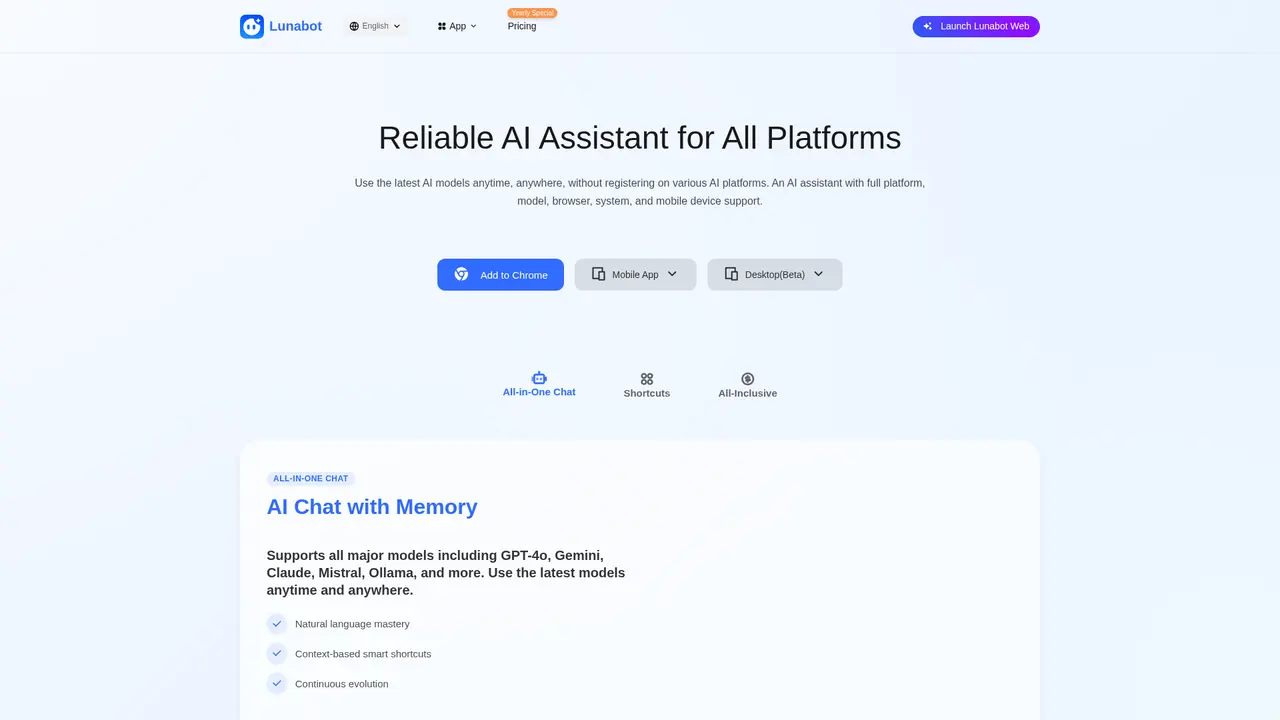
Lunabot is your AI assistant that works across any webpage as a sidebar chatbot, accessible everywhere. Access 100+ AI models including GPT-4o, Claude, and Gemini without needing API keys or a ChatGPT account. Use it on Chrome, Edge, Firefox, desktop apps, mobile, Telegram, and Siri with up to 2M tokens context and 180 tokens/s speed.
AI ChatbotFreemiumLarge Language ModelBrowser ExtensionClaudeMulti-languageGPT
Visit Website
Product Details
Lunabot - Main Image
Lunabot - Screenshot 1
Lunabot - Screenshot 2
Lunabot - Screenshot 3

What is Lunabot

Imagine you're working on a research project and need to quickly summarize an article, translate a foreign language passage, or generate creative content for your social media—all without switching between different apps or logging into multiple accounts. This is exactly the friction Lunabot was built to eliminate.

Lunabot is a cross-platform AI assistant that works wherever you do. Whether you're browsing the web, working on your desktop, or on the go with your phone, Lunabot brings the power of 100+ AI models directly to your workflow—no API keys or ChatGPT accounts required.

The core challenge Lunabot solves is fragmentation. Most AI tools force you to choose: use a web interface and stay glued to a browser tab, pay for API access and manage technical integrations, or accept limited functionality on mobile. Lunabot takes a different approach by offering six ways to access AI: browser extensions for Chrome, Edge, and Firefox, native desktop apps for macOS and Windows, mobile apps for iOS and Android, a Telegram Bot, Siri Shortcut integration, and a web app. All of these sync in real-time, so your conversation history and preferences follow you across devices.

Behind the scenes, Lunabot aggregates all major AI providers—GPT-4o, Gemini, Claude, Mistral, Ollama, and many others—into a unified interface. You can pick the best model for each task without juggling multiple subscriptions. The platform supports context windows up to 2,000,000 tokens, meaning you can drop in entire documents and have meaningful conversations about them. Response speeds reach 180 tokens per second, ensuring the experience feels snappy and responsive.

Lunabot is built by LESSLAB LLC and serves users globally in 12 languages, including English, Simplified and Traditional Chinese, Japanese, Korean, French, German, Spanish, Italian, Arabic, Portuguese, and Russian. With multi-data center deployment and 24/7 service availability, you can rely on Lunabot when you need it most.

TL;DR
  • 100+ AI models including GPT-4o, Gemini, Claude, Mistral, and Ollama
  • 6 ways to access: browser extensions, desktop apps, mobile apps, Telegram Bot, Siri Shortcut, and web app
  • No API key required — sign up and start using immediately
  • 2M token context for working with large documents
  • 180 tokens/s response speed for real-time interaction

Core Features That Make a Difference

Lunabot isn't just another chatbot—it's a complete AI workstation designed around how you actually work. Here's what you can do with it.

Unified AI Chat Across All Models. You get a single chat interface that connects to over 100 models organized into three capability tiers. Level 1 covers everyday models like GPT-4.1 Mini and Gemini Flash for quick tasks. Level 2 brings in GPT-4.1, Claude, and Gemini 2.0 for more complex reasoning. Level 3 unlocks premium models like GPT-5, Claude 4 Opus, and Mistral Large for your most demanding work. Whether you're drafting code, writing marketing copy, or analyzing data, you can switch models with a single click.

Browser Extension for Instant Assistance. Install the Chrome, Edge, or Firefox extension, and Lunabot appears as a sidebar on any webpage. Reading a lengthy article? One click gives you a summary. Need to translate foreign text? Select and translate in place. Writing an email? Get AI assistance without leaving your inbox. The extension installs in seconds and works immediately—no configuration needed.

Desktop Assistant That Works Globally. The macOS and Windows apps run in the background, accessible via a global hotkey ( Cmd+K on Mac, Ctrl+K on Windows). You're two keystrokes away from AI assistance no matter what application you're using. This is particularly valuable for developers, writers, and anyone who switches between many apps throughout the day.

Mobile Apps With Voice Power. The iOS and Android apps let you take AI on the road. Integration with Siri Shortcut means you can trigger Lunabot with your voice—"Hey Siri, ask Lunabot to draft a meeting summary"—even when the app isn't open. This transforms your phone into a hands-free AI companion for commute time, grocery runs, or anytime your hands are occupied.

Telegram Bot for Messaging Convenience. If you already live in Telegram, the Lunabot Bot brings AI directly to your chats. Send a message, get an AI response. It's particularly useful for quick queries, translations, and brainstorming without opening a separate app.

Custom Commands for Repetitive Tasks. Create your own shortcuts for tasks you do repeatedly. Set up a command like "/blog-outline" to automatically generate blog post structures, or "/code-review" to run your code through a standard review checklist. These custom commands become your personal library of AI-powered workflows.

  • Truly cross-platform: your chats, settings, and custom commands sync instantly across all devices
  • Flexible model selection: switch between 100+ models depending on task complexity and budget
  • Voice-first mobile: Siri integration enables hands-free use during commutes, driving, or cooking
  • No technical setup: no API keys, no developer accounts, no configuration files—just install and use
  • Customizable workflows: create personal commands that automate your most frequent tasks
  • Free tier limits: daily usage caps on the free plan may feel restrictive for power users
  • Model availability: some advanced models (Level 3) require Premium or Super plans
  • Offline limitations: requires internet connection for most AI interactions

Who Is Lunabot For

Lunabot serves a wide range of users—from solo creators to enterprise teams. Here's how different people use it, and which features matter most for each scenario.

Content Creators. If you regularly produce content for Twitter, LinkedIn, or blogs, you know the pain of constantly switching contexts to generate ideas, rewrite drafts, or create variations. Lunabot's browser extension and web app keep you in flow. Content creator Justin told us the convenience of generating posts directly within his workflow is "much appreciated." For creators who need image generation (for social graphics, blog thumbnails, or ad creatives), we recommend the Premium plan to access unlimited DALL-E 3 and FLUX.1-dev generation.

Cross-Device Power Users. You might start a conversation on your desktop, continue on your phone during your commute, and finish up on your laptop at home. That's the whole point of Lunabot. User Matt uses it "anytime, anywhere"—logging into the web app on any device, jumping into Telegram for quick questions, or asking Siri on his phone while walking. The key benefit: your conversation history syncs instantly, so you never lose context when switching devices.

Multi-Task Professionals. If your work involves juggling multiple projects simultaneously—like a product manager coordinating with engineering, design, and marketing—context switching is your biggest enemy. User Emily describes the experience as working "seamlessly on any device," picking up exactly where she left off regardless of which screen she opens.

Developers and Technical Users. Need AI capabilities embedded in your own applications? Lunabot provides API access and a desktop assistant that developers can invoke programmatically. Developer David calls the integration "incredibly powerful"—useful for code generation, debugging, documentation assistance, and automating code review workflows.

Mobile-First and Hands-Free Users. For many professionals, the best time to use AI isn't when sitting at a desk. User Sophia uses voice commands to "complete many tasks using voice commands" while driving, cooking, or exercising. The Siri Shortcut integration makes this possible—your phone becomes a voice-activated AI assistant that works completely hands-free.

Enterprise and Security-Conscious Teams. Business users often hesitate to adopt consumer AI tools due to data privacy concerns. Lunabot addresses this with advanced encryption, a dedicated privacy control panel where you can manage what data is stored, and full GDPR compliance. Enterprise teams requiring custom deployments, SSO, or dedicated support can contact hi@lunabot.ai for tailored solutions.

💡 Choosing the Right Plan
  • New users: Start with the Free plan to explore the interface and basic features
  • Regular users: Essential ($5.99/month) removes daily limits on most models and adds custom commands
  • Creators and power users: Premium ($9.99/month) adds unlimited image generation and channel sharing
  • Teams and enterprises: Super ($19.99/month) unlocks everything with no restrictions—ideal for heavy daily use

Pricing Plans

We believe AI access should be simple and affordable. Lunabot offers four transparent pricing tiers, with the option to pay monthly or annually (annual plans come with an 18% discount). Every plan includes access to all platforms—no separate purchases needed.

Feature Free Essential Premium Super
Monthly Price $0 $5.99 $9.99 $19.99
Annual Price $0 $9.99 $19.99 $39.99
Level 1 Models 20/day Unlimited Unlimited Unlimited
Level 2 Models — 20/day Unlimited Unlimited
Level 3 Models — 2/day 20/day Unlimited
Cross-Platform Apps ✓ ✓ ✓ ✓
Browser Extension ✓ ✓ ✓ ✓
Desktop Assistant ✓ ✓ ✓ ✓
Telegram Bot ✓ ✓ ✓ ✓
Siri Enhancement ✓ ✓ ✓ ✓
Unlimited Channel Messages — ✓ ✓ ✓
Custom Commands — ✓ ✓ ✓
Voice Interaction — ✓ ✓ ✓
AI Chat Memory — ✓ ✓ ✓
AI Document Training — ✓ ✓ ✓
AI Image Recognition — ✓ ✓ ✓
AI Image Generation — — ✓ ✓
Channel Sharing — — ✓ ✓

Understanding the model tiers: Level 1 includes cost-effective models like GPT-4.1 Mini and Gemini Flash—perfect for simple queries and translations. Level 2 brings GPT-4.1, Claude 3.5, and Gemini 2.0 for complex reasoning and detailed writing. Level 3 unlocks the most capable models: GPT-5, Claude 4 Opus, Mistral Large, and FLUX.1-dev for image generation.

The Free plan gives you a taste of everything—20 daily Level 1 queries. Essential removes the daily caps on most tasks while keeping premium features accessible. Premium is the sweet spot for content creators who need unlimited image generation. Super is designed for heavy users and teams who want zero restrictions across all models.

For organizations needing custom solutions—dedicated infrastructure, SSO integration, volume licensing, or priority support—please reach out to hi@lunabot.ai for enterprise and team pricing.

💡 Getting Started

Not sure which plan fits? Start with the Free version to experience the interface and core features. Upgrade when you hit usage limits or need premium capabilities like unlimited image generation. Annual billing saves you nearly 20%—worth considering if you plan to use Lunabot regularly.

Frequently Asked Questions

Which AI models does Lunabot support?

Lunabot supports over 100 AI models organized into three tiers. Level 1 includes everyday models like GPT-4.1 Mini, GPT-3.5 Turbo, Gemini Flash, Llama, Mistral, and Qwen. Level 2 covers advanced models such as GPT-4.1, GPT-4o, Claude 3.5/3.7, Gemini 2.0, Grok 2, and Deepseek. Level 3 unlocks premium options including GPT-5, Claude 4 Opus/Sonnet, Gemini 2.5 Pro, Mistral Large, and FLUX.1-dev for image generation. You can switch between models freely within the chat interface.

How does Lunabot improve work efficiency?

Lunabot removes the friction between you and AI assistance. The browser extension provides instant translation, summarization, and writing help without leaving your webpage. The desktop app's global hotkey (Cmd+K or Ctrl+K) summons AI in one keystroke from any application. Mobile users get hands-free operation via Siri Shortcuts—perfect for drafting messages during commutes. Custom commands automate repetitive tasks like generating blog outlines, reviewing code, or drafting customer responses. The result: less context-switching and faster completion of daily tasks.

How does Lunabot's pricing compare to ChatGPT?

Lunabot offers more flexible pricing and broader platform access. The Premium plan at $9.99/month (or $19.99/year with the 18% discount) gives you unlimited access to Level 1 and Level 2 models plus 20 daily Level 3 queries—including GPT-4o and Claude. Compare this to ChatGPT Plus at $20/month for essentially one model. Lunabot's all-platform access (browser, desktop, mobile, Telegram, Siri) means you never need separate subscriptions for different use cases.

How does Lunabot protect my data?

We take data security seriously. Lunabot employs advanced encryption for all data in transit and at rest. The privacy control panel lets you manage what conversations are stored and delete them at any time. We are fully GDPR compliant, meaning you retain full ownership of your data and can request deletion anytime. For enterprise users requiring additional guarantees, we offer custom data processing agreements.

How does Lunabot ensure service stability?

We partner with all major AI providers (OpenAI, Google, Anthropic, Mistral, and others) to ensure model availability. Our infrastructure uses multi-data center deployment with automatic failover—if one data center experiences issues, traffic routes to healthy locations. Our 7×24 monitoring system catches and resolves issues before they affect users. The result is consistent availability even during high-demand periods.

Which platforms and devices does Lunabot support?

Lunabot is available on virtually every platform: Browser extensions for Chrome, Edge, and Firefox; Desktop apps for macOS and Windows; Mobile apps for iOS and Android; Telegram Bot for messaging-based AI interaction; Siri Shortcut for voice-activated commands; and a Web app accessible from any browser. Install on all your devices and everything syncs automatically.

Explore AI Potential

Discover the latest AI tools and boost your productivity today.

Browse All Tools
Lunabot
Lunabot

Lunabot is your AI assistant that works across any webpage as a sidebar chatbot, accessible everywhere. Access 100+ AI models including GPT-4o, Claude, and Gemini without needing API keys or a ChatGPT account. Use it on Chrome, Edge, Firefox, desktop apps, mobile, Telegram, and Siri with up to 2M tokens context and 180 tokens/s speed.

Visit Website

Featured

Coachful

Coachful

One app. Your entire coaching business

Wix

Wix

AI-powered website builder for everyone

TruShot

TruShot

AI dating photos that actually get matches

AIToolFame

AIToolFame

Popular AI tools directory for discovery and promotion

ProductFame

ProductFame

Product launch platform for founders with SEO backlinks

Featured Articles
5 Best AI Agent Frameworks for Developers in 2026

5 Best AI Agent Frameworks for Developers in 2026

Compare the top AI agent frameworks including LangGraph, CrewAI, AutoGen, OpenAI Agents SDK, and LlamaIndex. Find the best framework for building multi-agent AI systems.

12 Best AI Coding Tools in 2026: Tested & Ranked

12 Best AI Coding Tools in 2026: Tested & Ranked

We tested 30+ AI coding tools to find the 12 best in 2026. Compare features, pricing, and real-world performance of Cursor, GitHub Copilot, Windsurf & more.

Information

Views
Updated

Related Content

ChatGPT vs Claude vs Gemini: Which AI Chatbot Wins in 2026?
Blog

ChatGPT vs Claude vs Gemini: Which AI Chatbot Wins in 2026?

We compared ChatGPT, Claude, and Gemini across writing, coding, reasoning, pricing, and more. Find out which AI chatbot is best for your needs in 2026.

Best Models for OpenClaw in 2026: Complete Guide
Blog

Best Models for OpenClaw in 2026: Complete Guide

Which LLM works best with OpenClaw? We tested Claude, GPT, Gemini, and local Ollama models across real agent tasks. Find the best model for your budget and use case.

Yuna - The trusted AI companion for your mental wellbeing
Tool

Yuna - The trusted AI companion for your mental wellbeing

Yuna is the #1 trusted AI mental health platform providing 24/7 support through voice or text conversations. Built with CBT-based technology and real-time crisis intervention, it helps employees manage stress and build resilience. HIPAA compliant and SOC 2 Type II certified for enterprise-grade security.

Markprompt - Enterprise AI customer support platform
Tool

Markprompt - Enterprise AI customer support platform

Enterprise-grade AI customer support platform designed for developer platforms and fintech companies with strict compliance requirements. Features SOC 2 Type II and GDPR certification, 99.9% SLA reliability. Vercel reduced manual ticket handling by 31% using Markprompt AI agents. Email, chat, and voice agents automate ticket resolution from day one.

