

Freed AI Scribe - AI-powered medical documentation that saves clinicians hours
Freed AI Scribe is an AI-powered medical documentation assistant designed for clinical doctors. It saves physicians 5-15 hours per week by automatically generating SOAP notes during patient visits. HIPAA-compliant with 20+ specialty templates.
What Is Freed AI Scribe
Picture this: it's Friday evening. You're at dinner with friends, but instead of enjoying the conversation, you're scrolling through your laptop between bites, trying to finish patient notes before the weekend. Your spouse, also a physician, is doing the same thing. This scene repeats itself countless times—not just on Friday nights, but every single night.
This is the reality for thousands of clinicians. The administrative burden of documentation has become so overwhelming that many doctors spend 2-3 hours every evening writing notes after patients have left the clinic. Some resort to bringing laptops to family dinners. Others burn out and consider leaving medicine altogether.
Freed AI Scribe was built specifically for this problem. It's not another generic EHR add-on or a template pasted onto existing workflows—it's an independent, focused AI medical documentation solution designed from the ground up to eliminate the note-writing burden for clinical physicians.
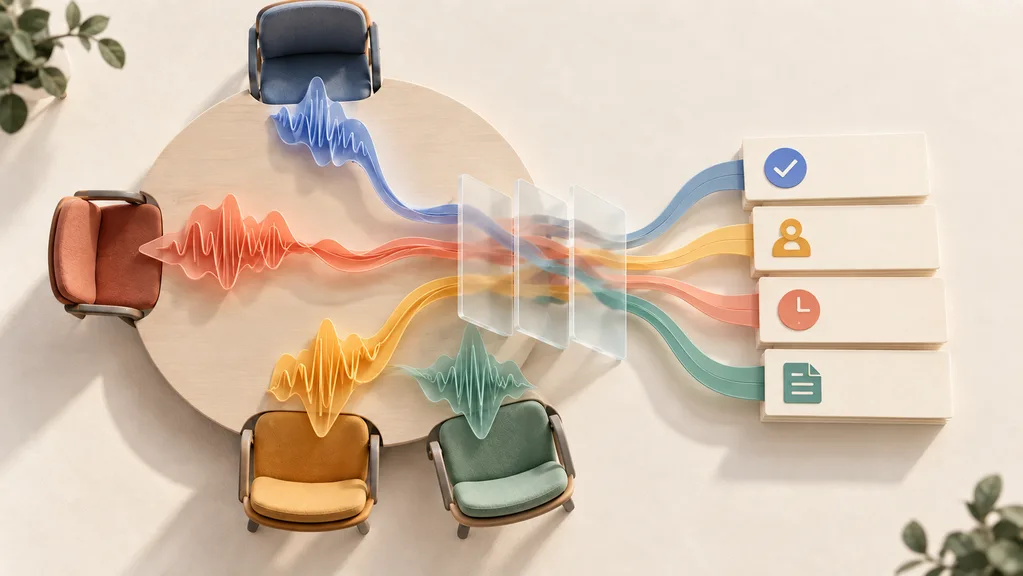
Here's how it works: during patient consultations, Freed listens to the conversation between you and your patient. When the visit ends, Freed processes the dialogue and generates a complete, well-structured SOAP note in approximately one minute. You review, make any necessary edits, and move on to your next patient—or finally, to your family.
The results speak for themselves. More than 20,000 clinical physicians now use Freed, including professionals at renowned healthcare organizations like Allergy Partners, American Family Care, Privia, The Urology Group, and Burlington Pediatrics. These clinicians report reclaiming 5-15 hours every week—time previously spent on documentation that kept them at the office late into the night.
One physician put it simply: Freed lets them get "baking cookies with them" instead of staying up late charting. Another shared that Freed has been "beyond saving me at least 4 hours a night in charting."
- AI-powered real-time SOAP note generation in approximately 1 minute
- Saves clinicians 5-15 hours per week on documentation
- 20+ specialty-specific templates for various medical fields
- HIPAA compliant, SOC 2 Type 1 & 2 certified, HITECH compliant
- Serves over 20,000 clinical physicians at major healthcare organizations
Core Features of Freed AI Scribe
What makes Freed different from other documentation tools is its laser focus on what actually matters to clinicians: saving time while maintaining high-quality medical records. Every feature was designed with this goal in mind. Let's walk through what you can actually do with Freed in your daily practice.
Smart Visit Prep gives you a head start before you even see the patient. Freed automatically extracts key information from the patient's historical visit records, presenting it as a concise summary you can review before entering the exam room. You can also chat with Freed's AI about the patient's history—asking questions like "What was the patient's blood pressure reading three visits ago?" or "List all medications from last month's note." This means you're prepared with relevant context without spending minutes manually scrolling through EHR records.
Spend 2 minutes before each patient using Smart Visit Prep to review the patient's history summary. This preparation time pays off significantly—you'll be more efficient during the consultation and can focus on what matters most: the patient's current condition.
Note Customization ensures your documentation matches your specific practice needs. Freed offers over 20 specialty-specific templates covering Family Medicine, Internal Medicine, Pediatrics, Psychiatry, OB/GYN, Orthopedic Surgery, Functional Medicine, and more. But you can go further: the custom template builder lets you control every section and subsection. Even better, the "Learn My Format" feature lets you edit a note to your preferred style, then apply that format to future notes with a single click. If you need to give Freed specific instructions, you can write custom AI prompts directly.
Magic Edit is like having a medical editor available 24/7. Instead of manually hunting through the entire note to make changes, you simply tell Freed what you want in natural language: "Shorten the subjective section" or "Add more detail to the assessment." Freed understands both general language and medical terminology, so you can communicate naturally without learning special commands.
Patient Instructions solves the post-visit communication challenge. After each visit, Freed can automatically generate patient-friendly follow-up instructions—translating complex medical notes into plain language that patients can actually understand. You maintain full control over when these instructions are sent.
Post-Visit Letters handles the paperwork that often falls by the wayside. Need a referral letter, sick note, return-to-work certificate, or letter for a caregiver? Freed generates 14+ pre-built letter types automatically based on the visit context. Review, edit if needed, and share—it's that simple.
ICD-10 Codes accelerates your billing workflow. Freed analyzes the clinical context and suggests billable ICD-10 codes in real time, with specialty-aware predictions that improve accuracy. This bridges the gap between documentation and claims submission. (CPT code support is currently in testing.)
EHR Integration ensures your finished notes flow directly into your electronic health record system. Rather than copy-pasting or retyping, Freed pushes completed documentation to your EHR, maintaining the data flow without adding extra steps.
Who Is Using Freed AI Scribe
Freed serves clinicians across nearly every medical specialty and practice setting. Understanding who else uses Freed can help you envision how it might fit into your specific workflow. Here are the most common scenarios.
Scenario 1: The Busy Family Physician handles 20-30 patients daily in a typical outpatient setting. Before Freed, each patient required 15-30 minutes of documentation after the visit—time that accumulated into late nights at the office. With Freed, the documentation happens in real time during the consultation, and a complete SOAP note is ready for review within about one minute after the visit ends. One family physician shared that Freed has been "getting home early, rather than staying late at the office"—a small change that profoundly impacts work-life balance.
Scenario 2: Psychiatry and Mental Health presents unique documentation challenges, especially in telepsychiatry. Traditional note-taking during video visits breaks eye contact and damages the therapeutic relationship—you're constantly glancing at the screen to type. Freed solves this by handling all documentation automatically, letting you focus entirely on the patient. A psychiatric mental health nurse practitioner using Freed described being able to have "all of the extra time to devote to the things that are important to me." Freed integrates with Zoom, so you can have Freed join your telehealth sessions and process everything automatically.
Scenario 3: Pediatric Practices require detailed documentation of growth parameters, developmental milestones, and vaccination records—information that must be accurately captured at every visit. Freed's pediatric specialty template handles these requirements natively. Clinics like Burlington Pediatrics have adopted Freed specifically for this reason.
Scenario 4: Clinic Team Management becomes significantly easier with Freed's Groups plan. Large healthcare organizations managing dozens of physicians need consistent documentation standards and centralized oversight. The Groups plan includes SSO (single sign-on), an administrator dashboard, dedicated account management, and real-time clinic onboarding. Organizations like American Family Care and Privia rely on Freed to manage documentation across their provider networks.
Scenario 5: Medical Education benefits from Freed's role in teaching proper documentation habits. Medical students and residents are learning clinical documentation at a time when healthcare is increasingly complex. Freed provides a 50% student discount for medical students and trainees, helping the next generation of physicians master documentation skills more efficiently while reducing academic burden.
If you're a specialist, start by testing Freed's template for your specific field. This gives you the most accurate baseline documentation. You can always customize further after seeing how well the default template matches your workflow.
Getting Started Quickly
One of Freed's core principles is that it should integrate seamlessly into your existing practice without requiring extensive training or technical setup. Most clinicians are up and running within minutes. Here's how to begin.
Step 1: Sign Up – Visit getfreed.ai and create your account. You'll immediately receive a 7-day free trial with full access to all features—no credit card required. This gives you ample time to test Freed with real patient visits.
Step 2: Configure Your Workspace – After logging in, select your specialty from the 20+ available templates. This sets up Freed's documentation structure to match your field's requirements. If you're unsure which template fits best, you can switch at any time.
Step 3: Start a Visit – In the exam room (or before a telehealth session), open Freed on your preferred device—whether desktop, tablet, or smartphone. Click "Start Visit" and Freed begins listening to the patient conversation. There's no need to press record or manage any recording controls. Freed handles everything automatically.
Step 4: Review and Edit – When the visit concludes, Freed processes the conversation and generates a complete note within approximately one minute. Review the generated SOAP note, make any adjustments using Magic Edit if needed, then sync directly to your EHR.
Step 5: Patient Communication – Optionally generate patient instructions or post-visit letters with a single click.
Before your first patient visit with Freed, verify: microphone permissions are enabled on your device, your internet connection is stable, you've selected the correct specialty template, and your EHR integration is configured (if applicable). A 30-second check prevents documentation gaps.
Device Compatibility: Freed works on any device with a web browser—desktop computers, laptops, tablets, and smartphones. It's designed for both in-person consultations and virtual telehealth visits. For telehealth, you can use Freed's Zoom integration to have Freed join and document your video visits automatically.
Best Practice Recommendation: We recommend spending approximately 2 minutes before each patient using Smart Visit Prep to review the patient's history summary. This minimal preparation significantly improves your consultation efficiency and ensures Freed generates more accurate, contextually relevant notes.
Technical Details
Understanding Freed's technical foundation helps you trust that your documentation is handled securely and professionally. Freed combines enterprise-grade infrastructure with medical-specific AI capabilities.
Infrastructure: Freed is built on Microsoft Azure's high-availability infrastructure, providing the reliability and scalability required for mission-critical healthcare applications. This ensures consistent performance even during peak usage times.
AI Model Architecture: Freed's AI was specifically designed for medical documentation—not adapted from general-purpose language models. It was trained exclusively on de-identified medical notes, meaning no personal health information was used in training. This medical-specific approach produces more accurate clinical terminology and documentation structures compared to generic AI tools.
Multilingual Capabilities: Freed supports over 14 languages in real time, capturing patient information in Spanish, Mandarin, Italian, German, Russian, Japanese, French, Korean, Thai, Portuguese, Dutch, Swedish, Polish, and Indonesian—then translating to English for documentation. This is particularly valuable for practices serving diverse patient populations.
Specialty Coverage: With templates for more than 20 medical specialties, Freed handles the unique documentation requirements across disciplines—from detailed psychiatric assessments to orthopedic surgical consultations.
- Built on Microsoft Azure enterprise infrastructure for reliability
- AI trained exclusively on de-identified medical notes for accuracy
- Supports 14+ languages for diverse patient populations
- 20+ specialty-specific templates covering major medical fields
- Comprehensive security certifications including HIPAA, SOC 2 Type 1 & 2, and HITECH compliance
- Encryption modules meet FIPS PUB 140-2 standards
- Patient data stored securely in the United States
- Requires stable internet connection for real-time processing
- EHR integration currently limited to specific systems (more integrations coming soon)
- CPT code suggestions still in testing phase
Security and Compliance: This is perhaps Freed's strongest differentiator. The platform maintains full HIPAA compliance and has achieved SOC 2 Type 1 and Type 2 certification. It meets HITECH requirements, uses encryption modules compliant with FIPS PUB 140-2 standards, and stores all data within the United States.
Regarding audio recordings: patient conversations are temporarily saved only until note generation and quality review are complete—they are then automatically deleted. You can also manually delete notes at any time or configure automatic deletion after 30 days. Freed signs Business Associate Agreements (BAA) with healthcare organizations, and all team members complete annual HIPAA and privacy training.
Pricing Plans
Freed offers four pricing tiers designed to match different practice sizes and needs. Here's the complete breakdown:
| Plan | Price | What's Included |
|---|---|---|
| Starter | $39/month | 1 clinical user, up to 40 notes per month, specialty templates, world-class real-time support |
| Core | $79/month | Unlimited note generation, instant template builder, AI clinical editing assistant |
| Premier | $104/month (billed annually) or $119/month (monthly) | Pre-visit summary and patient context, instant patient instructions/letters/referrals, EHR push integration, AI clinical assistant with medical knowledge base, ICD-10 coding (CPT in testing) |
| Groups | Custom pricing | Medical assistant users (Alpha), patient sharing (Beta), real-time clinic onboarding, SSO, admin dashboard, dedicated account manager |
Free Trial: All plans include a 7-day free trial with full feature access—no credit card required. This lets you test Freed with real patient visits before committing.
Student Discount: Medical students and trainees receive 50% off any plan. Simply submit your student verification to unlock this discount.
If you're a new clinician or evaluating Freed for the first time, start with Starter to explore the core experience. Established practitioners will find Core delivers the complete Freed experience with unlimited notes. Large clinics should consider Groups for team management capabilities and dedicated support.
Recommendation: We recommend that newly practicing clinicians begin with the Starter plan to become familiar with Freed's workflow. Once you've experienced the time savings firsthand, upgrading to Core unlocks unlimited documentation. Groups plans are ideal for practices with multiple providers needing centralized management.
Frequently Asked Questions
Are audio recordings saved?
No. Patient audio recordings are temporarily stored in a secure, HIPAA-compliant manner only until note summarization and quality checks are complete. They are then automatically deleted. You can also manually delete notes anytime or configure automatic deletion after 30 days.
Can I customize my notes?
Absolutely. You can choose from over 20 specialty-specific templates or create your own custom templates. Additionally, Freed's "Learn My Format" feature lets you edit a note to your preferred style, then apply that format to all future notes with a single click.
Can I use Freed on any device?
Yes. Freed works on any device with a web browser—desktop, tablet, or smartphone. It's designed for both in-person consultations and virtual telehealth visits.
Does Freed support telehealth appointments?
Yes, Freed supports documentation for both in-person and virtual visits. You can use Freed's Zoom application, which allows Freed to join your Zoom telehealth meetings and automatically generate notes from the session.
Does Freed support multiple languages?
Yes. Freed captures patient information in 14+ languages and translates your documentation to English. This is particularly valuable for practices serving multilingual patient populations.
Is Freed secure and HIPAA compliant?
Yes. Freed maintains full HIPAA compliance, SOC 2 Type 1 & 2 certification, and meets HITECH requirements. All data is encrypted and stored in the United States. Freed also signs Business Associate Agreements (BAA) with healthcare organizations.
How does an AI scribe actually save me time?
Traditional documentation requires hours of work after patients leave. Freed's AI listens to patient conversations during the visit and generates a complete note in approximately one minute after the consultation ends. Clinical users consistently report recovering 5-15 hours per week—time previously spent on documentation that kept them at the office late into the evening.
Featured

Aigotools
Practical AI workflows and verified tools directory

Insight Agent
AI-powered Etsy market research and SEO optimization tool

Questie.ai
Your AI companion that watches and reacts to your games in real time

Emochi
Your favorite anime and game characters brought to life through AI chat

ManualFig
AI instruction and manual illustration generator from product photos

12 Best AI Coding Tools in 2026: Tested & Ranked
We tested 30+ AI coding tools to find the 12 best in 2026. Compare features, pricing, and real-world performance of Cursor, GitHub Copilot, Windsurf & more.

8 Best Free AI Code Assistants in 2026: Tested & Compared
Looking for free AI coding tools? We tested 8 of the best free AI code assistants for 2026 — from VS Code extensions to open-source alternatives to GitHub Copilot.



Comments