
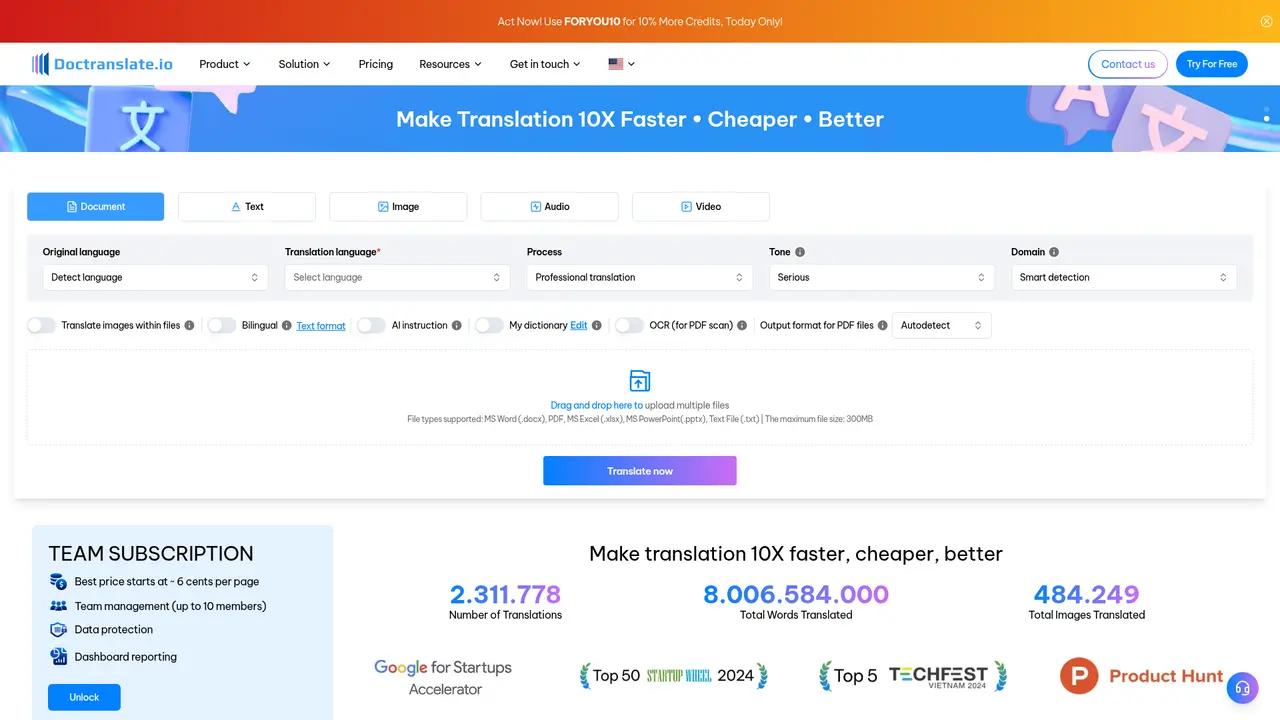
DocTranslate is an AI-powered document translation platform with OCR recognition supporting PDF, Word, Excel, PowerPoint, and TXT files up to 300MB. With features like medical translation, subtitle translation, and bilingual display, it's ideal for enterprises, educators, and content creators. The platform has completed over 2.3 million translations processing 8+ billion words.


Your team just received a 50-page technical report in Vietnamese that needs to be translated into English for tomorrow's board meeting. The traditional approach—sending it to a translation agency and waiting days—simply won't work. Or perhaps you're a researcher who needs to quickly scan dozens of academic papers in German and Japanese, extracting key findings across languages. Maybe you're a content creator looking to localize your training materials into five different markets, but manual translation is eating into your production timeline.
These are the exact challenges that DocTranslate was built to solve.
DocTranslate is an AI-powered document translation platform designed to make translation up to 10 times faster, cheaper, and better than traditional methods. Whether you're handling corporate contracts, academic research, marketing materials, or educational content, DocTranslate provides a unified solution that handles multiple file formats with remarkable accuracy.
What sets DocTranslate apart is its comprehensive approach to document translation. Unlike basic translation tools that only handle plain text, DocTranslate processes entire documents while preserving their original formatting—tables, images, charts, and layout all remain intact. The platform supports PDF, Word (.docx), Excel (.xlsx), PowerPoint (.pptx), and plain text files, with file sizes up to 300MB. This means you can translate a complex quarterly report or a 100-page legal contract without rebuilding it from scratch.
The platform leverages AI-driven translation engines enhanced with OCR (Optical Character Recognition) technology, enabling it to handle scanned documents and images within your files. If you've ever tried translating a scanned PDF or a photograph containing text, you know how frustrating it can be. DocTranslate solves this by automatically recognizing and translating text even in non-editable formats.
DocTranslate isn't just a promising startup—it's a proven solution that has delivered results for organizations across industries. The platform has completed over 2,311,778 translations processing more than 8 billion words and translating over 484,249 images. This scale of usage has refined the AI engines to handle everything from simple correspondence to complex technical documentation.
The customer roster reads like a who's who of Vietnamese and international organizations: Acecook, FPT, Decathlon, and NU (Vietnam National University) trust DocTranslate for their document translation needs. Educational institutions like HSU (Ho Chi Minh City University) and UEH (University of Economics Ho Chi Minh City) use the platform for research materials, while media companies like Spiderum and PennArts rely on it for content localization. The platform's enterprise credibility is further reinforced by being backed by Google, providing additional confidence in its reliability and infrastructure.
DocTranslate offers a comprehensive suite of features designed to handle real-world translation challenges. Here's how each feature translates into practical value for your work.
You can use DocTranslate to translate PDF, Word, Excel, PowerPoint, and text files in a single workflow. The platform automatically detects the format and preserves your original layout—fonts, colors, tables, and images all carry over to the translated version. This eliminates the hours you'd otherwise spend reformatting translated content.
When you need to translate scanned PDFs, physical contracts, or handwritten documents, DocTranslate's OCR capability recognizes text and translates it without requiring you to retype anything. This is particularly valuable for translating historical archives, legacy documentation, or any paper-based materials you need to digitize and localize.
DocTranslate can extract and translate text embedded within images, charts, and diagrams in your documents. If you have a marketing presentation with multilingual graphics or a technical report with annotated screenshots, the platform handles the translation seamlessly.
For healthcare organizations and medical researchers, DocTranslate offers a professional writing style specifically optimized for medical terminology. This ensures that clinical reports, research papers, and pharmaceutical documentation maintain accuracy and use the correct medical nomenclature.
Content creators and educators can use DocTranslate to translate video subtitles and YouTube caption files. This opens up your content to international audiences without requiring expensive subtitle localization services.
If you're translating novels, historical documents, or creative content, DocTranslate allows you to customize the literary style to match the tone and voice of the original work. This flexibility ensures that translations maintain their narrative impact.
You can use DocTranslate to convert Word or PDF files into dynamic PowerPoint presentations. This feature is invaluable for quickly creating multilingual sales decks, training materials, or educational slides.
Taking it a step further, DocTranslate can transform PowerPoint or PDF files into engaging video presentations. This streamlines your content creation workflow for marketing videos, company-wide training, and investor presentations.
For language learners and professional translators, DocTranslate provides a side-by-side bilingual view that displays the original and translated text together. This feature is perfect for verifying translation accuracy or using the tool as a learning aid.
You can provide specific translation instructions and build custom dictionaries to ensure consistent use of terminology across all your documents. This is essential for organizations with brand-specific terminology or technical glossaries.
When translating technical or domain-specific documents, take advantage of the custom dictionary feature. Upload your organization's terminology list once, and DocTranslate will apply it consistently across all future translations—saving you time on repetitive corrections.
DocTranslate addresses translation challenges across several key scenarios. Here's how different teams apply the platform to solve specific problems.
If you work at a multinational corporation, you frequently need to translate contracts, reports, and internal communications into multiple languages for different regional offices. The traditional approach—outsourcing to translation agencies—takes days and costs significantly per word.
With DocTranslate, you can batch-upload multiple documents, and the AI automatically recognizes each format and processes the translation. A 30-page quarterly report that would take a professional translator 3-5 days can be translated in minutes. Your team reviews and makes final edits, dramatically reducing both turnaround time and costs—typically achieving a 10x improvement in speed while cutting expenses by 60-80%.
Researchers often need to review literature in multiple languages before starting a new study. Medical researchers, in particular, must ensure absolute accuracy when translating clinical findings or pharmaceutical studies.
DocTranslate addresses this with its specialized medical translation mode and custom dictionary feature. You can pre-load your project's terminology glossary, and the AI applies it consistently throughout the document. Combined with OCR capabilities, you can even translate scanned historical papers or legacy research documents that exist only in physical form.
Content creators and marketing teams need to rapidly localize their materials for different geographic markets. Whether it's product launches, social media content, or training videos, speed to market directly impacts competitive advantage.
DocTranslate enables you to translate video subtitles, convert presentations to PowerPoint, and even generate video presentations—all from your source documents. A marketing team can produce a five-language campaign launch package in hours rather than weeks, maintaining brand consistency while dramatically accelerating time-to-market.
Educational institutions and corporate training departments frequently need to adapt curricula and training materials for diverse student or employee populations.
The bilingual display mode is particularly valuable here. Students can view original and translated content side-by-side, facilitating language learning while ensuring they understand the material accurately. Teachers can quickly translate lecture notes, assignments, and supplementary reading materials without waiting for professional translation services.
DocTranslate has earned the trust of organizations across education, retail, technology, and media sectors. Here's what some of our customers have experienced:
"DocTranslate has transformed how we handle international documentation. What used to take our team days now takes hours. The OCR feature alone has saved us countless hours retyping scanned historical documents." — FPT Corporation
"As a university with extensive international research collaborations, we needed a reliable translation solution. DocTranslate handles our academic papers with impressive accuracy, especially with technical terminology." — HSU (Ho Chi Minh City University)
"We localize content for multiple Southeast Asian markets, and DocTranslate's speed has been game-changing for our content pipeline. The PowerPoint and video features help us maintain consistency across formats." — Decathlon Vietnam
"The medical translation mode is remarkably accurate. Our healthcare reports maintain professional terminology that our international partners expect." — Acecook (Healthcare division)
These testimonials reflect the real-world impact: organizations that previously struggled with translation bottlenecks now have streamlined workflows that support their global ambitions.
DocTranslate offers transparent, usage-based pricing designed to accommodate everyone from individual users to growing teams.
Free: 500 words (up to 2 pages)
New users receive complimentary translation credits to explore the platform's capabilities. This lets you test accuracy, formatting preservation, and workflow integration before committing to a paid plan.
Starting at ~$0.06 per page (approximately 6 cents)
The Team plan is designed for small to medium organizations that need collaborative translation features:
This pricing structure means even small teams can access enterprise-grade translation capabilities without significant investment. For context, professional human translation typically costs $0.10-0.25 per word—making DocTranslate dramatically more affordable at scale.
For a limited time, any paid subscription includes a one-time lifetime translation credit with your initial purchase. This means your first payment unlocks ongoing value beyond the subscription period—a compelling incentive for teams ready to standardize their translation workflow.
| Plan | Price | Best For |
|---|---|---|
| Free | 500 words (2 pages) | First-time users exploring the platform |
| Team | ~$0.06/page (10 members max) | SMBs, departments, growing teams |
Our recommendation: If you translate more than 10 pages per month, the Team plan pays for itself quickly compared to alternatives. The lifetime bonus adds additional long-term value.
Start with the free trial to validate that DocTranslate meets your accuracy and format requirements. If you find yourself translating regularly—whether for work, research, or content creation—the Team plan's per-page cost is significantly more affordable than human translation or even competing AI tools.
DocTranslate handles MS Word (.docx), PDF, MS Excel (.xlsx), MS PowerPoint (.pptx), and plain text (.txt) files. The maximum file size is 300MB, which accommodates even large reports and presentations.
Quality comes from three layers: the AI translation engine's training on diverse content, domain-specific modes (medical, literary) that optimize for different content types, and the custom dictionary feature that lets you enforce terminology consistency. For critical documents, we recommend human review of AI translations—this is standard practice across the industry.
Yes. DocTranslate includes OCR (Optical Character Recognition) technology that detects text in scanned PDFs, images, and photographs. The platform extracts the text, translates it, and maintains the original document formatting. This is particularly useful for translating historical archives, physical contracts, or any paper-based materials.
The Team plan supports up to 10 team members with data protection features, usage dashboards for tracking translation volume and spending, and priority support. It's designed for organizations that need collaborative translation workflows and want visibility into their translation spending.
Simply visit doctranslate.io and sign up. New accounts receive 500 free words (up to 2 pages) automatically. No credit card is required to start. You can immediately upload documents to test accuracy across your specific content types.
Whether you're handling enterprise documents, academic research, marketing content, or educational materials, DocTranslate provides a comprehensive solution that combines speed, accuracy, and format preservation. The platform's AI-powered engine, OCR capabilities, and domain-specific modes address the real challenges that teams face when working across languages.
Start with your free 500-word trial at doctranslate.io—upload a document, experience the speed and accuracy, and discover how much time and money your team can save on translation workflows.
DocTranslate is an AI-powered document translation platform with OCR recognition supporting PDF, Word, Excel, PowerPoint, and TXT files up to 300MB. With features like medical translation, subtitle translation, and bilingual display, it's ideal for enterprises, educators, and content creators. The platform has completed over 2.3 million translations processing 8+ billion words.
One app. Your entire coaching business
AI-powered website builder for everyone
AI dating photos that actually get matches
Popular AI tools directory for discovery and promotion
Product launch platform for founders with SEO backlinks
Cursor vs Windsurf vs GitHub Copilot — we compare features, pricing, AI models, and real-world performance to help you pick the best AI code editor in 2026.
We tested the top AI blog writing tools to find the 5 best for SEO. Compare Jasper, Frase, Copy.ai, Surfer SEO, and Writesonic — with pricing, features, and honest pros/cons for each.

