AI Face Cutout

AI Face Cutout - AI-powered portrait background removal with hair-level precision

Launched today

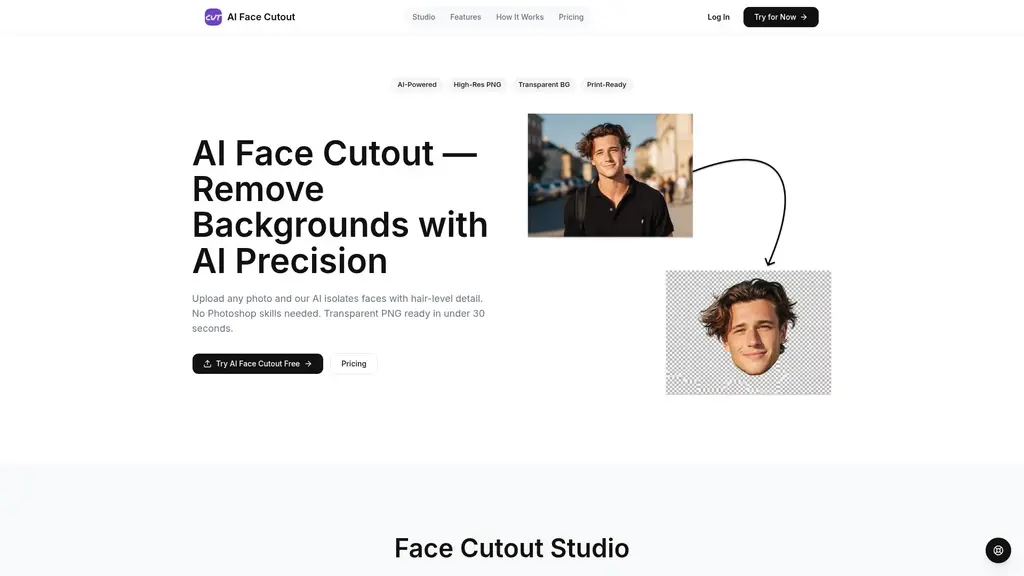
Struggling with messy photo backgrounds? AI Face Cutout removes them in seconds with professional-grade precision. Powered by an AI model trained on millions of face images, our tool delivers hair-level edge detail and supports up to 2K resolution at 300 DPI for print-ready output. No design skills needed — just upload and download a transparent PNG. Perfect for social media creators, print shops, and teams handling group photos.
AI ImageFreemiumPrivacy FocusedComputer VisionImage EditingContent CreationBackground Removal

What Is AI Face Cutout?

If you've ever spent an evening wrestling with Photoshop's "Refine Edge" tool, trying to isolate a person from a complex background, you know the pain. Twenty minutes per image, maybe an hour for a tricky one. And if you outsourced it to a print shop? You'd be lucky to get results back in three business days. For anyone creating content, managing events, or running a small business, that kind of delay is simply a bottleneck you don't need.

Enter AI Face Cutout — an AI-powered background removal tool built specifically for facial and portrait isolation. Unlike general-purpose background removers that treat every subject the same, this tool was trained on millions of human faces. It understands facial structure, hair strands, and edge boundaries at a pixel level.

The workflow is dead simple: Upload → AI processes automatically → Download a transparent PNG. That's it. Most images are ready in under 30 seconds.

核心要点
  • 30-second processing speed — versus 20–60 minutes in Photoshop or 1–3 days at a print shop
  • Hair-level AI edge precision — retains fine strands for a natural, professional cutout
  • Up to 2K resolution / 300 DPI output — print-ready transparent PNGs
  • Zero learning curve — no design skills needed, just upload and go
  • Privacy-first processing — encrypted uploads, auto-deleted after processing

Whether you're a social media creator who needs a clean headshot in minutes, a print shop owner looking to slash turnaround times, or someone sorting through class photos for an entire school, AI Face Cutout aims to replace both Photoshop and the print shop with an AI-powered alternative that actually delivers on speed and quality.

Core Features That Make a Difference

What sets AI Face Cutout apart isn't just that it removes backgrounds — it's how it does it. Every feature is designed around one core question: How do we make portrait isolation faster, cleaner, and more accessible?

🎯 AI Background Removal Built for Portraits

Most background removal tools use a generic AI model that handles everything from cars to cats to coffee cups. AI Face Cutout's model is different — it's purpose-trained for human faces and portraits, drawing on millions of facial data points.

You can use it to upload a selfie, a professional headshot, or a candid portrait and get a clean cutout that respects facial contours, hair flow, and subtle edge details. The model understands the difference between a subject's shoulder and a cluttered background — something general-purpose tools often struggle with.

✨ Hair-Level Edge Precision

This is where AI Face Cutout truly shines. Generic background removers tend to produce jagged, blocky edges around hair — especially curly, wispy, or windblown styles. You've probably seen that telltale "clipped-out" look where the edges are too sharp to be real.

AI Face Cutout uses a fine-grained segmentation algorithm that preserves individual hair strands, delivering cutouts that rival Photoshop-level professional quality — without you ever touching a lasso tool or a pen tablet.

You can use it for anything from professional portraits to creative content where the subject needs to blend naturally into a new background.

👥 Batch Multi-Person Processing (Pro Plan)

This feature alone can save you hours. Instead of manually cutting out each person from a group photo one by one, AI Face Cutout lets you upload a single group image and extract every face at once.

You can use it to process class photos, team group shots, wedding party pictures, or family portraits. The AI detects multiple faces simultaneously, separates them cleanly, and delivers individual transparent PNGs in a fraction of the time it would take to do manually.

⚡ 30-Second Processing

Speed is one of the strongest arguments for using AI Face Cutout. Most images are processed in under 30 seconds.

Compare that to:

  • Photoshop manual cutout: 20–60 minutes per image (often longer for complex hair)
  • Traditional print shop: 1–3 business days turnaround
  • AI Face Cutout: under 30 seconds

You can use it for urgent projects — last-minute event materials, same-day social media posts, or batch processing before a deadline.

🖨️ Up to 2K / 300 DPI Print-Ready Output

Low-resolution PNGs are fine for screens, but they fall apart when printed. AI Face Cutout's Starter and Pro plans support up to 2K resolution at 300 DPI, making the output suitable for large-format printing.

You can use the exported transparent PNGs directly in posters, banners, flyers, merchandise, or any printed material. No need to upscale or reprocess — the files are print-ready right out of the tool.

💡 Professional Tip

For best results with complex hairstyles, upload images with good contrast between the subject's hair and the background. The AI handles most cases automatically, but strong contrast helps the edge-detection algorithm deliver even cleaner results.

Who Uses AI Face Cutout?

AI Face Cutout isn't just for graphic designers. In fact, most of its users aren't designers at all — they're people who need clean portrait cutouts as a means to an end. Here are five real-world scenarios where the tool fits naturally.

Social Media Creators

The problem: You need a clean transparent PNG of yourself for a new profile picture, a YouTube thumbnail, or an Instagram story, but you don't have Photoshop skills. Outsourcing takes too long and costs too much for a simple headshot.

The solution: Upload your photo to AI Face Cutout, wait 30 seconds, download a transparent PNG, and drop it straight into Canva or Figma for your next design. The free plan gives you 2 credits per month — enough to create several profile images or thumbnails without spending a dime.

The problem: Your customers bring in photos that need backgrounds removed before printing. Traditionally, this means 1–3 business days of manual labor or outsourcing, slowing down your entire workflow.

The solution: With AI Face Cutout, you can process a customer's image in under 30 seconds and output a 2K/300 DPI transparent PNG that's immediately ready for large-format printing. Turnaround drops from days to minutes, and you can preview results before the customer waits.

School & Class Photo Coordinators

The problem: A single class photo needs to be processed into individual student portraits — each one manually cut out. With 30 or 40 students per class, this is hours of tedious work.

The solution: Upload the group photo once. AI Face Cutout's batch multi-person processing (Pro plan) automatically detects and extracts every student. What used to take hours now takes a few minutes.

E-commerce Sellers

The problem: Product images featuring models need the model isolated from the original background so you can place them on a clean white backdrop or a creative scene. Outsourcing costs $5–$50 per image, and turnaround is unpredictable.

The solution: Process model photos through AI Face Cutout at near-zero cost (free plan included). The transparent PNG output integrates directly into your product listing workflow. Speed drops from days to seconds.

Families & Personal Photo Projects

The problem: A family reunion photo or a multi-generational portrait has a messy background that you'd like to replace with something cleaner. But the photo contains multiple family members, and manually cutting everyone out is too complex.

The solution: Upload the full-family photo, and AI Face Cutout processes everyone simultaneously. Download individual transparent PNGs and composite them onto a unified background. It's a quick way to create printed gifts, memorial albums, or holiday cards.

💡 Which Plan Fits Your Use Case?

If you frequently process group photos — class photos, team photos, event group shots — the Pro plan's batch processing feature will save you the most time. For simple individual headshots, the Starter plan's 100 credits per month should cover most needs easily.

AI Face Cutout Pricing: Find the Right Plan

AI Face Cutout uses a straightforward tiered pricing model. The philosophy is simple: let casual users try the tool for free, while giving power users access to higher resolution and batch processing at a fair price.

All plans include watermark-free downloads.

Plan Price Credits/Month Max Resolution Key Features Best For
Free $0/mo 2 credits 1024px No watermark, no credit card needed Occasional users & testing
Starter $5.99/mo 100 credits Up to 2K Transparent PNG, high-res output Light personal use
Pro $12.99/mo 300 credits Up to 2K Transparent PNG, batch processing, priority processing Heavy users & businesses

Free Plan — Try Before You Commit

The Free plan gives you 2 credits per month with no watermark and no credit card required. It's enough to test the quality on your own photos — see how the AI handles your hair, your lighting, and your backgrounds before deciding to upgrade. Output is limited to 1024px, which is fine for social media profile pictures and thumbnails.

Starter Plan — For Regular Personal Use

At $5.99/month for 100 credits, the Starter plan is ideal if you're processing a few to a few dozen portraits per month. The key upgrade here is up to 2K resolution / 300 DPI output, which unlocks print-ready quality. This plan works well for content creators, freelancers, and anyone who needs clean portraits on a regular basis.

Pro Plan — For Teams and Power Users

The Pro plan at $12.99/month is where the value scales. With 300 credits per month, you get roughly three times the processing capacity of Starter, plus two exclusive features:

  • Batch multi-person processing: Upload a group photo and extract all faces at once
  • Priority processing: Your images get handled faster during peak times

The Pro plan is the best value if you're processing photos for a small business, managing school or event photography, or need batch capabilities regularly.

What Users Are Saying

While AI Face Cutout is still building its public reputation, early feedback from different user groups highlights consistent themes:

Social media creators appreciate the zero learning curve. Common feedback mentions being able to go from upload to a finished Canva design in under two minutes — no tutorials, no trial-and-error, just results.

Print shop operators consistently point to the speed difference. Going from a 1–3 day manual turnaround to 30 seconds per image fundamentally changes how quickly they can serve walk-in customers. The fact that output is already 2K/300 DPI means no extra prep work before printing.

School coordinators and event organizers mention the batch processing feature as a game-changer. Processing 30+ individual portraits from a single group photo upload saves literal hours of manual work compared to traditional methods.

E-commerce sellers highlight the cost efficiency. Moving from $5–$50 per outsourced image to near-zero cost on the free or starter plan removes a significant operational expense, especially for sellers with high product turnover.

These patterns suggest AI Face Cutout's core value isn't just in the AI technology itself — it's in how that technology removes friction from real workflows across different industries.

Frequently Asked Questions

How is AI Face Cutout different from general background removal tools like remove.bg?

Our AI model is specifically trained for facial and portrait isolation — not general-purpose subject removal. This means it achieves significantly better precision around hair strands and complex facial edges. The result is a more natural, professional cutout, especially for portraits with intricate hairstyles or busy backgrounds.

What does the free plan include? Do I need a credit card?

The Free plan gives you 2 credits per month at $0 with no watermark. No credit card is required — just upload and try it. Output is limited to 1024px resolution, which is sufficient for most digital uses like social media profiles and thumbnails.

Can I use the processed images for printing?

Yes. Starter and Pro plans support up to 2K resolution at 300 DPI, which meets standard requirements for large-format printing. You can take the exported transparent PNGs directly to any print shop.

Does AI Face Cutout support batch processing of group photos?

Yes — this feature is available exclusively on the Pro plan ($12.99/month). Upload a single group photo, and the AI will automatically detect and separate all individuals, delivering individual transparent PNG files in one batch.

Are my photos safe? Will you store or train on them?

Absolutely safe. All photos are encrypted during upload and transmission. They are automatically deleted immediately after processing. We do not store original images, nor do we use user-uploaded photos for AI model training. Your privacy is built into the process.

What image formats do you support? Is there a file size limit?

We support JPG, PNG, and WebP uploads, with a maximum file size of 10MB per image. These three formats cover the vast majority of common use cases.

How fast is the processing?

Most images are processed in under 30 seconds. In comparison, a manual Photoshop cutout typically takes 20–60 minutes per image, and traditional print shops require 1–3 business days. AI Face Cutout is designed for speed from the ground up.

Which plan should I choose?

If you're just curious or only need a few cutouts occasionally, the Free plan's 2 credits per month are a great starting point. For regular personal use — a few to a few dozen portraits per month — the Starter plan ($5.99/mo, 100 credits) offers the best balance of cost and resolution. If you're processing photos for a team, a business, or regularly handling group photos, the Pro plan ($12.99/mo, 300 credits) with batch processing and priority support delivers the best value per credit.

Comments

Comments

Please sign in to leave a comment.
No comments yet. Be the first to share your thoughts!