


folk - AI-powered CRM for modern sales teams
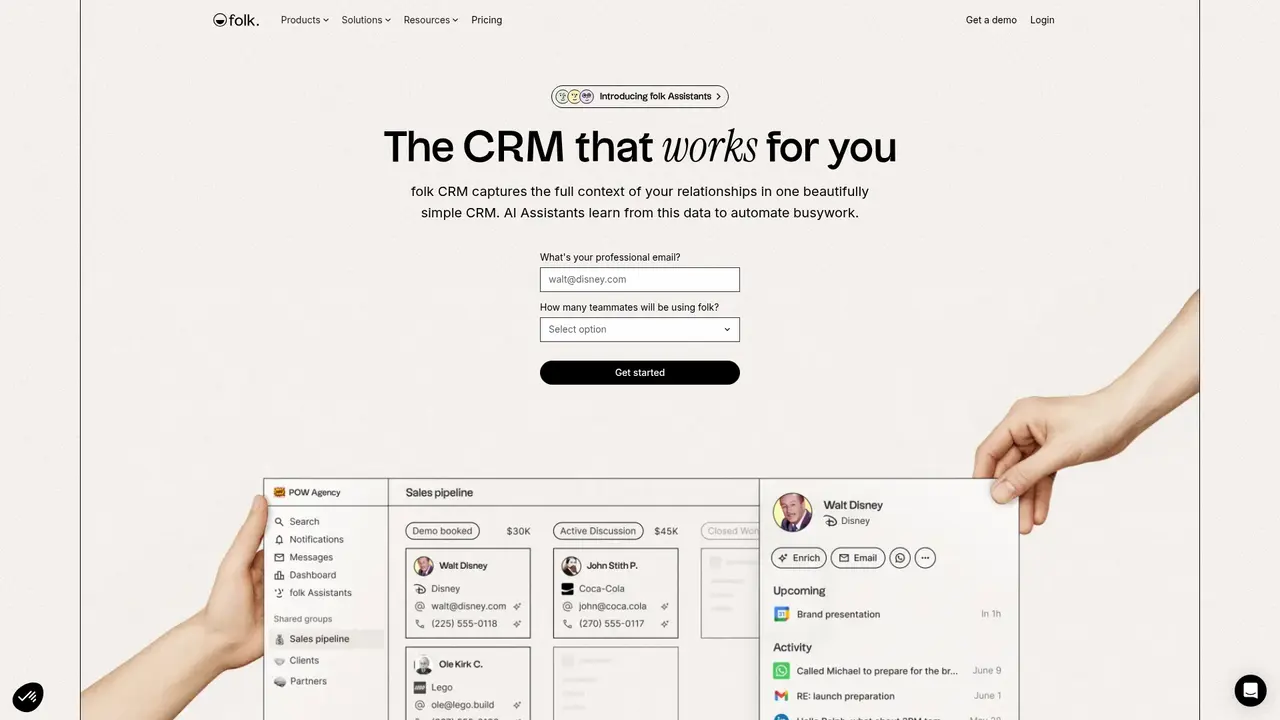
Launched on Feb 23, 2025folk is an AI-powered CRM designed for modern sales teams. It automates background tasks with AI assistants, deeply integrates with LinkedIn and other platforms, and offers 5000+ integrations. With SOC 2 and GDPR compliance, it helps you manage customer relationships efficiently.
What Is folk? Your AI-Powered CRM That Works for You
Managing customer relationships across multiple channels has become increasingly challenging for modern sales teams. You might be discovering prospects on LinkedIn, catching leads at industry events, and receiving referrals from your network—all in the same week. But keeping all this information organized and following up at the right time? That's where things fall apart.
This is exactly the problem folk was built to solve. folk is an AI-driven CRM designed specifically for teams that live and breathe social selling, partnership development, and relationship-based sales. Unlike traditional CRMs that feel like administrative burdens, folk acts as an intelligent assistant that automates the后台 tasks (后台 tasks) so you can focus on what actually matters—building genuine relationships and closing deals.
What sets folk apart is its deep integration with the platforms where your prospects already live. The platform connects seamlessly with LinkedIn, Gmail, Outlook, and WhatsApp, allowing you to work directly within your existing workflow without constantly switching between apps. When you find a potential client on LinkedIn, folk can automatically enrich their profile with verified contact details, company information, and research notes—all without leaving your browser.
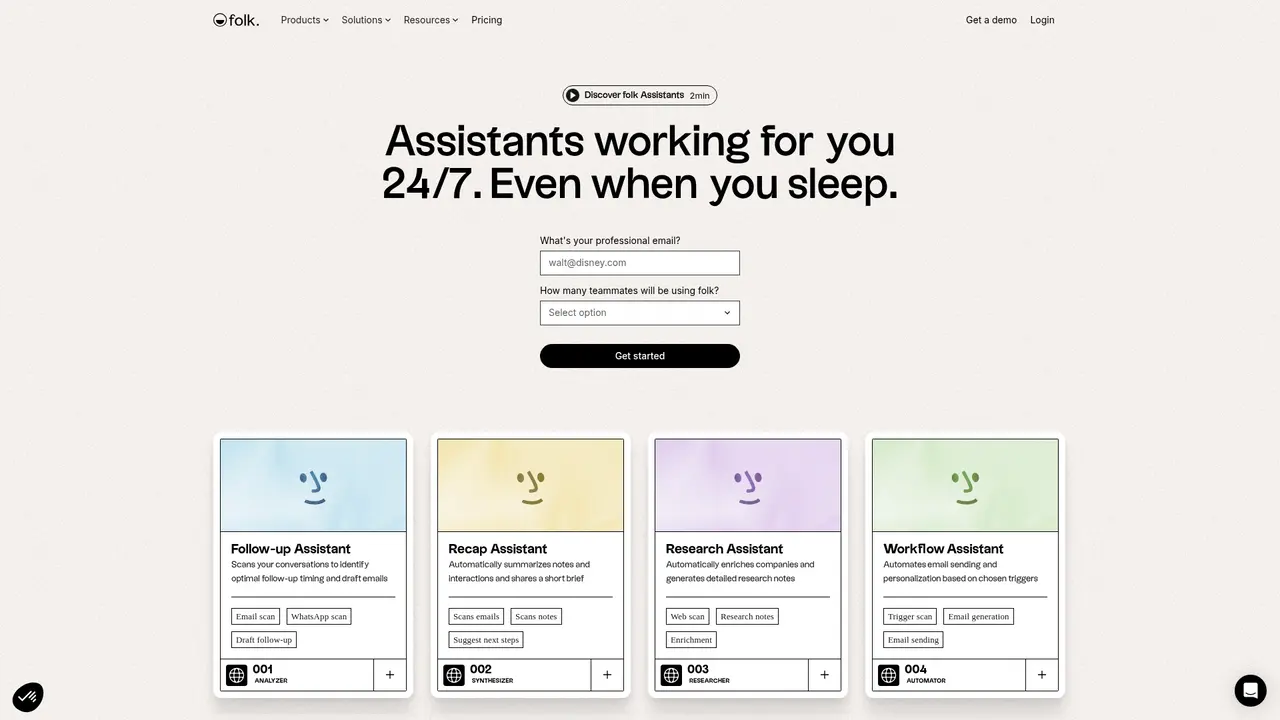
The real magic happens through folk's four AI Assistants. The Follow-up Assistant scans your email and WhatsApp conversations to identify the best moments to reconnect and drafts personalized follow-up messages in your own voice. The Recap Assistant automatically summarizes interactions from emails, meetings, and notes into concise briefs using your preferred sales methodology—whether that's MEDDIC, BANT, or your own custom framework. The Research Assistant enriches company profiles with industry data, funding details, and competitive insights using trusted data sources like People Data Labs and Perplexity. And the Workflow Assistant automates outreach based on triggers you define, sending personalized emails automatically when new contacts are added or specific fields are updated.
Over 4,000 companies worldwide trust folk to manage their customer relationships. The platform consistently earns high marks from users: 4.9 out of 5 on Product Hunt, 4.8 out of 5 on the Chrome Store, and 4.5 out of 5 on G2. Beyond user satisfaction, folk maintains enterprise-grade security with SOC 2 Type I certification, full GDPR compliance, and Google Security verification—meaning your sensitive customer data stays protected.
:::card{type="summary" title="Why Teams Choose folk"}
- AI Automation: Four intelligent assistants handle follow-ups, research, note-taking, and workflow automation
- Multi-Platform Integration: Deep sync with LinkedIn, Gmail, Outlook, and WhatsApp
- 5,000+ Integrations: Connect folk to your entire tool stack via Zapier, Make, or REST API
- Enterprise Security: SOC 2 Type I, GDPR compliant, and Google Security certified :::
---
folk's Core Features: What You Can Actually Use
Understanding what a CRM *can* do is one thing—knowing what it *will* do for your specific workflow is another. Here's how folk's features translate into real daily value for your team.
folkX Chrome Extension: Your LinkedIn Power Tool
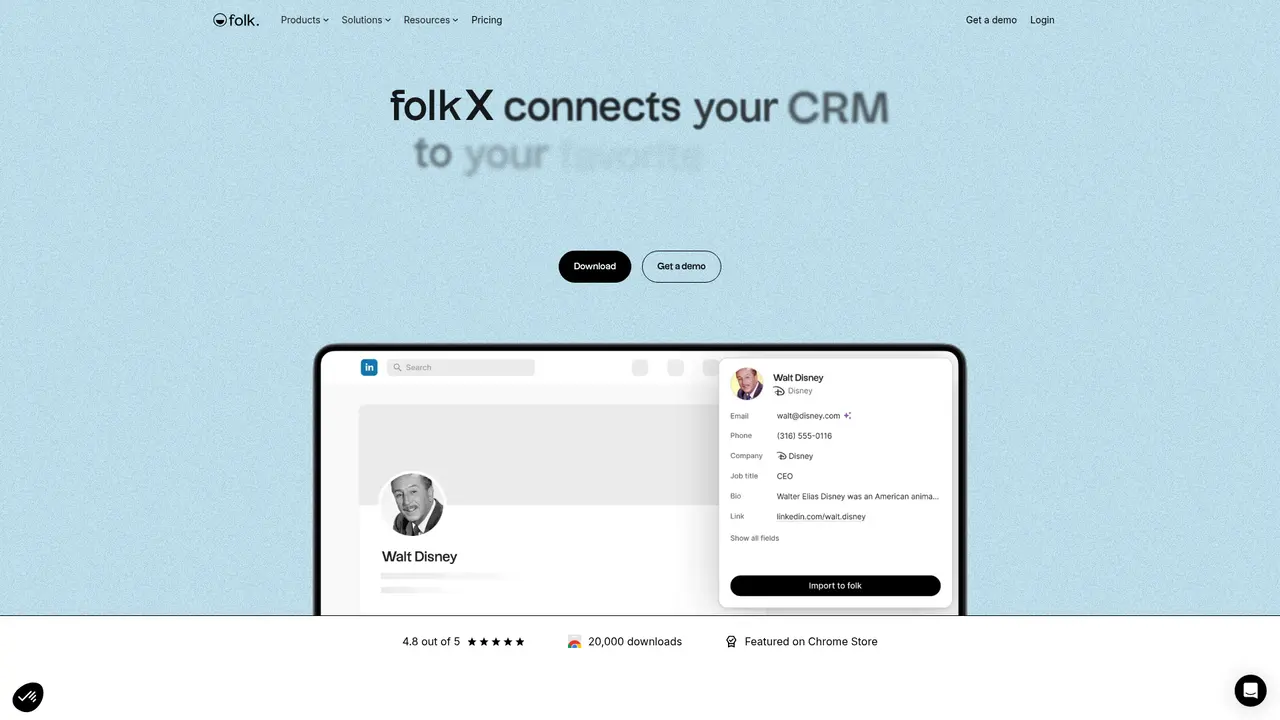
You know that moment when you're browsing LinkedIn Sales Navigator and spot a perfect prospect? With folkX, there's no need to copy-paste their profile into a spreadsheet or wait until later to enter them into your CRM. The Chrome extension automatically detects potential leads and lets you import them with one click—complete with profile data, company information, and the ability to enrich their profile immediately. This eliminates the friction between discovery and action that typically kills pipeline momentum.
1-Click Enrichment: Complete Contact Data in Seconds
Missing email addresses and phone numbers are a major bottleneck in sales. folk's waterfall enrichment automatically searches multiple data providers to find verified contact details for your prospects. It also identifies their strongest connections (who knows whom), imports company data from their website, and surfaces relevant background information. Standard plans include 500 enrichments per month; Premium plans bump that to 1,000—plenty for active prospecting teams.
Messages and Sequences: Outreach That Scales Without Sacrificing Personalization
Sending individual emails might work when you're starting out, but it doesn't scale. folk lets you run bulk email campaigns and automated sequences while still maintaining personalization. The CRM pulls context from your stored data to help AI generate relevant message drafts that sound human, not robotic. You get 2,000 sends per user per month on Standard, or 5,000 on Premium—which handles most team's outreach needs comfortably.
AI Assistants: Your Round-the-Clock Sales Team
This is where folk truly differentiates itself. Instead of just storing data, folk actively helps you act on it:
- Follow-up Assistant: Monitors your email and WhatsApp conversations to identify stalled discussions and suggests optimal follow-up timing with personalized message drafts written in your tone.
- Recap Assistant: Transforms scattered interactions across email, meetings, notes, and LinkedIn into structured briefs aligned with your chosen sales methodology.
- Research Assistant: Automatically builds comprehensive company profiles using industry data, funding information, social links, and AI-generated research notes.
- Workflow Assistant: Triggers automated actions based on rules you set—whether that's sending a welcome sequence when a contact is created or updating fields when specific events occur.
Dashboards and Pipeline Management: Visibility When You Need It
Sales leaders need to see the big picture without digging through data. folk's visual dashboards surface pipeline health, conversion rates, and team performance metrics at a glance. The collaborative pipeline view lets your entire team see where every deal stands, what's stuck, and who's working on what—eliminating the "who's handling this lead?" back-and-forth.
Integrations: Making folk Work With What You Already Have
The best CRM is one that fits into your existing stack. folk connects to over 5,000 tools through Zapier and Make, with full REST API access on Premium plans. Whether you use Slack for communication, HubSpot for marketing automation, or custom internal tools, folk can integrate seamlessly.
::::grid :::card{type="advantages"}
- Intelligent Automation: AI handles time-consuming tasks like follow-up timing, note summarization, and research—freeing your team to sell
- Platform-Native Experience: Works within LinkedIn, Gmail, Outlook, and WhatsApp rather than forcing you into a separate system
- Flexible Scaling: Grows with your team from startup to enterprise with Custom plans offering tailored limits and support ::: :::card{type="disadvantages"}
- Payment Limitations: Only accepts credit card payments—no PayPal or alternative payment methods ::: ::::
---
Who Uses folk? Real Teams, Real Results
folk serves a diverse range of teams, each with distinct relationship management needs. Here's how different organizations put the platform to work.
Sales Teams: Unified Pipeline Visibility
For sales professionals, the challenge isn't finding leads—it's managing them across channels. You might receive inbound leads from your website, discover prospects on LinkedIn, get referrals from existing clients, and attend conferences all in the same month. Without a unified system, these prospects slip through the cracks at different stages. folk captures every interaction in one place, and the AI assistants ensure nothing falls through the cracks by automatically suggesting follow-ups and surfacing stale opportunities.
Agencies: Managing Multiple Client Accounts
Agency teams often struggle with CRM complexity. You need to manage separate pipelines for each client while maintaining clear internal handoffs. folk's flexible organization lets you structure data your way—whether that's separate pipelines per client, tags for campaign tracking, or custom fields for specific workflows. Multiple team members can collaborate on accounts without stepping on each other's toes.
Startups: Growing Without Growing Pains
When you're small, you might manage relationships through notes and memory. But as you hire your first sales rep or launch an outbound motion, you need infrastructure that scales. folk grows with you: start with the basics, then unlock advanced features like custom objects, API access, and unlimited integrations as your needs evolve. The platform handles the infrastructure so you can focus on building your sales motion.
Partnership Teams: Never Miss a Connection
Partnership managers deal with relationships across a wide network—strategic partners, reseller channels, integration partners, and more. These relationships often originate from events, mutual connections, or inbound inquiries. folk lets you capture every partner interaction in one system, with AI research enrichment helping you prepare for conversations with background on companies and key stakeholders.
Investor Relations (VCs): Efficient Portfolio Management
Venture capitalists and investor relations teams manage relationships with hundreds of founders, portfolio companies, and co-investors. The Research Assistant becomes particularly valuable here, automatically enriching company profiles with funding rounds, industry positioning, and competitive landscape. Rather than manually Googling each founder before a meeting, you get instant context.
Enterprise Teams: Cross-Functional Collaboration
Large organizations face a unique challenge: keeping multiple teams aligned on shared accounts. folk addresses this with shared pipelines, customizable role-based permissions, and complete interaction history visible to everyone who needs it. Decision-makers get the dashboards they need for forecasting, while individual contributors have the flexibility to work their own deals.
:::card{type="tip" title="Choosing the Right Plan"} Not sure where to start? Small teams and those new to CRM should begin with Standard—it includes everything needed for pipeline management, email outreach, AI assistants, and core integrations. Upgrade to Premium when you need custom objects, advanced permissions, API access, and larger sending limits. Custom plans are ideal for enterprises requiring dedicated support and tailored arrangements. :::
---
Getting Started: Your First 14 Days
One of folk's strongest advantages is how quickly you can go from sign-up to productive use. Here's how to make the most of your free 14-day trial—no credit card required.
Step 1: Create Your Account
Head to folk.app and register with your email. The trial activates immediately with full access to all Premium features, so you can test everything the platform offers without limitations.
Step 2: Install folkX Chrome Extension
The browser extension is where folk's magic really shines. Install it from the Chrome Web Store, then connect your LinkedIn account. You'll immediately start seeing enrichment suggestions when browsing LinkedIn profiles. The extension also connects to 7+ other platforms, so you can import data from wherever you work.
Step 3: Connect Your Communication Channels
Link your Gmail or Outlook account to enable the AI assistants. They need access to your email and calendar to analyze conversations, suggest follow-ups, and generate recaps. If your team uses WhatsApp for business communication, connect that too—the Follow-up Assistant monitors WhatsApp threads alongside email.
Step 4: Import Your Existing Data
Whether you're migrating from another CRM or starting fresh, folk makes import straightforward. You can upload CSV files, pull data from connected platforms, or manually add contacts. The 1-click enrichment feature will then automatically fill in missing information.
Step 5: Configure Your Pipeline
Set up your sales stages based on your methodology. folk's visual pipeline builder is intuitive—you can add stages, rename them, and customize workflows without any technical setup.
Step 6: Activate Your AI Assistants
This is the step most new users overlook but shouldn't. Take 10 minutes to configure the four AI assistants:
- Set your preferred sales methodology (MEDDIC, BANT, or custom)
- Define follow-up preferences and tone
- Select which data sources each assistant should analyze
- Configure workflow triggers for automated sequences
:::card{type="tip" title="Testing the AI Features"} During your trial, actively test each AI assistant with real scenarios. Try the Follow-up Assistant on an email thread that's gone cold. Use the Research Assistant on a prospect company. Have the Recap Assistant summarize a recent meeting. This hands-on experience will show you exactly how much time the platform can save. :::
---
Pricing and Plans: Choose What Fits Your Team
folk offers transparent pricing with clear value differentiation between tiers. All plans include a 14-day free trial with full feature access—no credit card needed to start.
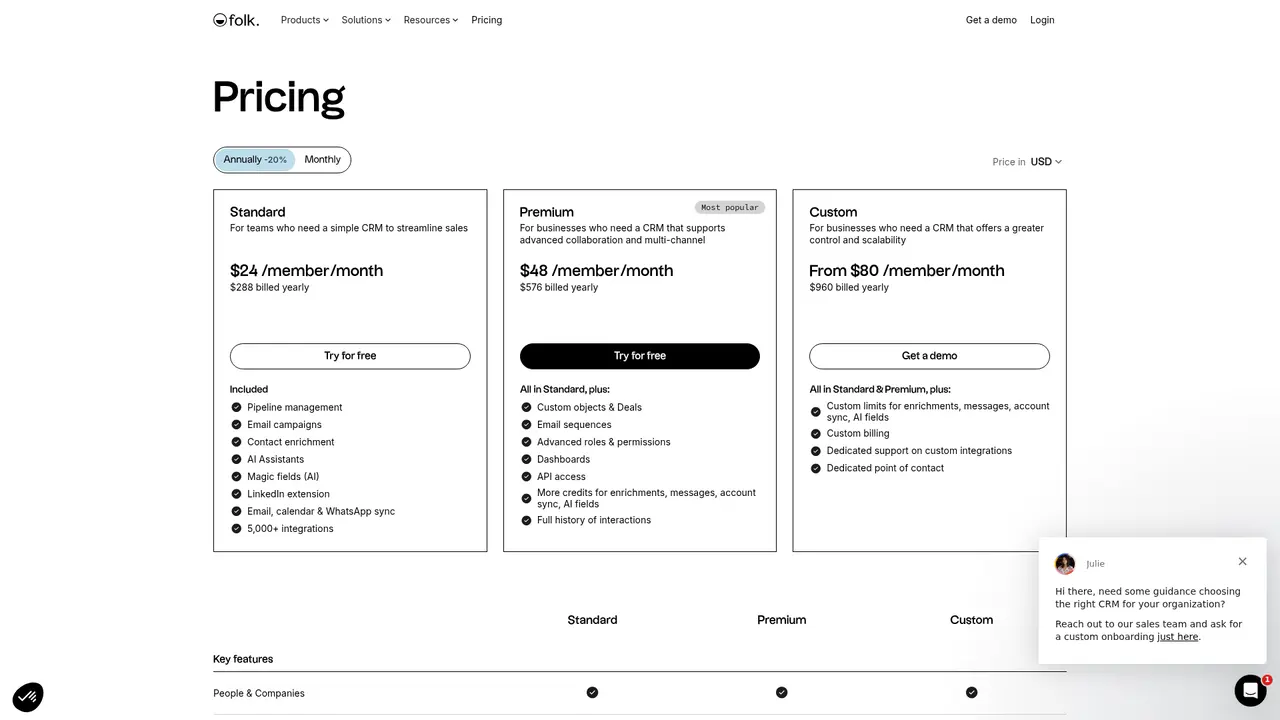
| Plan | Annual Price | Monthly Price | Best For | |------|--------------|---------------|----------| | Standard | $24/user/month ($288/year) | $30/user/month | Teams simplifying sales processes | | Premium | $48/user/month ($576/year) | $60/user/month | Organizations needing advanced collaboration | | Custom | Starting at $80/user/month | Starting at $100/user/month | Enterprises requiring full control and scalability |
What's Included:
Standard gives you everything needed for effective relationship management: pipeline management, email campaigns, contact enrichment (500/month), AI assistants, Magic fields, LinkedIn extension access, and 5,000+ integrations through Zapier and Make.
Premium adds: custom objects and deals, email sequences with advanced automation, role-based permissions, visual dashboards, full API access, and complete interaction history. The sending limits increase to 5,000 emails per user per month, and enrichment jumps to 1,000 contacts monthly.
Custom plans are designed for organizations with specific requirements: higher enrichment and sending limits, custom billing arrangements, dedicated integration support, and a named customer success contact.
All plans include the 14-day free trial, SOC 2 Type I security, GDPR compliance, and access to folk's support team.
:::card{type="tip" title="Annual vs Monthly Billing"} If you're confident in your choice, annual billing saves 20% compared to monthly payments. Most teams find Standard covers their needs well, with Premium worth considering when advanced automation and team collaboration become priorities. :::
---
Frequently Asked Questions
:::card{type="faq" title="Can my team try folk together for free?"} Yes. When you sign up for folk, your 14-day free trial activates immediately with full access to all Premium features. This lets your entire team test the complete platform before committing. :::
:::card{type="faq" title="Do I need to add a credit card for the free trial?"} No. folk doesn't require any payment information to start your trial. You get full access to all features for 14 days without entering any billing details. :::
:::card{type="faq" title="What happens if I don't upgrade after the trial ends?"} Your account will be locked after the trial period expires. You can request a one-week extension to continue evaluating, or upgrade to a paid plan to restore full access immediately. :::
:::card{type="faq" title="How do I upgrade my plan?"} You can upgrade anytime through Settings > Plans in your folk dashboard. The upgrade takes effect immediately, and you'll be billed prorated for the remainder of your billing cycle. :::
:::card{type="faq" title="Can I cancel my subscription?"} Yes. You can cancel or downgrade to the free plan at any time through your account settings. If you downgrade, you'll retain access to features included in your new plan, with data preserved for 30 days. :::
:::card{type="faq" title="Is folk secure?"} Absolutely. folk maintains SOC 2 Type I certification, full GDPR compliance, and Google Security verification. Your customer data is protected with enterprise-grade security measures and encryption protocols. :::
:::card{type="faq" title="What payment methods does folk accept?"} Currently, folk only accepts credit card payments (Visa, Mastercard, American Express). PayPal and other payment methods are not supported at this time. :::
Related Content

Copy.ai Review 2026: AI Copywriting Made Easy
Our honest Copy.ai review for 2026. We test Content Agents, AI Workflows, pricing ($29-$249/mo), and compare it to Jasper and Writesonic. Find out if it's worth it for your marketing team.

Rytr Review 2026: Is This Budget AI Writer Worth It?
Our hands-on Rytr review for 2026. We test features, pricing, content quality, and compare it to Jasper & ChatGPT. Find out if Rytr is the best budget AI writing tool.

Word Changer - Free AI tool to rewrite and improve your writing instantly
Writing always using repetitive words or need to avoid plagiarism? Word Changer is a free AI writing assistant that instantly rewrites any text with richer vocabulary and appropriate tone. Get multiple versions with one click, adjust formality level, check readability - all for free!

Unite - AI-powered platform for romantic fantasies and dream couple moments
Explore romantic fantasies and create special moments for your dream couple. This AI-powered platform lets you generate personalized romantic content and experience exclusive AI-created romantic experiences.
Comments